Free Lessons
Courses
Seminars
TechHelp
Fast Tips
Templates
Topic Index
Forum
ABCD
 
Home   Courses   TechHelp   Forums   Help   Contact   Merch   Join   Order   Logon  
 
Back to Access Forum    Comments List
Upload Images   @Reply   Bookmark    Link   Email   Next Unseen 
Continuous Sub Form List Two Long
Gary Orros 
     
16 months ago
Hi everyone

I have a continuous subform, which I use to track key history in the database. I have now created a printable form (technically a report) for the customer to sign and for us to have the customer's details on a keep a record. On this form, I have used the subform which should stop mistakes on doubling up key history. This is fine with customers with not a lot of history but thinking ahead I will have an issue with a customer who will have 20-100+ entries showing.
So my question is, is there a way to limit the number of entries shown on the subform I'm using to the last 8 or 10 entries, so I can just use on the report only?

Thanks, Sorry for the long message.
John Davy  @Reply  
         
16 months ago
Hi Gary
Do you use a date in the history. If so, you could restrict the number thru your query.

John
Joe Holland  @Reply  
       
16 months ago
Watch this video to limit records: Top X
Kevin Robertson  @Reply  
          
16 months ago
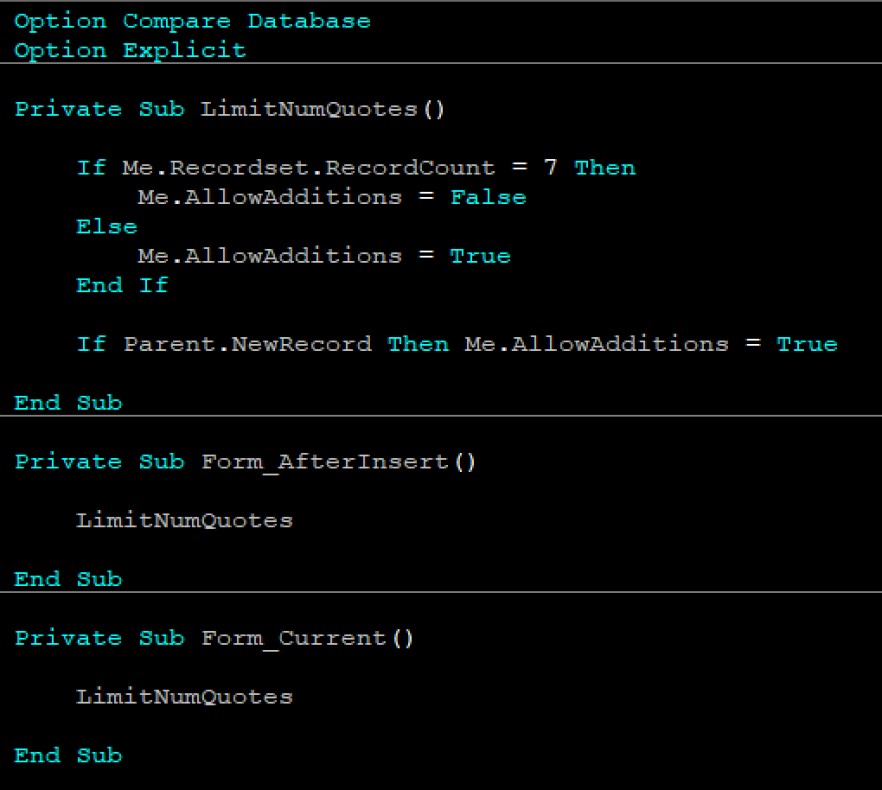
I like to limit the number of records in my subform by turning off the ability to add new records. The screenshot below shows how I limited the number of movie quotes that could be entered for any single movie record.

Not exactly what you are looking to do but it might give you some ideas.
Kevin Robertson  @Reply  
          
16 months ago

Gary Orros OP  @Reply  
     
16 months ago
Thanks for your help everyone, I will try a few of things and if I can make it work I let you know.
Gary Orros OP  @Reply  
     
16 months ago
Just to update in case anyone is interested.

I watched the Top X video which I thought was the answer. (it kinda is)

What I didn't know until later, was I was only dealing with the last 5 entries in the table. So at the time while testing this appeared to be working but it doesn't work if the records you need are lower/older than the last however entries you are filtering. I found this out later looking at other test data.

The only way I could get it to work (from my limited knowledge) was to do one query that selects the results from the report (IE customers and the key history), then a second query which filters the results as per the "Top X" video.

This seems to work fine, I can screen shot if relevant for anyone.

Thanks Again People

This thread is now CLOSED. If you wish to comment, start a NEW discussion in Access Forum.
 

Next Unseen

 
New Feature: Comment Live View


The following is a paid advertisement
Computer Learning Zone is not responsible for any content shown or offers made by these ads.
 

Learn
 
Access - index
Excel - index
Word - index
Windows - index
PowerPoint - index
Photoshop - index
Visual Basic - index
ASP - index
Seminars
More...
Customers
 
Login
My Account
My Courses
Lost Password
Memberships
Student Databases
Change Email
Info
 
Latest News
New Releases
User Forums
Topic Glossary
Tips & Tricks
Search The Site
Code Vault
Collapse Menus
Help
 
Customer Support
Web Site Tour
FAQs
TechHelp
Consulting Services
About
 
Background
Testimonials
Jobs
Affiliate Program
Richard Rost
Free Lessons
Mailing List
PCResale.NET
Order
 
Video Tutorials
Handbooks
Memberships
Learning Connection
Idiot's Guide to Excel
Volume Discounts
Payment Info
Shipping
Terms of Sale
Contact
 
Contact Info
Support Policy
Mailing Address
Phone Number
Fax Number
Course Survey
Email Richard
[email protected]
Blog RSS Feed    YouTube Channel

LinkedIn
Copyright 2026 by Computer Learning Zone, Amicron, and Richard Rost. All Rights Reserved. Current Time: 5/6/2026 7:03:22 AM. PLT: 1s