Free Lessons
Courses
Seminars
TechHelp
Fast Tips
Templates
Topic Index
Forum
ABCD
 
Home   Courses   TechHelp   Forums   Help   Contact   Merch   Join   Order   Logon  
 
Back to Access Forum    Comments List
Upload Images   @Reply   Bookmark    Link   Email   Next Unseen 
Multiple Field value
Chris Nichol 
     
16 months ago
Hi all,

Hope you are all keeping well.

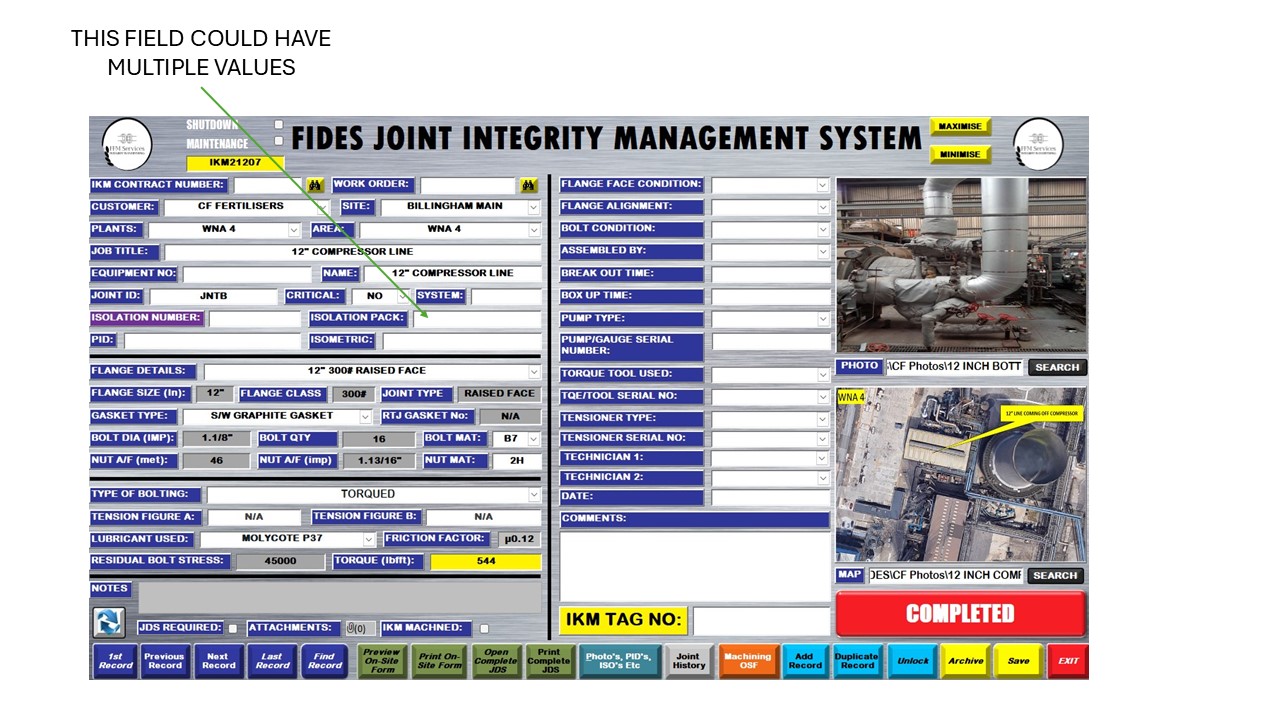
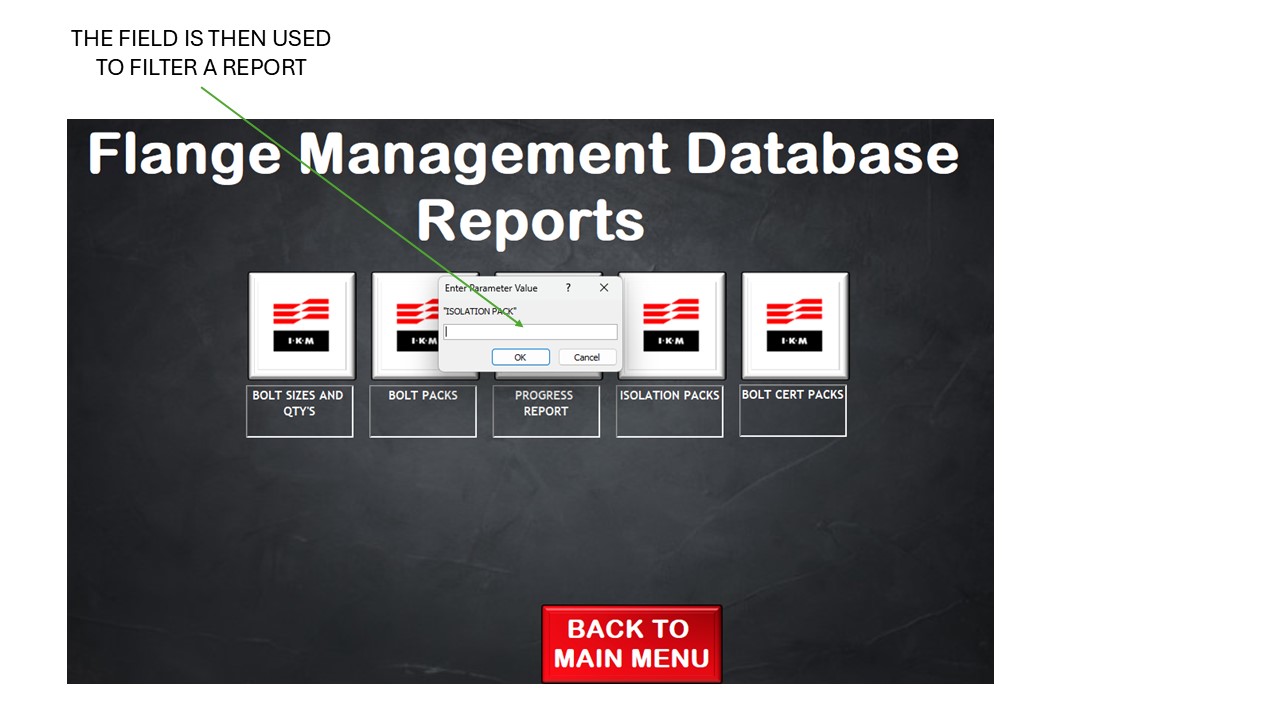
So I've just come up with a problem that I'm struggling to get past. On my database form there is a field that in theory could have multiple values. Now I could use the Multivalued Field but this field is also the filter for a report so when I run the report I just get back "the multi-valued field cannot be used in a where or having clause"

Does anyone know of anyway's of getting around this?

I'll post some photos underneath which may help you to understand my issue

Many thanks in advance!

Chris
Chris Nichol OP  @Reply  
     
16 months ago

Chris Nichol OP  @Reply  
     
16 months ago

Sami Shamma  @Reply  
             
16 months ago
Chris

If you want to fix this problem the correct way, you need to get rid of the Multi Value field and replace it with a lookup table.
Multi Value fields will keep biting your rear end for the lifetime of your application.
Chris Nichol OP  @Reply  
     
16 months ago
Hi Sami,

Yes you're totally right, I'm very much a novice when it comes to this and when i read and watched videos about the Multi Value Field and really don't want to use it I'm just struggling to think of a way of doing it though

Many thanks

Chris
Sandra Truax  @Reply  
         
16 months ago
What I did in my form is to put in the on click event of the multi value list box, I set the value to a TempVars and then use the TempVars in the WHERE clause.
Sami Shamma  @Reply  
             
16 months ago
Chris,

What are the possible values in the Multi Value fields?

We will work with you to fix this
Chris Nichol OP  @Reply  
     
16 months ago
Hi Sami,

So my database is all about joints. Every joint we work on has its own record with the data being inputed into a single form. These joints can form isolations for several different vessels. On my Form I have a field called Isolation Pack and the value is literally the name of the vessel ie 16F104 or 16G6 or 16F107. So i may need to put all those vessel numbers into the Isolation pack field.

When I open my report it's filtered using the Isolation pack field which is why I'd love to be able to have multiple values in a field or some sort of way around it.

Thank you so much for your assistance!

Many thanks

Chris
Richard Rost  @Reply  
          
16 months ago
One of the hardest things for me about understanding someone's database is to understand their terminology and their business. To me, I don't understand the relationship in the real world between joints, isolation packs, vessels, and all these other terms that are unique to your business. Is it possible that you could relate this to something that everyone would understand, for example, customers, orders, products, that kind of thing? That's why I picked that example from my database because everyone can relate to a retail store. But I don't understand your business, so if you could somehow convert that over to an order terminology, then it would make it much easier for us to help you.
Sami Shamma  @Reply  
             
16 months ago
As well as what Richard has said, the isolation pack field needs to become its own child table of whichever table you had the multi value field.
So instead of one field with multiple values, you will have a child table with as many values as you want. This is a proper relational database structure. Now all your searches and filtering become straightforward.
Chris Nichol OP  @Reply  
     
16 months ago
Hi Richard and Sami,

I get what your saying, I use access for something which not a lot people would of thought it's capable of doing but for me it's a fantastic tool. Doesn't help as well that I'm a total novice when it comes to this, I've created practically everything by watching Richard's videos! So thanks for that.

So trying to put it into something you may understand:

I have a database for car spares, on that database there is a record for Brake discs, these brake discs can be used on a Ford Focus or on a Ford Fiesta. I've created a report to show me what spares are required for different cars and when I click on the report to open it asks what car I'm looking for. So I type in ford focus and all the spares including the brake discs come up. I then run the report again and ask for the Ford Fiesta spares but the brake discs don't come up on the report because on the database record i can only have either Ford Focus or Ford Fiesta not both (multiple values)

I hope this example makes sense

Many thanks

Chris

Kevin Robertson  @Reply  
          
16 months ago
Richard Rost  @Reply  
          
16 months ago
That does make sense now. So you have a table of parts and each part has a list of which cars it works with (one-to-many). Now you want to be able to have a form where you select MULTIPLE cars and have it show you a list of all of the available parts that work with ALL of those cars? Do I understand correctly?
Chris Nichol OP  @Reply  
     
16 months ago
Hi Richard,

Yes that's exactly what I'm looking for yes! I've been trying a many to many but just can't make it work!

This thread is now CLOSED. If you wish to comment, start a NEW discussion in Access Forum.
 

Next Unseen

 
New Feature: Comment Live View


The following is a paid advertisement
Computer Learning Zone is not responsible for any content shown or offers made by these ads.
 

Learn
 
Access - index
Excel - index
Word - index
Windows - index
PowerPoint - index
Photoshop - index
Visual Basic - index
ASP - index
Seminars
More...
Customers
 
Login
My Account
My Courses
Lost Password
Memberships
Student Databases
Change Email
Info
 
Latest News
New Releases
User Forums
Topic Glossary
Tips & Tricks
Search The Site
Code Vault
Collapse Menus
Help
 
Customer Support
Web Site Tour
FAQs
TechHelp
Consulting Services
About
 
Background
Testimonials
Jobs
Affiliate Program
Richard Rost
Free Lessons
Mailing List
PCResale.NET
Order
 
Video Tutorials
Handbooks
Memberships
Learning Connection
Idiot's Guide to Excel
Volume Discounts
Payment Info
Shipping
Terms of Sale
Contact
 
Contact Info
Support Policy
Mailing Address
Phone Number
Fax Number
Course Survey
Email Richard
[email protected]
Blog RSS Feed    YouTube Channel

LinkedIn
Copyright 2026 by Computer Learning Zone, Amicron, and Richard Rost. All Rights Reserved. Current Time: 5/7/2026 2:41:17 AM. PLT: 1s