599CD.com Bronchitis Sucks   Collapse Menus
 
 
NEW Courses - Excel 2007 Level 4 & 5, Access Security dismiss


What's New?  |  Courses  |  Theater  |  Demo  |  Tips  |  Blog  |  Forums  |  Search  |  Help  |  Order

 
What do you want to learn today? 
 
New Tips Added Weekly. Get Notified of New Tips & Tricks.


Tips & Tricks
   

  Access   Excel   Word   Windows   FrontPage   Hardware   Misc


Conditional Formatting in Excel
How to see which invoices are 30, 60, 90+ days late in full color
 
Q: I have a spreadsheet with invoices and the date each was due. How can I visually make late invoices stand out by changing them to different colors based on how late they are?
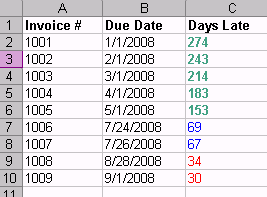
A: Excel has a feature called Conditional Formatting that you can use to change the format (color, font, bold, etc.) based on the value of the cell. For example, here you can see that all of the invoices that are 30 to 60 days late are red, 60 to 90 are blue, and over 90 are green and bold.


In this example, I've used the TODAY() function to determine how many days late each invoice is, and then I used Conditional Formatting to change the color based on that.

We have a FREE video tutorial that shows you how to do this step-by-step.
 
 Click here to view the FREE video

I also cover Conditional Formatting in much more detail in my Excel 104 class.

Want to learn how to extend Conditional Formatting to include more than 3 options with a little bit of VBA code? Click here.


Huge Discounts Available
When you purchase multiple classes together
Huge savings up to 50% off! Order Now.
 

You may want to read these articles from the 599CD Blog:


Need Help
 
Do you have questions about Word, Excel, Access, Web Design, or computers in general? Just ask us anything you'd like. Click here for assistance.
 

Get Free Tips & Tricks
 

Join our mailing list today and get information on our Free Tips & Tricks Newsletter including free video tutorials, eBooks, live seminars, and more.

Email:
Name:
Type in the word to the left:
 
Your email will be kept 100% safe and will never be given to 3rd parties.


CLICK HERE for a FREE lesson


Order your first 599CD course now.
Your Satisfaction is Guaranteed!


Subscribe to our RSS FeedWhat's This?

599CD on Facebook  599CD on Twitter  Subscribe to RSS Feed  Add to Live Bookmarks  Add to My AOL  Add to MyYahoo  Add to Google Reader or Homepage    hide help

599CD Home   |   Learn More   |   What's New?   |   Contact Us   |   Free Demo   |   FAQs   |   Order Now   |   Affiliate Program   |   TechHelp   |   MYOLP   |   Jobs   |   Downloads   |   Handbooks  (Text)   |    Mailing List   |   Lost Passwords   |   Referral Program   |   Online Poll   |   Corporate, Educational, Government, Non-Profit Sales   |   Message Forums   |   Testimonials   |   Privacy Policy   |   Free Gift CDs   |   Tips & Tricks