|
|
|
New Version Update |
|
|
|
|
Follow these quick and simple steps to download your Video Player
update. |
|
|
|
Step 1. Close the 599CD Video Player if it's already
running. |
|
Step 2.
Click
THIS
LINK or the button to the right to download and run the Player Update Program. |
 |
|
|
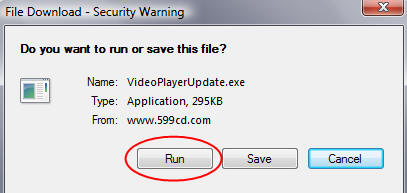
Step 3. When asked if you want to RUN the program or SAVE it to
your computer, select RUN THIS PROGRAM. |
|
|
 |
|
|
|
|
|
Step 4. Windows Vista may give you a warning message or two about
downloading programs. That's OK. Just click RUN, or ALLOW,
and installation will continue. |
|
|
|
Step 5. The Update program will run. When finished, restart the
Video Player. |
|
|
|
NOTE: Some browsers such as Firefox may not give you a RUN option. In this case,
SAVE the file to your downloads folder, and then double-click on it
to run it. |
|
|
|
|
|
|
|
|
|
|

