The version of the ABCD database that I have does not display error messages when programming. I remember you said you usually turn those off when you work. I need to have all type of warnings ON when programming because I make mistakes. How do you turn On/off. In particular, If I'm running a sub and there is a problem there, Access is not telling me in which line the problem is. So debugging is a lot harder. Thank you
Scott Axton
@Reply 4 years ago
Beginner 1 lesson 7 - Confirm record changes
Also Developer 1 - Docmd.SetWarnings
Eduardo BenaimOP
@Reply 4 years ago
I followed your instructions with no Luck
If I run this simple test VBA in the database I'm working on, I am not getting an error message:
Private Sub testBtn_Click()
x = ""
DoCmd.Print x
End Sub
In a new Database I get the error prompt: " Invalid Use of Null"
In the Database I'm working on the Message does not show (it does nothing)
I have no Set warnings off or Echo offs in the data base
Any Clues to how these errors are being lost?
How do I turn these error banners on?
Scott Axton
@Reply 4 years ago
Did you make the changes that I indicated it THIS POST?
If those are turned on you might want to do a global search for .SetWarnings.
Open your code window. Type Ctrl-F. Choose the option for Current Project.
Remember if you have any DoCmd.SetWarnings False you need to follow it up with DoCmd.SetWarnings True after your done doing the procedures you want warnings suppressed for.
Honestly though, that error you just mentioned above, should come up whether or not you have those setting on or off.
If you are just trying something to force an error that will work because there isn't a DoCmd.Print method.
If you are attempting to get x to display to the Immediate window you can use Debug.Print x and that would work.
The Client Settings under options and .SetWarnings False are the only two error suppression that I know of. Echo just turns off all out put to the screen.
Scott Axton
@Reply 4 years ago
You might Compile your database and run through the Troubleshooter if neither of those help.
Kevin Robertson
@Reply 4 years ago
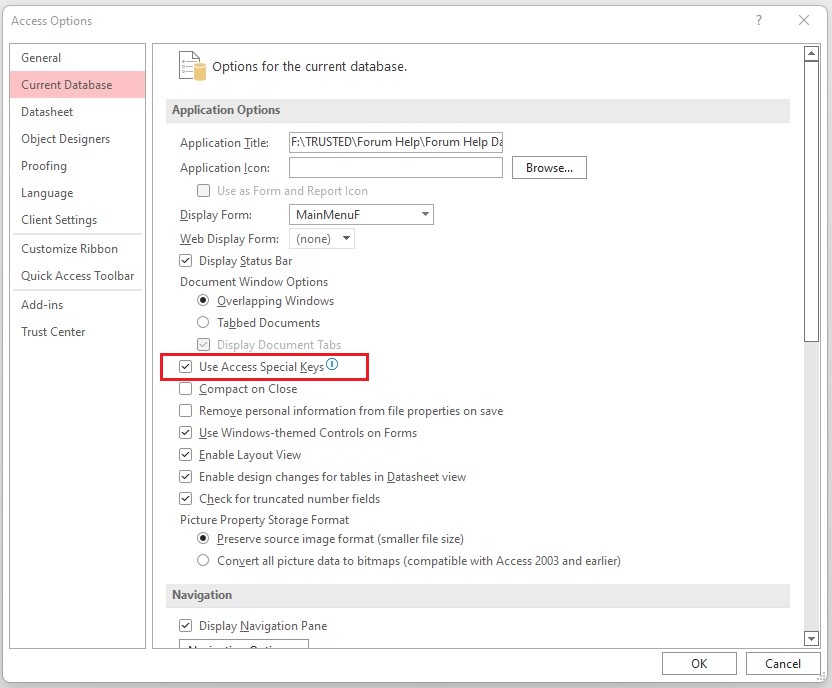
Make sure Use Access Special Keys is checked on as this seems to suppress error messages.
Kevin Robertson
@Reply 4 years ago
Eduardo BenaimOP
@Reply 4 years ago
Scott and Kevin.
Thank you very much for all your suggestions.
The Culprit is the "Use Access Special Keys".
Yes. I was trying to force error messages so I could determine why they were not showing up.
Scott: I had made sure I did not have any SetWarnings or echos in the way.
Kevin: Once I turned on the "Use Access Special Keys" all started working Fine.
I think this is an important Finding because part of the Security protocol that Rick implements is turning this Off.
If anyone is Working with ABCD they need to check this If they want error messages while programming.
Scott Axton
@Reply 4 years ago
Glad you found the solution.
Kevin - I missed that one! Glad I'm part of this team... It sometimes takes the whole village.
Sorry, only students may add comments.
Click here for more
information on how you can set up an account.
If you are a Visitor, go ahead and post your reply as a
new comment, and we'll move it here for you
once it's approved. Be sure to use the same name and email address.
This thread is now CLOSED. If you wish to comment, start a NEW discussion in
ABCD Core Part 6.