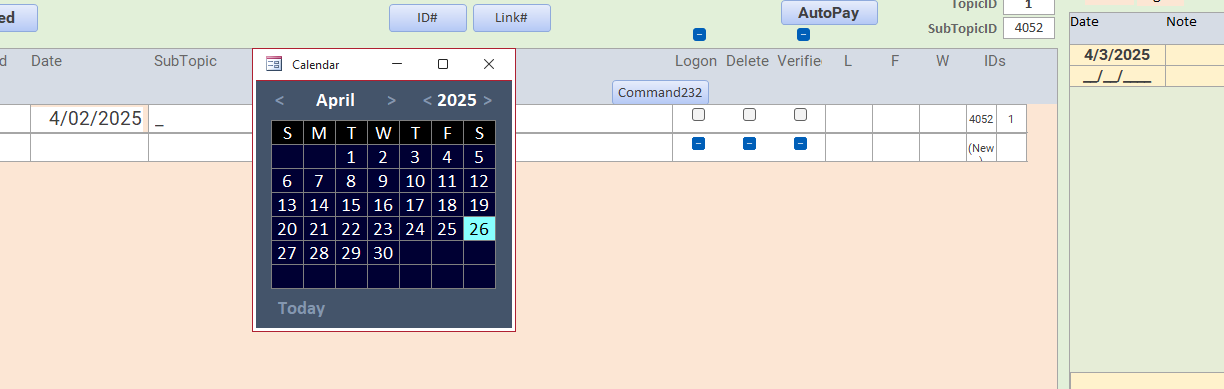
Hey Richard, don't you want to make and addendum to this so that it will open the form at the cursor? I've been trying (with the help of ChatGPT) for hours and cannot get it to work. I'm trying to use it with your pop-up calendar.
I don't understand what you mean by "open the form at the cursor." Can you elaborate? Screen shot maybe?
Sandra TruaxOP
@Reply 17 months ago
Sandra TruaxOP
@Reply 17 months ago
If I click on the EvenDate on the left, I would love if the calendar would open on at the point where I clicked, so if it is a cont. form it would still open at the point I clicked, even if it was at the bottom. Also, the NoteDate at the right (yellow), if I click there, it would be great if the calendar would open there instead of the other side of the screen. I use this on multiple forms, and I tried getting the x,y coordinates and moving or opening the form at those coordinates, but nothing works.
Sami Shamma
@Reply 17 months ago
Hi Sandra
The Calendar Form Is Model and Popup, correct?
Access has a problem where you cannot control were it opens. On my system with 3 Monitors, it is always on the wrong monitor.
Sami Shamma
@Reply 17 months ago
I think it is on the list of items we are compiling for the Access team.
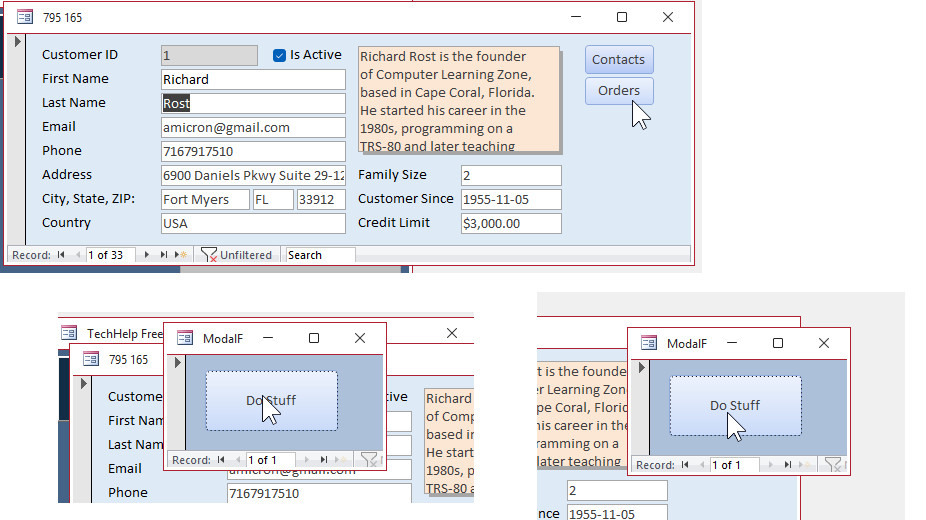
Yeah, this is definitely a tricky situation. The easy solution is to not make it pop up, just make it modal. This way it opens up on top of other windows, and you have to select the value and close it before you can interact with anything behind it. That's basically what you want to do with this mini form anyways. You want to pick a date, close it, and then it returns the date.
Actual popup windows are useful when you want to interact with them, but also still interact with the windows behind them. So you could popup something up like a notepad form, keep that off to the side, and yet still be able to interact with your customer form. But the notepad popup remains on top of other forms. That's okay, but popup windows break the boundaries of the Access application interface, which is why they're difficult to track. I've got a two-monitor setup myself, and popup windows appear anywhere. I try not to use popup windows if possible, and I only use modal windows because it's very difficult to position them.
I know I played around with this in the past, and there is code in the code vault to open forms at a particular location (Open Form Right, for example). Maybe I'll play around with this and see if I can get it so it opens near the cursor or the mouse pointer. The mouse pointer is a pain because you have to use special tricks to figure out where the pointer is. I'll add it to my list. In the meantime, just get rid of Popup and keep it modal. It will stay at least within your Access application window.
Sandra TruaxOP
@Reply 17 months ago
I had already turned off the Popup. My next attempt is to assign a number to a tempvars and use if elseif to move it to coordinates depending on the code. Have no idea if that will work either, but I'm like a dog with a bone, and can't let it go.
You're over-thinking it. Just move the modal form to the location of the button. Let's say you've got two spots where you open up the modal form from: your order button and maybe if you click on your customer ID. In the click events for those two objects, just move your modal form to where that object exists.
I'm sad to say, this didn't work either. The two fields are in two different subforms. Could that be the reason why? Or is it something I'm doing wrong?
Sandra TruaxOP
@Reply 17 months ago
When I used this technique on a single form, it worked perfect. But all my forms have the date fields in subforms.
Yeah, with a subform, it's going to be a little more complicated.
DetailsPrivate Sub ProductName_Click()
Dim X As Long, Y As Long
X = Forms!OrderF.WindowLeft + Forms!OrderF!OrderDetailF.Left + ProductName.Left
Y = Forms!OrderF.WindowTop + Forms!OrderF!OrderDetailF.Top + ProductName.Top
DoCmd.OpenForm "ModalF"
DoCmd.MoveSize X, Y
End Sub
Private Sub SumExtPrice_Click()
Dim X As Long, Y As Long
X = Forms!OrderF.WindowLeft + Forms!OrderF!OrderDetailF.Left + SumExtPrice.Left
Y = Forms!OrderF.WindowTop + Forms!OrderF!OrderDetailF.Top + SumExtPrice.Top
DoCmd.OpenForm "ModalF"
DoCmd.MoveSize X, Y
End Sub
I'll try playing around with it a little bit more when I'm done with my taxes today. I'll see if I can figure out if getting the mouse coordinates is the best method, and this will give you good enough if you have an object like I put it on the sum extended price on my order form, and it is close enough with the y coordinate. But it's assuming that you only have one record in the form which is kind of how it works with subforms and continuous subforms. Especially, but yeah I could use a little more tweaking. I'll play with it later.
Sandra TruaxOP
@Reply 17 months ago
Yes! I was able to get this to work!!! Thanks!! I had given up.
If you are a Visitor, go ahead and post your reply as a
new comment, and we'll move it here for you
once it's approved. Be sure to use the same name and email address.
This thread is now CLOSED. If you wish to comment, start a NEW discussion in
Form Positioning.