I seem to have been only like a boy playing on the seashore, and diverting myself in now and then finding a smoother pebble or a prettier shell than ordinary, whilst the great ocean of truth lay all undiscovered before me.
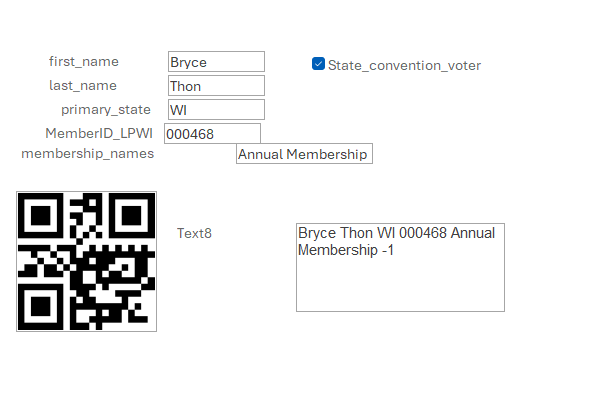
Richard, I am trying to get a QR code generated for organization members with certain information contained in it from their files (name, membership #, etc.) for their membership cards/ID badges. My database worked well when using the old Google API but since that is no longer an option, I switched to the new GoQR API but I cannot get the information from my database to work with that API.Any help you can offer is appreciated. BTW, I am completely self-taught on MS Access and your tutorials and TechHelp videos have made me look like an Access Guru to my members! Thanks a lot! (I was unable to put a screen shot on this message - sorry.)
That is the example I am using. My trouble has been replacing 'Example' with the string of data I need from my database. Every time I try, the entire statement disappears.
If you've got some non-standard characters in that example string, you might need to URL encode it. I actually have a video coming out on this pretty soon. Essentially, you just have to translate some characters into a URL-friendly character. For example, the character ? has to be coded to %3F.
Unfortunately, VBA doesn't have a built-in URLEncode function like ASP or some other languages do. But it's not hard to write one; it's just basically string replacement again. I've got a video coming out on this pretty soon, so stay tuned.
Alex yeah, I just put that in there. I copied it here because he's not a Gold member. :(
Michael ConardOP
@Reply 16 months ago
Thank you Richard! I'll try writing it that way and see what happens. In the meantime, I look forward to the upcoming video!
Brad Wile
@Reply 12 months ago
Michael Try it like this:
="https://api.qrserver.com/v1/create-qr-code/?size=200x200&data=" & [PartNumber] & " ==> " & [PartDescription] & ""
That should use the [PartNumber] field data in a database then an arrow pointing to the [PartDescription] field data from the database.
Or try it with just a PartNumber:
="https://api.qrserver.com/v1/create-qr-code/?size=200x200&data=" & [PartNumber] & ""
Hope that helps
Sorry, only students may add comments.
Click here for more
information on how you can set up an account.
If you are a Visitor, go ahead and post your reply as a
new comment, and we'll move it here for you
once it's approved. Be sure to use the same name and email address.
This thread is now CLOSED. If you wish to comment, start a NEW discussion in
New QR Code Site.