One of the end goals I have is getting a program out of Visual Studio as a program my users can use as opposed to having something in Visual Studio that no one else can use. Almost no video's online show how to get from 'Your first program' (that only runs in Visual Studio) to an application or .exe file someone else can use.
Hopefully seeing this will help me understand the whole 'Project' and 'Solution' difference.
DBs will be a while off for now, but I will certainly be recording some, I need to cover the basics first, although I did a Legacy Connect to Access DB
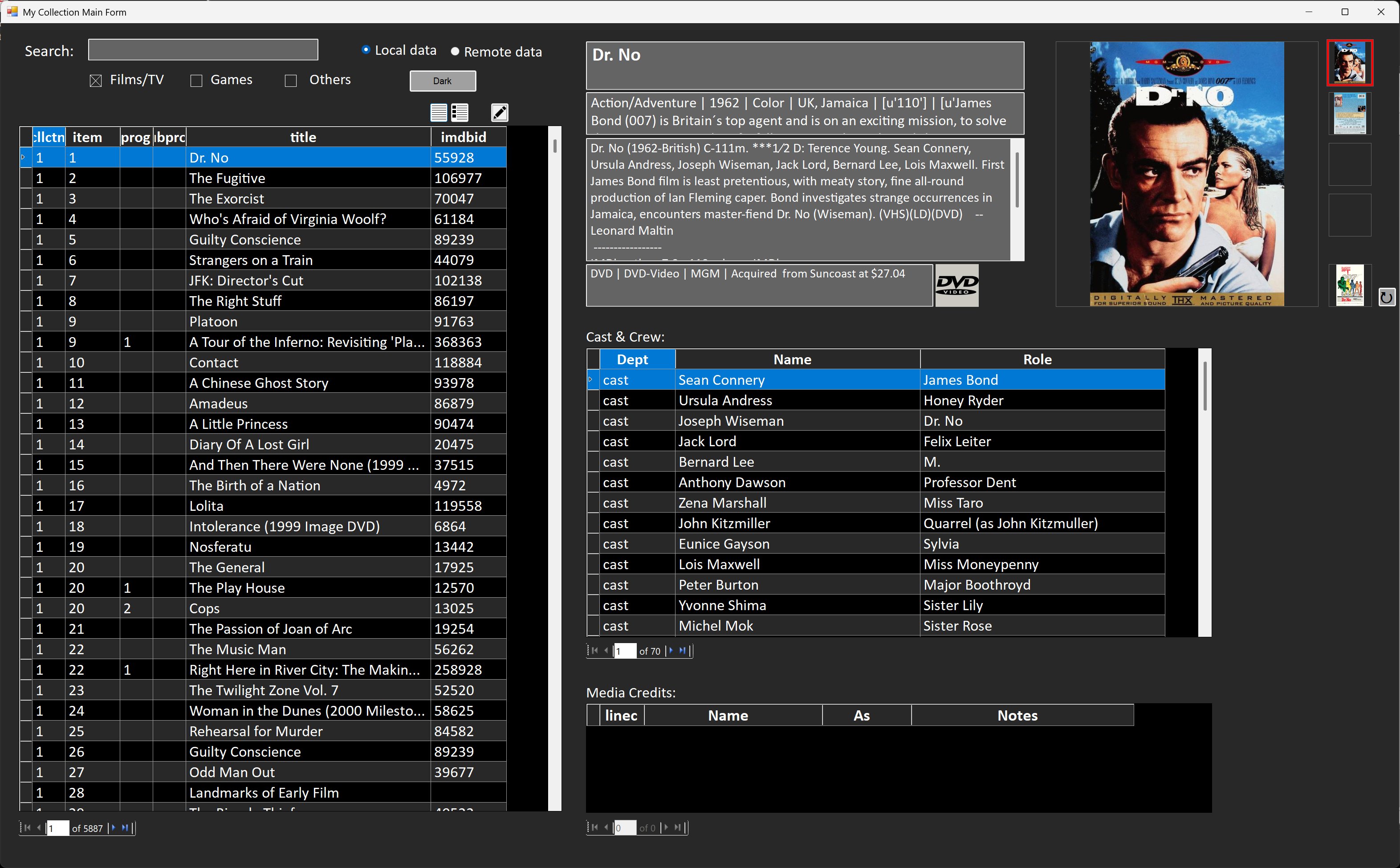
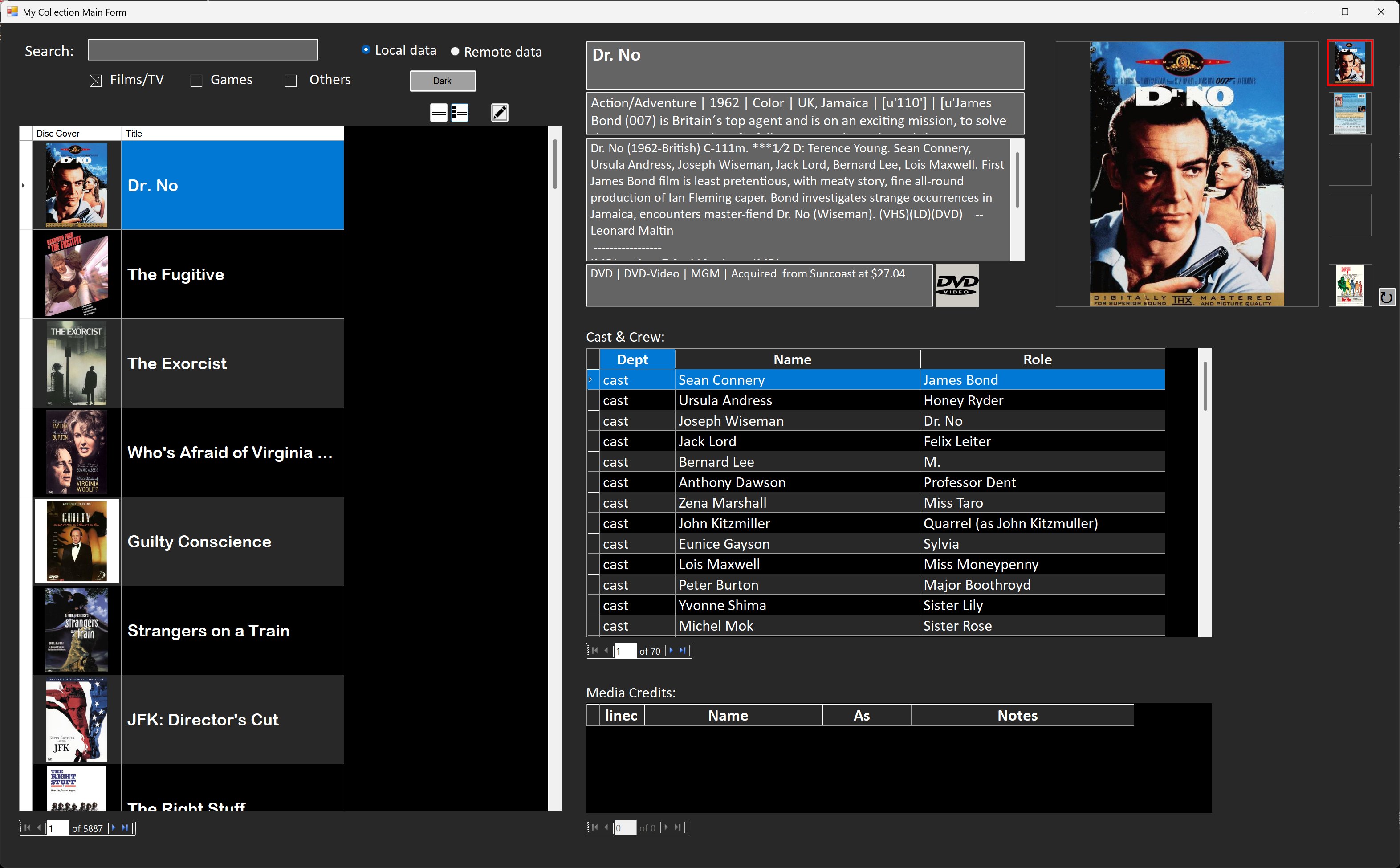
Raymond There is no subform per se in Visual Studio. It has something called a "DataGridView." You can fill it with data, but it's done in a completely different manner and with different coding. The end result may look like Access subforms or continuous forms (pictures below). There are many more formatting options than in Access. You can format headers and individual cells in the grid. It's not like in Access where formatting one field formats the whole column.
Kevin Yip
@Reply 10 months ago
Kevin Yip
@Reply 10 months ago
Kevin Yip
@Reply 10 months ago
Raymond You didn't ask, but there are what seem like design shortcomings in Visual Studio as well. There is no multi-column combo box, only single-column. A textbox has no properties for border color and thickness. To get around these, you need some creative coding or third-party add-ins. This may seem primitive, but many other platforms are like this too. For instance, HTML has no multi-column combo box either (have you seen a website that has one?). Some of the features in Access are pretty much Access-only. To make a textbox border thicker or more colorful in VS, you need to DRAW a custom box around the textbox with code. Many platforms require "hacky" workarounds like this, even the latest advanced platforms.
I would like a preview of files in the Visual Basic Form is possible, but also be able to open if there is a Word File, Excel File, PDF or JPG, etc.
I would also like to Print a series of file attachments from one button if that's possible too. Some as 8.5 x 11 and drawings as 11 x 17.
-Raymond
Kevin Yip
@Reply 10 months ago
Raymond All those features have to be programmed by yourself. Visual Studio is not part of Office like Access is, and cannot read Word or Excel documents natively. You have to find ways (such as third-party add-ins) to read content of .docx, .xlsx, and .pdf files in order to show previews of them. Of course, you can just launch Office apps and PDF reader apps to open those files. To see those files' content without their native apps is much tougher. Same thing with printing: you have to design and code how print dialogs behave, how users enter inputs, how to handle document formats, every aspect of it. There is no "report designer" like in Access. Visual Studio is pretty much a "blank slate." Any feature you need, you pretty much have to code for it. Even something simple like a multi-column combo box, you have to create it yourself.
Crystal Reports is the kind of third-party add-in I alluded to. Visual Studio has no built-in report features and many other features, and it often relies on outside components, many of which are payware like Crystal Reports. If you are developing apps you wish to sell, then you don't mind paying for these. That's why VS is different from Access in many ways. VS is strictly for development, and Access is not.
Sorry, only students may add comments.
Click here for more
information on how you can set up an account.
If you are a Visitor, go ahead and post your reply as a
new comment, and we'll move it here for you
once it's approved. Be sure to use the same name and email address.
This thread is now CLOSED. If you wish to comment, start a NEW discussion in
VB.NET TechHelp.