After recording yesterday's TechHelp video on copying data from a web page and pulling pricing from Amazon and Walmart, I did what I probably shouldn't have done and stayed up until about 3:00 in the morning building my own version of the idea into a reusable template.
The result is a database where you load in your grocery items, paste in links from Amazon and Walmart, select the items you want to check, and let it go to town grabbing all the prices automatically. No bouncing between tabs. No manual copying and pasting. Just select the items you need (whatever's on your shopping list) click and go.
Unlike some projects that end up sitting on the shelf unfinished (yes, Calendar 2.0, I'm looking at you), this one is getting finished. I'm polishing it up this weekend and planning to release it as a template. There will be a full walkthrough video showing how it works, plus a developer-level video that digs into the queries, code, and overall design.
It's already working well, but I want to use it myself for a day or two to shake out any bugs before releasing it. Keep an eye out for it very soon.
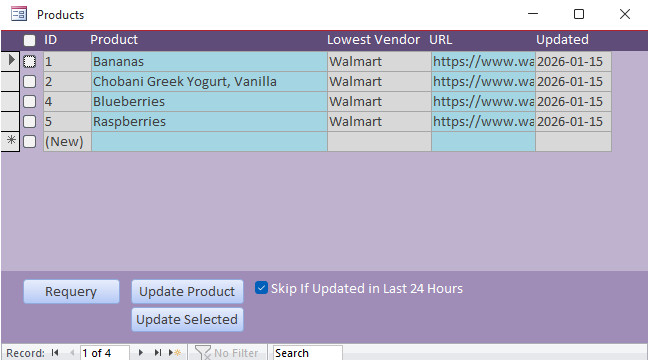
Below are some screenshots of what it does so far. This approach will be useful for anyone who needs to pull information from a website, not just pricing data. As long as you can log into the site in a browser, the database should be able to hit it and pull what you need.
P.S. Calendar 2.0 is not read. I just realized that proper synch with Google Calendar is a nightmare. So I just need to strip that stuff out and it's ready to go.
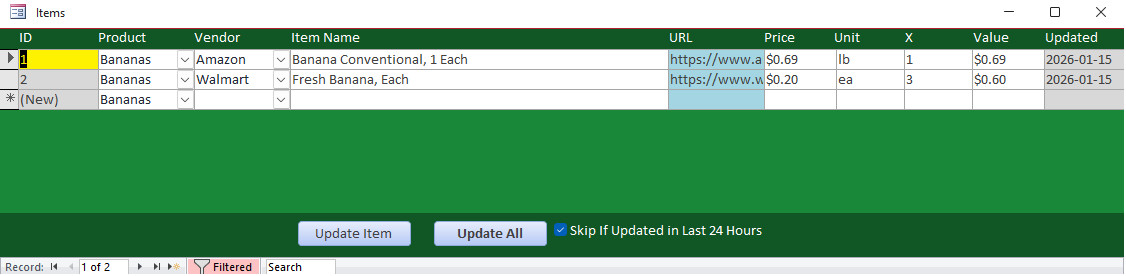
The items form shows all of a specific product that you purchase from multiple vendors: - The price - The unit - The multiplier (so you can compare pounds to ounces, for example) - The date it was last updated
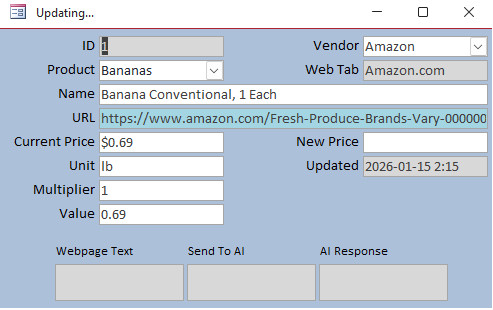
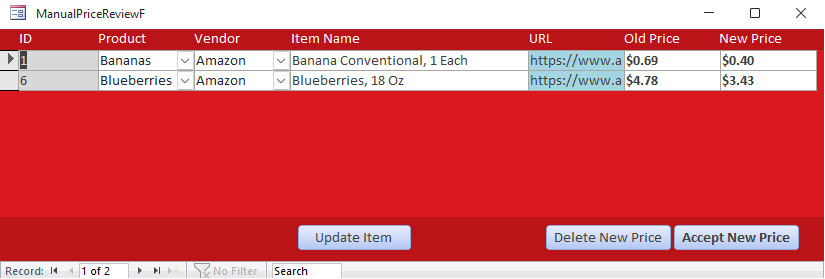
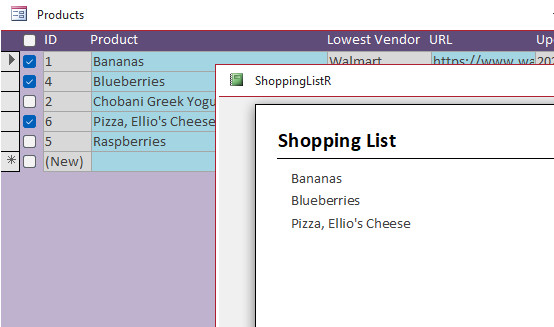
This is the worker form that appears when it's updating a specific item. Since there's a lot of back and forth with the browser, I made sure that the user can see exactly what's happening and where.
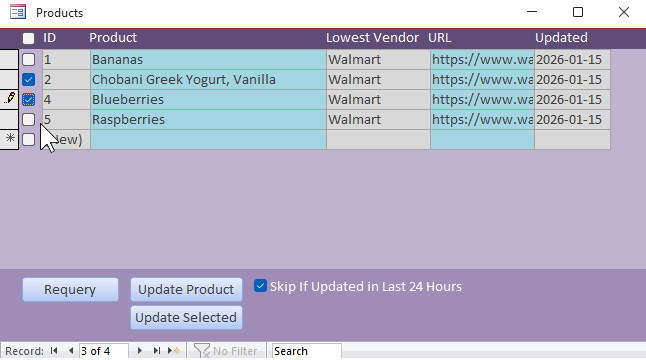
The workflow is basically: Select the items that you need. Click the update selected button. The database will update all of those prices from the various vendors, optonally skipping if updated less than 24 hours ago.
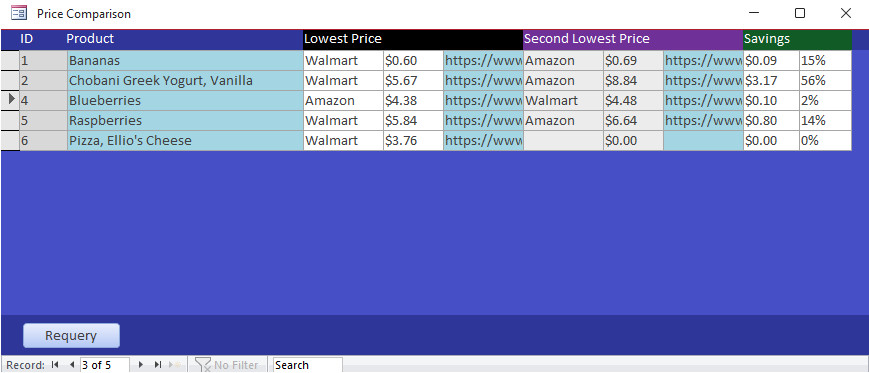
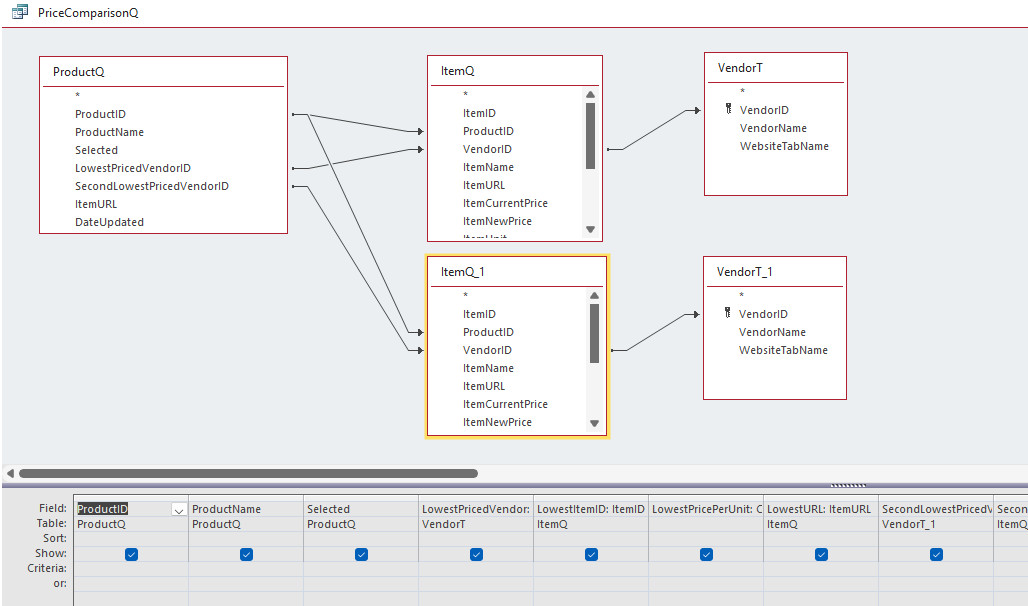
Next, I want to put together a comparison page that's going to show each product, the price from the lowest vendor, and then the price from the second lowest vendor, so that you can see how much you're saving. I think comparing the best two is enough because I usually only have two vendors, and wo cares about everybody else, right? I don't care who has the worst price.
So, that was my project yesterday that kept me up late. If you have any suggestions or features you'd like to see me add, let me know now while it's still in the development phase. Because you know me, once I put it on the shelf, I don't go back to it for six years. LOL.
Matt Hall
@Reply 9 months ago
For those of us who still "go" to the store, you might generate reports for the lists for each store. For those who shop online, populating the carts might be useful.
Yeah, I've thought about taking the selected items and generating reports that show what you need to pick up at each store. You could even group them by aisle or department.
I actually did something similar before using ChatGPT. I programmed it with product locations by aisle, then fed it my shopping list and said, "Arrange this by aisle" so I don't have to walk back and forth around the store like an idiot. I could just hit each aisle once. That might be an interesting feature to add.
That said, I don't physically grocery shop anymore. I can't stand it. But automatically populating online shopping carts would be fantastic. If websites stayed static, you could theoretically do it with SendKeys and tabbing. I've done that for uploading YouTube videos. Their upload page rarely changes, so I know exactly how many tabs to hit before pasting each field. Once every couple of months they move something and break the tab order, but overall it works.
For a site like Walmart or Amazon, though, with constantly changing layouts and millions of items, that would be nearly impossible unless the fields were consistently named. Maybe you could brute-force a button click here and there, but it'd be fragile at best. I might experiment with it later. For now, my goal is just to compare pricing and see who's cheapest.
Matt Hall
@Reply 9 months ago
I thought about the aisle thing, as some stores list that on the webpage and Chat GPT could grab that too. Then I realized that people who regularly shop in stores usually know about where everything is. I figured that may have a diminishing return.
And because I know someone's gonna ask for it, yes, I made a printable shopping list. I know there's gonna be times where I'm like, "Screw it, I'm going to the store." I just want to print what's on the shopping list.
Okay, I just posted version 1.0 in the moderator forum for those guys to play with it and beat it up and let me know what they think. Hopefully I'll release it in a few days. I want to use it over the weekend first. Make sure there's no problems with it.
George Hepworth
@Reply 9 months ago
I was excited when I saw this because I've been using a shopping app that I created 8 years ago, using PowerApps so it could accompany me to stores for shopping trips. (I don't do online grocery shopping, but that is a whole other topic.)
However, using the store's online shopping apps to capture current pricing before leaving the comfort of my home is such a no-brainer that I'm embarrassed it never occurred to me.
By the way, I currently have over 7,000 items in my shipping history. Lots of data for nice PowerBI charts comparing the cost of eggs and milk and bananas over the last 8 years. Guess which one has NOT gone up in that time?
Michael Olgren
@Reply 9 months ago
Probably my favorite app is AnyList. If you want an app that functions perfectly for truly ANY list, spend the $20 (by far the biggest bargain in the app store) per year. I can choose which lists to share with my wife, so we can both dynamically add items to any store's list. Our adult daughter can add to our grocery list so we have what she wants when she comes to visit! Tapping strikethroughs an item, two taps to clean those off the list. It has meal planning with recipes you can easily import. Set meatloaf for Sunday dinner, tap the ingredients you need... Lists have categories so you can use that for aisles.
I could wax poetically for a long time. I cannot recommend this app enough. Two brothers do all the coding and they are super responsive. One app: travel packing list, grocery list, meal plans, movies to see, books to read, ad infinitum. My iPhone's bottom tray is Phone, Gmail, Calendar, and AnyList.
I use Amazon Alexa to track my grocery list because the wife or I could just easily say in any room of the house, "Hey Alexa, add strawberries to the shopping list," and then it just shows up in our app. My next goal is to be able to take that list, just copy it and paste it into my shopping database, and then have the database recognize what the items are and add them to the shopping list in my Access database so I can do my price comparison too. That's the next step. But I see what you're saying though - that is a cool app, but I like Alexa because we can just use it with our voices anywhere in the house. I'm constantly telling her to add a reminder to my reminder list or something to the shopping list, or send myself an email for something.
Jeffrey Kraft
@Reply 9 months ago
I'm actually thinking of doing something like that. It's been on my bucket list for awhile. Those video might help (key is might).
Lars Schindler
@Reply 9 months ago
A little off topic, but:
‘I just realised that proper synchronisation with Google Calendar is a nightmare.’
What about synchronisation with Google Contacts?
For me, proper synchronisation with Google Contacts would be even more important than with Google Calendar.
Lars I'm sure that's possible, but that's a completely different database lol.
I think I am going to try and work something in to read the calendar just from an import status, because Google Calendar exposes a public URL that you can use to read it. I might be able to quickly add in the ability to at least read what's in your Google Calendar, even though I can't give you the option right now to edit and add stuff to it.
Sorry, only students may add comments.
Click here for more
information on how you can set up an account.
If you are a Visitor, go ahead and post your reply as a
new comment, and we'll move it here for you
once it's approved. Be sure to use the same name and email address.
This thread is now CLOSED. If you wish to comment, start a NEW discussion in
Captain's Log.