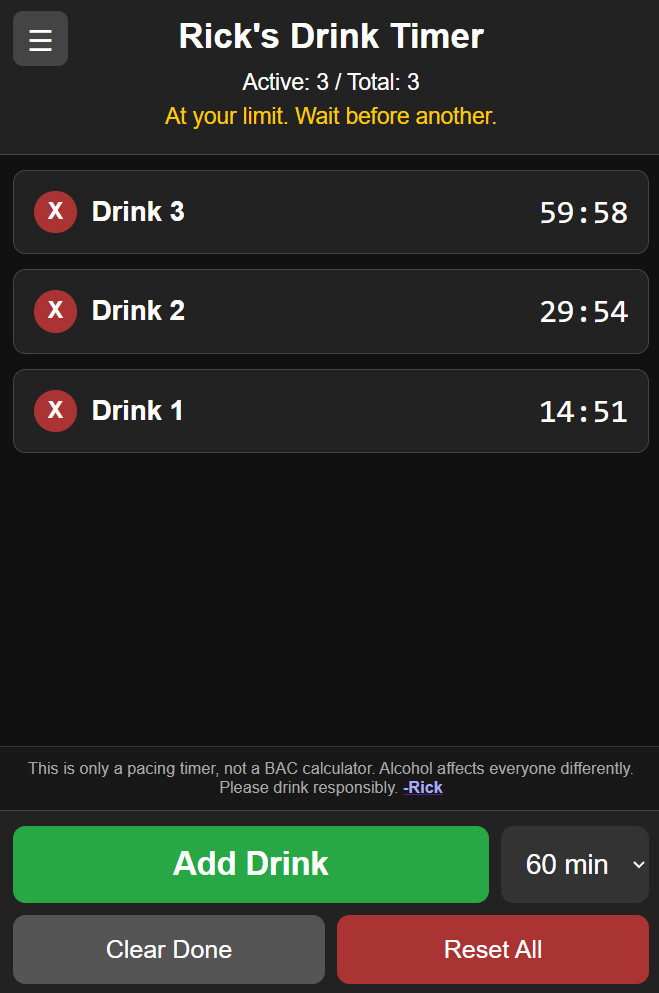
This morning I took my first real shot at what people are calling "vibe coding."
Now, before anyone starts throwing tomatoes, let me clarify something. I know HTML. I know JavaScript. I was a C programmer for years back in the 1990s, and JavaScript is heavily influenced by C. The syntax feels familiar. If I look at JavaScript code, I can generally follow what's going on. But could I sit down today and write a complete JavaScript application from scratch without constantly looking things up? Probably not. That's where today's little experiment came in.
The idea came from a recent vacation with my wife. You know how beach vacations go. You spend time by the pool, relax in the sun, maybe do a little swimming, chat with people, and occasionally visit the pool bar. After a while, it becomes surprisingly easy to lose track of how many drinks you've had. I got to thinking that it would be nice to have a simple drink timer. Not a blood alcohol calculator. Not something scientific. Just a simple rule-of-thumb tracker.
For the average person, a common guideline is that your body processes roughly one drink per hour. That's not exact. It's not medical advice. Everybody is different. Plus a beer hits different than a dirty martini. But for me personally, I know from experience that once I get past about three drinks in fairly rapid succession, I start feeling it. That's when the pleasant little vacation buzz starts turning into "maybe I shouldn't be trusted with stairs" territory. And this ain't synthahol. You can't just shake off those poolside pina coladas and report for duty like nothing happened.
Now, for reference, I'm six feet tall* and weigh two-hundred-and-something pounds. We're not going to discuss exactly what the something is. Some mysteries are best left unsolved. So the goal was simple. Every time I have a drink, I tap a button. A one-hour timer starts counting down. If I already have three active drink timers running, maybe it's time to slow down and enjoy the scenery for a bit before ordering another one. Once the first timer expires, I know that first drink has had roughly an hour to work its way through my system, and I'm probably fine to have another.
Could I have built this myself by manually coding it? Absolutely. Would I have built it in ten minutes? Absolutely not.
It probably would have taken me most of an afternoon. Not because it's particularly difficult, but because I'd have to dust off old JavaScript knowledge, look up browser APIs, fiddle with mobile layouts, test persistence, and handle all the little details that go into building even a simple web application. Instead, I described what I wanted to ChatGPT. We went back and forth for about ten minutes.
Here's what I want. Put a timer here. Make it mobile friendly. Add a delete button. Remember the data if I close the browser. Let me adjust the timer if I forgot to record a drink until later. One small refinement at a time, the application came together exactly the way I wanted it. Honestly, I was impressed.
Now, before anyone interprets this as me saying AI can replace programmers, let me add an important disclaimer. This was a fun little personal project. If I were building a mission-critical business application that my employees, customers, or members depended on, my standards would be very different. I would want to understand every single line of code. I would want to know how it works, why it works, and how to fix it myself if something breaks.
AI is a fantastic accelerator. It is not a substitute for understanding. At least not for anything important. If you're responsible for maintaining a system, you need to understand the system. Period. For a fun little utility that helps me keep track of poolside beverages on vacation? Sure. This was the perfect use case. And now I have a handy little drink timer that works on my phone, remembers its state even if I close the browser, lets me add and remove timers, and helps me avoid accidentally turning a relaxing afternoon into an unplanned adventure.
The data is stored locally in your browser using local storage, so everything stays on your device. If you close the browser and come back later, your active timers should still be there waiting for you. And no, it doesn't have to be used for drinks. You could use the exact same concept for project tracking, task timing, workout intervals, study sessions, or anything else that involves multiple overlapping timers. Change a few labels and you've got a completely different application.
If you'd like to see more content like this, whether that's HTML, JavaScript, classic ASP, web development, or even more experiments with AI-assisted coding, post a comment and let me know. I actually recorded an HTML 101 course many, many years ago, back when web development was still the Wild West. I think it was around 2002. It might be fun to revisit some of that material with modern tools.
One final observation. It took me about ten minutes to build the application. It's taken me longer to write this article. That alone tells me something interesting about where these tools are headed. And yes, I'm still impressed.
A Quick Look Under The Hood
For those curious about how the application works, here's the high-level overview. At the top of the page is the HTML structure. That's simply the layout of the page: buttons, timer display areas, counters, and drop-down lists.
Next comes the CSS section. CSS controls the appearance of the page. It handles the colors, fonts, spacing, button styles, mobile layout, and overall look and feel. The CSS is what makes the page work nicely on both desktop computers and mobile phones.
After that comes the JavaScript code. The JavaScript contains several functions that handle the actual behavior of the application. There is a function that adds a new drink timer. Another function removes a timer if you accidentally added one. Another periodically updates all active countdown timers. There are functions for clearing completed timers, resetting everything, formatting the countdown display, and updating the status indicators at the top of the screen. The application stores timer information in a simple array in memory while the page is running. Each timer keeps track of when it started and how long it should run.
The most interesting part is probably local storage. Local storage is a feature built into modern web browsers that allows a web page to save small amounts of data directly on your device. Unlike cookies, which are traditionally sent back and forth to a web server, local storage stays entirely within your browser. When you add or remove a timer, the application saves the current timer list to local storage. When you reopen the page later, the application loads that data back into memory and recreates your timers.
That's why the app remembers your timers even if you refresh the page or close the browser and come back later. It's a surprisingly powerful feature for small self-contained applications like this one. And that's really all there is to it. A little HTML, some CSS, a handful of JavaScript functions, local storage, and about ten minutes of collaboration between a human and an AI.
P.S. Apparently I couldn't leave well enough alone. I spent another ten minutes working on the app. I had ChatGPT help me add a notification sound and phone vibration when one of your drink timers expires. There's now a little hamburger menu in the upper left corner where you can turn sound and vibration alerts on or off. I also added a three-second timer option for testing purposes because waiting a full hour every time you want to test something gets old pretty fast. No, the app is not suggesting that anyone can metabolize a drink in three seconds. Unless you're Barry Allen or Clark Kent, that's probably not happening. It's just there so I can quickly test the alerts without sitting around for an hour waiting for a ding.
* OK, fine, you caught me. I was 6' in my 20s. I've shrunk an inch since then. Last physical I measured 5'11". Damn oldness.
Very cool.
I changed the timer to 3 seconds and added 25 drinks and got a nice little tune when they expired. LOL
Sam Domino
@Reply 3 months ago
I don't drink. Maybe that is why when I read this "Captain's Log", I pictured making a label change and using it during one of those speed dating events. LOL!!!
Juan Rivera
@Reply 3 months ago
Hi Richard,
This brings a thought to mind. In one of your upcoming SQL courses, could you show how to create a web page that connects to SQL and runs locally, without having to host it online?
I would really like to give that a shot and learn how that setup works. It would also be great to see how to give the page some style and class so it looks clean, modern, and professional. A lot of examples I have seen are very plain, with just a few boxes placed in a corner.
Showing how to make it functional and visually appealing may spark interest for others as well and encourage more people to start coming to the LZ.
Thank you.
Juan Rivera
@Reply 3 months ago
Sandra Truax
@Reply 3 months ago
I'm going to try it on my web browser in 30 minutes as a reminder to get my butt out of this chair for a little bit. Otherwise I'll spend all day and half the night in this chair. Of course using the oven timer I have no choice but to get up!
Jesus Rodriguez
@Reply 3 months ago
You can use the app he built for walking reminder. Stop working every hour or so
Kevin Robertson
@Reply 3 months ago
Sandra Learn VB.NET, or C# and you can build your own alarm that will play any MP3 on your system.
You could also display a specific message if you want.
Thomas Gonder
@Reply 3 months ago
Oh great, now I need to find an all-inclusive resort to validate your vibing experiment. But first, you'll have to add an option for watered-down drinks.
And yeah, that's one of the reasons why I've got 15-minute increments on there. If you get a watered-down drink, just pick 45 minutes or 30 minutes instead of an hour. If you get an extra strong drink or an extra large mug of beer, or, as my wife likes, a 9 oz pour of wine, then you can just tap two drinks.
Thomas Gonder
@Reply 3 months ago
Richard I guess I could get by with 15 minutes. Realistically, for most resorts the way they water them down, I think 10 minutes could be the max I would need. I don't even bother with the bottled water they hand out, at least their drinks come cold with ice.
Now if there was an easy way to get to Aruba from Colombia...
Richard And probably faster than an airline could get me there. However, I'm not near a beach, and the closest is in the Pacific. I'd have to swim through the Panama Canal.
If you are a Visitor, go ahead and post your reply as a
new comment, and we'll move it here for you
once it's approved. Be sure to use the same name and email address.
This thread is now CLOSED. If you wish to comment, start a NEW discussion in
Captain's Log.