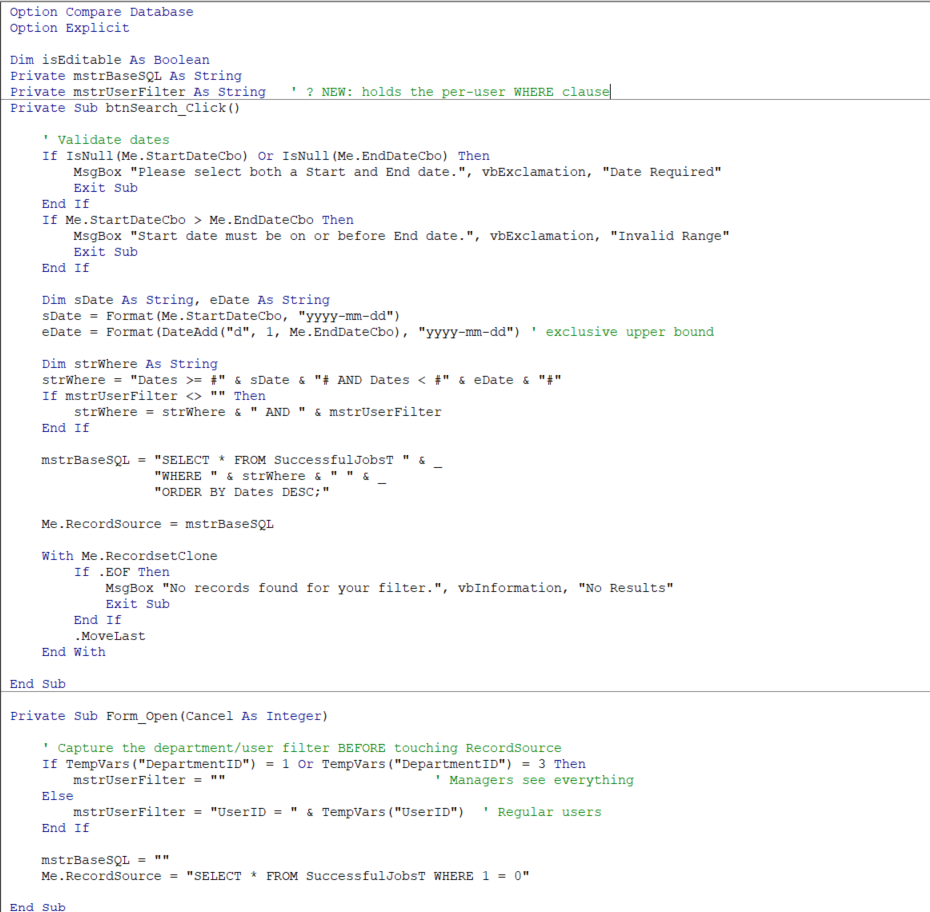
Hello Access People, I have An Access Database and My back-end is linked to SQL server so currently i load data to Forms as Read/write by VBA as follow screenshot, may i ask is this the correct way or is this the best way to do it? in other words, i want all filtering happens in SQL server side instead of access download entire table and then apply the filtering.
What you're doing is perfectly reasonable, especially if you want complete control over the SQL that's sent to the server.
One thing that's worth mentioning, though, is that linked SQL Server tables are much smarter than they used to be. Back in the Access 95/97 days, the common complaint was that Access often pulled far more data across the network than it really needed, which made SQL Server back ends feel painfully slow on anything but small tables. That's where the old advice about "Access downloads the whole table" came from. And I'm even guilty of saying this in some of my lessons because that's honestly how it used to be.
Modern versions of Access do a much better job of pushing filtering, sorting, and other operations to SQL Server whenever they can, so in many cases only the records you actually need are retrieved. Continuous forms based on properly indexed linked SQL Server tables are often surprisingly efficient.
That said, there are still situations where Access can't pass the work off to SQL Server. If your query uses VBA functions, Access-specific expressions, or other features SQL Server doesn't understand, then Access may have to do more of the processing locally, and that's when performance can suffer.
If you want maximum control over what SQL Server executes, pass-through queries are generally the gold standard because the SQL is sent directly to SQL Server with virtually no interpretation by Access. I'll be covering those in detail later in the SQL Server course. I already cover them in my Access SQL Server Online Seminar, but they'll definitely be part of the regular SQL course as well.
So your approach isn't wrong at all. In fact, it's a good approach. Just don't feel like you have to build every form manually in VBA to get good SQL Server performance. Linked tables can perform remarkably well when the tables are properly indexed and the queries are written in a way that SQL Server can optimize.
Just remember, any filtering you can do in your SQL statement or your form's record source will be helpful. When you're opening up a continuous form, try to start with a small subset of records or filter the results before you load that full form, so it's not pulling down 5,000 records on the first load. In fact, sometimes when I open a continuous form, I set the Where condition to WHERE 1=0 so that it opens up with no records and then the user can set the search terms to what they want.
Halkawt QadirOP
@Reply 3 months ago
Thank you so much Mr Richard
Sorry, only students may add comments.
Click here for more
information on how you can set up an account.
If you are a Visitor, go ahead and post your reply as a
new comment, and we'll move it here for you
once it's approved. Be sure to use the same name and email address.
This thread is now CLOSED. If you wish to comment, start a NEW discussion in
SQL Forum.