I am attempting to reproduce the Open Programs Database while watching the video.
The first line of the coding is highlighted in yellow so I am assuming that needs attention??? I have been staring at the coding for about 30 minutes and cant figure out what is wrong!! Maybe I can't see for looking.
Private Sub Attachment_DblClick(Cancel As Integer)
If Right(Attachment, 4) = ".TXT" Then Shell "NOTEPAD.EXE " & Attachment, vbNormalFocus ElseIf Right(Attachment, 5) = ".XLSX" Then Shell "EXCEL.EXE " & Attachment, vbNormalFocus ElseIf Right(Attachment, 5) = ".DOCX" Then Shell "WINWORD.EXE " & Attachment, vbNormalFocus End If
End Sub
My apologies for asking yet another question . . . I really want to learn this.
Adam Schwanz
@Reply 5 years ago
If Right(Attachment, 4) = ".TXT" Then
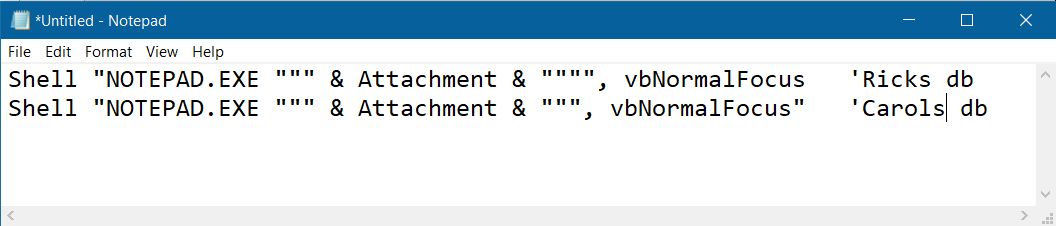
Shell "NOTEPAD.EXE """ & Attachment & """", vbNormalFocus
Thank you Adam. I am trying to reproduce Ricks work EXACTLY. So to that end I need to know WHY mine doesnt work AND why I got the yellow highlighted error message. What is the message telling me is wrong? I need to fix it before it allows me to continue.
Scott Axton
@Reply 5 years ago
Carol -
FYI - 99.9% of the time Richard provides a completed database that you can look at to learn by.
It's good that you are watching and building because it helps anchor it into the brain.
The database is useful to see where you made errors. Sometimes you just can't see the forest for the trees.
The database can be found here: Student Databases I don't recall if it is password protected but if it is it is the same as for your course videos.
Scott Axton
@Reply 5 years ago
Access, by highlighting the line, is telling you "this is the line that has the problem". (Most of the time)
What is the error you are getting in the message box? That will give you an indication of what is wrong on that yellow line.
For instance a syntax error means you don't have something typed correctly. You might be missing a parentheses or quote or comma.
The text in the error matters when you are asking for help. It helps us to guide you.
Carol HerriotOP
@Reply 5 years ago
*****I have been stuck at this point for days and really want to learn what I am doing wrong.***** Can someone please help???
@Adam
I used double quotes as suggested (see cut/paste below) and I still get an error (yellow highlighted text = Shell "NOTEPAD.EXE """ & Attachment & """, vbNormalFocus"
__________________________________________
Private Sub Attachment_DblClick(Cancel As Integer)
If Right(Attachment, 4) = ".TXT" Then
Shell "NOTEPAD.EXE """ & Attachment & """, vbNormalFocus
End If
End Sub
____________________________________________________
Access added a quote at the end of vbNormalFocus, (see below) but does not allow me to save. If I remove the last quote, Access puts it back.
Carol -
Here is a trick I use when trying to look at code. The old eyes aren't as good as the once were.
Copy and paste the code into Notepad and zoom it in.
In this case I assume Rick's code is good and mine is not.
Paste your code on the next line and look for the difference. It is a lot of times easier to see in larger type of something that is fixed width font.
For instance trying to see the difference between " and ''. The first is a double quote ( " ).
The second is two single quotes ( ' ' - space in between for clarity )
Scott Axton
@Reply 5 years ago
Scott Axton
@Reply 5 years ago
Now to understanding why. Access is trying to help you out by putting in the extra quote at the end of vbNormalFocus. It gets it correct most of the time but not always, as is demonstrated here.
This is something you just have to learn by doing over time. The Double Double Quotes in syntax is probably one of the most difficult things to grasp. Watch that video again and again until it clicks.
My opinion here so take this with a grain of salt:
You are also jumping in to the deep end it appears. I see that you have started the Beginner Series but you obviously have the Open Other Programs Seminar which contains some more advanced topics.
You need to keep learning how to crawl before you can run. Make sure you are building your knowledge base by going through the courses. Don't get ahead of yourself.
BTW - I get it. Sometimes you need to get something done and NEED to go a little out of your comfort zone.
Carol HerriotOP
@Reply 5 years ago
@Scott and Alex
Thank you for your patience. I have solved my issue.
I started over (yet again) and it seems to be working for me now.
Sorry, only students may add comments.
Click here for more
information on how you can set up an account.
If you are a Visitor, go ahead and post your reply as a
new comment, and we'll move it here for you
once it's approved. Be sure to use the same name and email address.