Man, just had to Rollback Office AGAIN. Constant crashing while I'm trying to work on my database.
If you're experiencing a lot of crashes with Access lately, you're not alone. I'm trying to do some upgrades to my database and it crashed at least a dozen times in an hour or two.
Not cool, Access Team. Not cool.
The problem version is: Microsoft 365 MSO (Version 2408 Build 16.0.17928.20114) 64-bit
I rolled back to good old trusty 16.0.17531.20152 and no problems. So... someone on the Access Team needs to figure this out.
You (we) really need to read the update notes ( https://learn.microsoft.com/en-us/officeupdates/update-history-microsoft365-apps-by-date ) and choose only the updates we need instead of updating whatever they put out. Not every update has anything for Access. The 20114 update that gave you problems did not even have anything for Access so there was no reason to install it. The last two updates that had anything for Access were from August and April. If you look only at the security updates, Access gets even less -- the last two security updates for Access was Jul-09-2024 (the version I using) and May-09-2023, over a year apart. That's the reason I haven't updated Access since Jul-09-2024. I'm still on version 2406 build 17726.20160.
Richard, maybe you need to do a video whenever Office puts out an update. The video would have you look over the update notes line by line, then comment on whether we need it or not.
Kevin Yip
@Reply 2 years ago
As I said, most of the updates are not for Access, and yet some of them broke Access. That is a disconcerting thing, to be sure, but we need to do our part in being vigilant. If an update has nothing for Access, DON'T install it.
Michael Johnson
@Reply 2 years ago
I had to roll back to version 2407 because it wasn't properly closing databases for me. Not only not deleting the laccdb files and not closing completely in Windows, but also within VBA. So when I would run code with multiple recordsets, or recordsets in loops, it would throw up the error 3048: Cannot open any more databases.
Thomas Gonder
@Reply 2 years ago
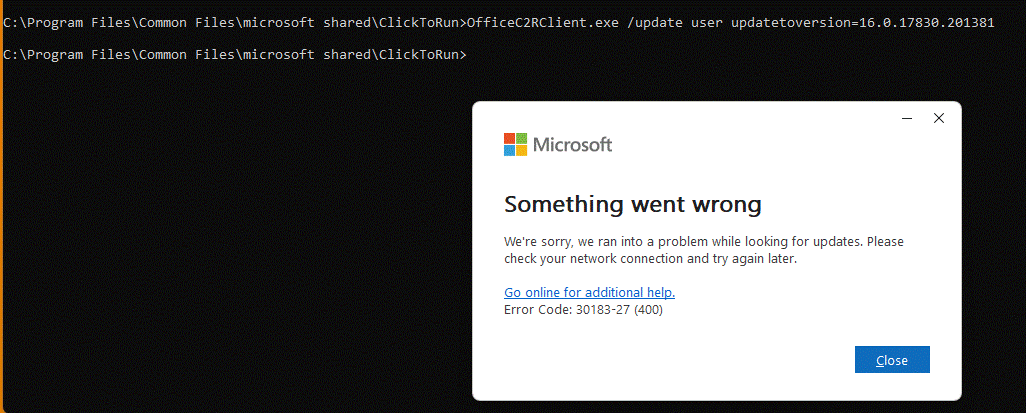
I've got Office 2021. I tried to roll back because of lots of weird stuff. Even turning off the firewall and virus detection (temporarily, as suggested in the error help) still has error 30183-27 (400). So, I can't roll back, which I need to do. Come'on Microsoft!
Thomas Gonder
@Reply 2 years ago
Thomas Gonder
@Reply 2 years ago
Even after doing an online Office repair, turning off the security I still get the message. Good grief Microsoft!
Thomas Gonder
@Reply 2 years ago
@Kevin Y. Say we need an update for another Office product. Can we somehow tell it to not update Access?
Make sure that version is applicable to Office 2021. That looks like it might be an Office 365-only version. Check on Microsoft's website and make sure it's a version compatible with your install.
Thomas Gonder
@Reply 2 years ago
And for fun, I followed the directions Using the Office Deployment Tool (ODT), and that flashed up a quick Microsoft message, nothing ran. Reboot included. Aggghhhh!
Okay Richard, I'll look again, but Microsoft makes it really complicated to know what version they're talking about in their pages.
A decent error message would make things nice.
Thomas Gonder
@Reply 2 years ago
And to make matters worse, I just checked, and after the "repair", I was bumped down to Office 2016 from Office 2021. Great, and it won't let me switch the license key! F..... Microsoft.
Thomas Gonder
@Reply 2 years ago
Final note, as this is my problem, but others may be warned. I tried to activate online and over the phone, with a key I've used before. Microsoft now says they can't "recognize" the key I've used for three years. It seems they are doing everything they can to mess with users that want something other than 365.
All these problems for just trying to rollback from a current, messed up version of Access!
Kevin Robertson
@Reply 2 years ago
Thomas,
Try a System Restore. You may be able to restore your system to before the rollback. Emphasis on maybe!
Kevin Yip
@Reply 2 years ago
>> @Kevin Y. Say we need an update for another Office product. Can we somehow tell it to not update Access?
You can't tell it not to update Access if it isn't its intention to update it in the first place. As I said, the update notes did NOT mention Access at all, but it broke Access anyway. This is a common occurrence: when the programmers fixed something, they broke something elsewhere unexpectedly.
As I said, if the update notes don't mention Access, just don't update Access with it. You have nothing to gain, yet you risk having headaches like this.
Again, update Access when the update notes actually say something is being done to Access. That way, you are sure to have something to gain. And if it's a security update, a lot to gain: having better security is enough to outweigh having a possible rollback.
Kevin Yip
@Reply 2 years ago
For instance, the latest Office update is from Sep-10-2024. In it are the:
List of non-security updates: https://learn.microsoft.com/en-us/officeupdates/current-channel#version-2408-september-10
List of security updates: https://learn.microsoft.com/en-us/officeupdates/microsoft365-apps-security-updates
And Access isn't mentioned at all, so this update is a skip for me.
Thomas Gonder
@Reply 2 years ago
@Kevin, that's a good idea, but I don't want to kick the can down the road. I better solve the key problem now, rather than later. Even though it won't activate, they say it's good for 30 days before limitations kick in. Crossing my fingers.
Tony Roberts
@Reply 2 years ago
I find my Access crashes if I am in design mode and go back to Form view without saving (I know Richard always tells us to do this!), otherwise seems okay.
Thomas Gonder
@Reply 2 years ago
For those that aren't using Office 365, and are wondering what release to roll back to, going into the comments of the referenced article ROLLBACK (1st post), and then down to the comment by Heinrich Moser, will give a link to the updates for 2016 through 2021. You may want to be double sure of the version you're rolling back to, because it made a mess for me in Access with version and activation. Get a good backup first!
Thomas Gonder
@Reply 2 years ago
@Richard, I'm going to take a guess that a lot of the old-timer programmers of Access are beginning to retire, and like with the airlines, thousands of hours of experience are walking out the door into retirement. The new kids are saying, "Watch this, I'm going to make it better!"
Sorry, only students may add comments.
Click here for more
information on how you can set up an account.
If you are a Visitor, go ahead and post your reply as a
new comment, and we'll move it here for you
once it's approved. Be sure to use the same name and email address.
This thread is now CLOSED. If you wish to comment, start a NEW discussion in
Captain's Log.