
|

After all, what nobler thought can one cherish than that the universe lives within us all? -Neil deGrasse Tyson |
|
||||
|
New Video Player By Richard Rost 
 6 years ago
If you go to any of my newer course pages, like Access Developer 14, you'll see the video window starts out small (actually what I like to call "medium") to the right, and the list of lessons are to the left. When you click on the video window, the lessons will start playing. When you click on any of the lessons, that lesson will start playing, and you'll see it turn BOLD to help you keep track of where you are. There are links below the video to let you resize the player however you like. Small is pretty tiny. Medium is where it started. Large is roughly the width of the center column on the whole web site. Extra Large will pretty much fill your whole screen, but it's not full screen (this is my preferred setting), and then of course, there is the actual Full Screen option. That works best on portable devices. By popular demand, I also added links for you to control the playback speed. A lot of you have told me you like watching the videos a little faster than normal (I do too). Reg is regular speed (1x). Fast is at 1.5x. And then there's 2x. I don't see any practical reason why you'd want to slow the video down, but there's a Slo option which plays at 0.5x speed, and it's hilarious. Listen to a few minutes of video. It sounds like I'm drunk. Too funny. I left it there for your amusement. LOL. I'm working on adding additional options, like skip ahead / skip back 10 seconds, and of course having the site remember exactly where you left off. The titles go bold now, but as soon as you leave the page, that gets reset. I'm working on a way to bookmark exactly where you stopped watching your last video (like Netflix does). I'm not going to be adding any new enhancements to the Classic Theater. Those videos are going to be slowly moved over to the new system OR re-recorded. I'm going to be making it a priority to re-record my beginner Word, Excel, and PowerPoint lessons soon. If you happen to run across any videos that don't load properly, please let me know. I keep finding litle nooks and crannies in my web site (Tips pages, mostly) that don't work. So it's a challenge. Any suggestions, please feel free to post them here.
|
||||||||||||||
|
| |||
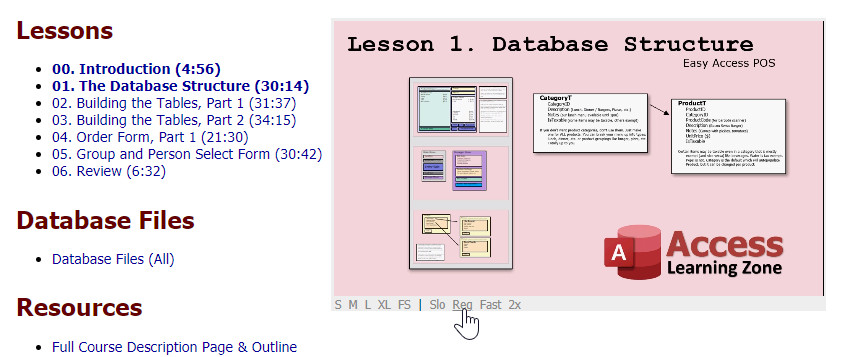 I spent most of my Sunday working on the video player here on the web site. I'm doing my best to give you guys the best possible user experience when it comes to watching my videos.


