Think of the rivers of blood spilled by all those generals and emperors so that in glory and in triumph they could become the "Momentary" masters of a "Fraction" of a "Dot."
Took some time today to add a much-needed feature to the website. You can now manage what courses you're enrolled in on the Learning Connection account management page.
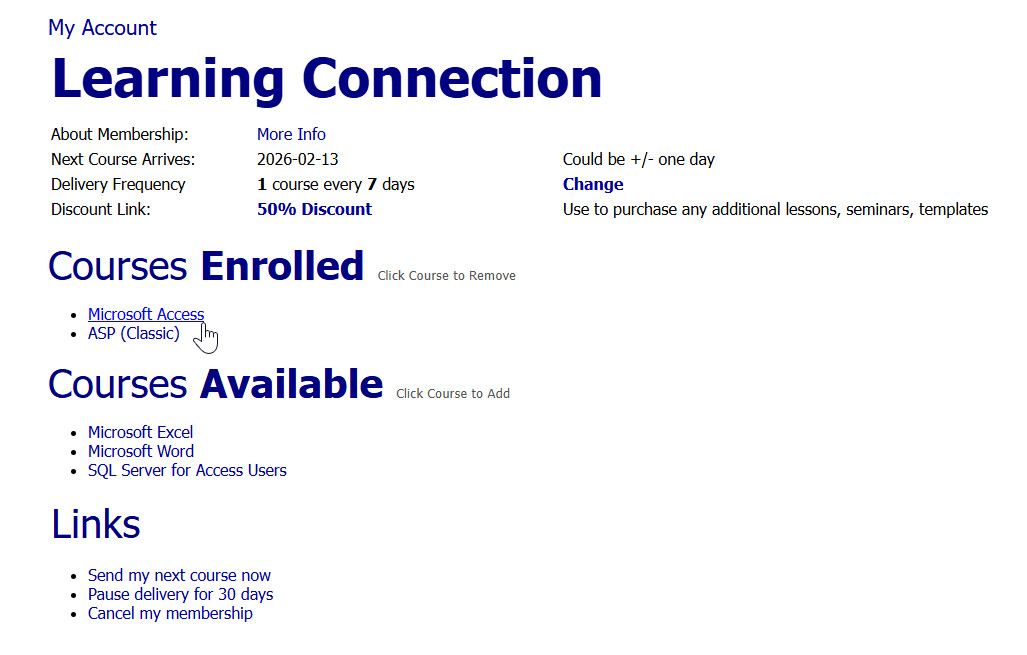
Right in the middle is the new section. This is where you'll see a list of the courses you're currently enrolled in, along with courses that are available but that you're not enrolled in yet. If you want to remove something, like if you don't want to receive any more Access lessons, just click it and it'll be taken off your account. If you want to add something, like the SQL Server for Access Users course, click that and it'll be added. This gives you direct control over what comes next in your delivery schedule.
Remember, the system will always send you the lowest level course first. So if you're enrolled in Access and Word, and you've completed a bunch of advanced Access classes but you're still missing Word Beginner 2, 3, and 4, the Word classes will go out before anything else. Using this new section lets you manage that more easily. If you decide you want Excel to be next, just enroll in it here and remove the others.
Above and below that, you'll still see all the familiar controls. That's where you manage your delivery frequency, how many classes you receive, and when they're sent. Your discount link is there as well if you want to order additional seminars or courses. At the bottom are the same quick links to send your next class immediately, pause delivery for 30 days, or cancel your membership altogether.
And yes, this update definitely came from a pain point. I've had a ton of requests from people wanting to switch from Access over to the new SQL Server course, so now you can handle those changes yourself.
Enjoy. Don't break it.
LLAP
RR
Sorry, only students may add comments.
Click here for more
information on how you can set up an account.
If you are a Visitor, go ahead and post your reply as a
new comment, and we'll move it here for you
once it's approved. Be sure to use the same name and email address.
This thread is now CLOSED. If you wish to comment, start a NEW discussion in
Captain's Log.