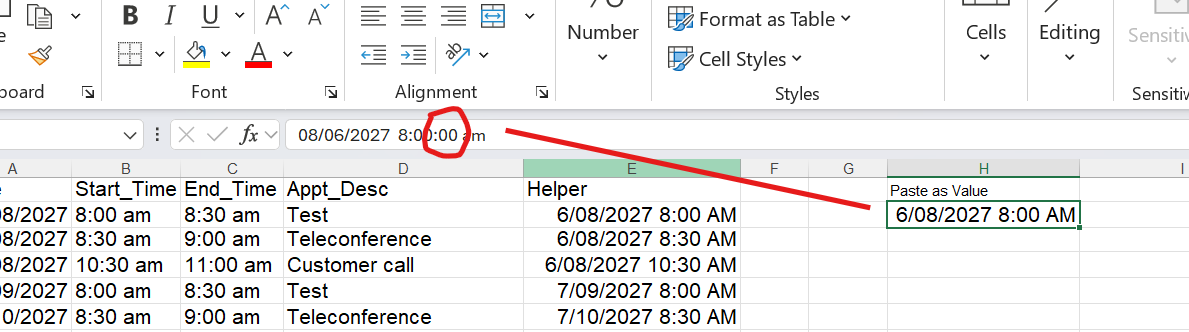
I'm concantinating two values from an Excel table (date(m/dd/yyyy) & time (h:mm AM/PM) and trying to find a matching value on another sheet in a column that already has the concantenated values (m/dd/yyyy h:mm AM/Pm), using the formula as follows: =XLOOKUP($T$20+T23, Appointments!$E$1:$E$1000, Appointments!$D$1:$D$1000,"") It can't find a match even though I know there is one there.
If T20 is a real date and T23 is a real time, adding them together is exactly how you build a proper datetime in Excel. The issue is usually that one side of the comparison is a true numeric date/time value and the other side is text that just looks like a date and time because of formatting.
I'd check with ISNUMBER and ISTEXT on both the lookup value and the values in the Appointments column. If either one is text, you'll need to coerce it or rebuild it as a true date/time value. Also make sure there aren't hidden seconds in one value that aren't showing in the formatted display. That alone can make two values look identical but not actually match.
Mark HacheOP
@Reply 7 months ago
So, I got the same formula working while in the Excel table but just can't get to work inside of VBA (using Application.WorksheetFuntion.Xlookup). I've changed all the data types to match, created a Helper column in another tab to compare the concantenated value to but Excel keeps sneaking in "ss" to time value which is formatted only for "h:mm". I suspect this where it can't find a match. At my wit's end and don't know what to do next. I'm going to have to brute force it using FOR...IF...THEN...ELSE...NEXT loops to find the appropriate value. No finesse in this.
Of interest, when I'm looking up a specific value in a single cell and I represent it as ws.Range("E25").Text the following formula works:
result = Application.WorksheetFunction.XLookup(lookupValue, ws.Range("E25").Text, returnRange, "N/A") ' This works!!
Mark HacheOP
@Reply 7 months ago
My last post led to a BREAK THROUGH! Once I converted the Helper column to text (=TEXT(A13,"m/dd/yyyy")&" "&TEXT(B13,"h:mm am/pm")), the lookup worked!. I didn't need to specify a specific cell, rather the lookup range became what I set it at (Set lookupRange = ws.Range("E:E")). Frustrated no more!
If you are a Visitor, go ahead and post your reply as a
new comment, and we'll move it here for you
once it's approved. Be sure to use the same name and email address.
This thread is now CLOSED. If you wish to comment, start a NEW discussion in
Excel Forum.