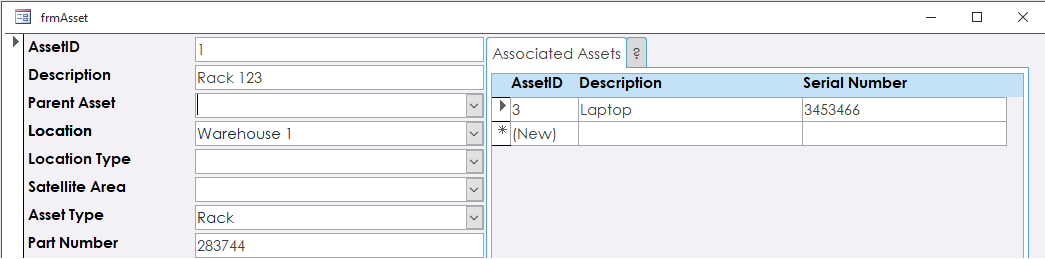
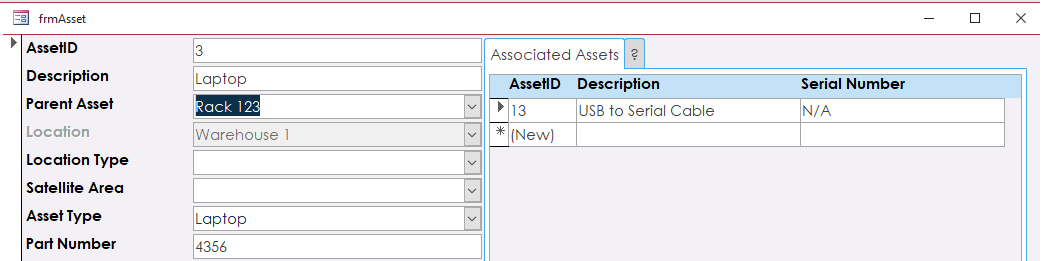
I've been playing around with the template from this seminar and came across a few things that left me wondering. (forgive me if this is a simple VBA line as I'm only familiar with VBA and not advanced in that language.) 1. Is there a way to refresh the current record when you change the parent asset? In your example you made the child assets Owner and Location fields hidden when assigned to a parent. I wanted to see if there was a way to refresh the record so that those fields return when the child is removed from the parent. I've tried many things in VBA and cant seem to get those fields to refresh unless I move to the next record or requery the entire form. I know that a requery also sends you back to record 1 so if that is the only way to see updates in the record as you change them, is there a way to have access return you to the record you were on after the requery? 2.If you do assign a child asset record to a parent, is there a way to force the location and owner to change to the parents location and owner? Then on the flip side, if you remove that parent from the child, can you set the values back to 0 until a new location is provided?
Adam Schwanz
@Reply 5 years ago
I'm not familiar with this seminar or what you have going on exactly, so I'm just shooting in the dark here
#1 doesn't a simple me.refresh work for this? Again I don't know how you're doing things but you could just include it in the code that removes the child, or if you're pushing a button to go to a new form to make the changes, putting it on the ongotfocus event.
#2 not sure how you're doing it, but if you were to add children in say a subform of the parent, you could just add to the code that location=Forms!ParentF!location kind of thing, and when removing it, do the same thing but manually location="" or 0 whatever you want to put. You could also do this with DLookup if you weren't on the parent form.
If I'm way off, can you upload an image with the upload images button near the top right of your post? That would probably help clear things up.
Nathan SchmidtOP
@Reply 5 years ago
Nathan SchmidtOP
@Reply 5 years ago
Nathan SchmidtOP
@Reply 5 years ago
Adam,
The refresh didn't work for me which is why this is so frustrating. I'm also not using buttons in the form just yet. I needed to cut the bottom of the screen off on these photos cause it has information that I'm trying to track specific to my Job but the only way to get to the next record is to use the record selector arrows at the bottom of the form. The asset table includes all assets whether they are subassembly's or the top level asset so i can see all records and then see what is installed in that unit in the sub form. So top level is a rack of some sort where you would then install a server. The rack level is the parent and the server is the child so the rack would show the server in its sub form and the server might show any other asset that it is a parent of in its subform say like a network card. If i was to say Rack 123 got sent out to a site to be installed and the laptop went with it, id like to force that change in location with all assets assigned.
Nathan SchmidtOP
@Reply 5 years ago
The second photo shows that I'm trying to take the child assets location and make it disabled, which is easy, but I cant refresh the location field if I remove that parent asset. It stays disabled until I click to the next asset and then back to the asset I'm working on. If I requery the entire thing I go back to record one and that just wont work for me. Again, sorry I'm asking so much I very much enjoy Access but I'm not very strong in my VBA yet.
Adam Schwanz
@Reply 5 years ago
It's been a long day, so sorry if I need it explained like a 2nd grader,
For the second photo, what about just doing after update event of
If Me.Dirty = True Then Me.Dirty = False
Me.Refresh
Or if it wants to be really stubborn you could try getting around it with an automatic move next and back instantly.
recordset.movenext
recordset.moveprevious
Maybe I've misunderstood what you were asking too, are you basically saying you have potentially a string of parent/children
A----B----C----D
You decide you don't want A there anymore, you want to put E. Are you asking how to then tell B, C, and D it's new location from it's new parent, E?
Nathan SchmidtOP
@Reply 5 years ago
Not a problem at all, I unfortunately understand exactly what that's like especially trying to help folks from a distance without knowing the whole background. So first off thanks!! the If then statement didn't work with the me.refresh but the recordset movement did the trick. The flash of the screen is a little ugly but it solves my issues when a change is made and for that i am REALLY happy. Secondly, yes you are correct about the string of parents and children. I'll try to explain a bit to help give some background. We currently have a program where we have say 600 Equipment racks that can be installed in facilities around the globe. Each of those locations will have racks that will include equipment to which id like to tie to that rack at that location which isnt an issue so far. The problem is with the nature of the equipment, it gets moved around a lot so it will need to be able to be paired to different racks and locations easily.
Nathan SchmidtOP
@Reply 5 years ago
Using the template from this class has made this tremendously easier but i want to make sure the location updates with the assigning of another parent. If the parent was removed then i'd like it to have a zero in the table so i can then make sure i can update the location or retire the asset.
Sorry, only students may add comments.
Click here for more
information on how you can set up an account.
If you are a Visitor, go ahead and post your reply as a
new comment, and we'll move it here for you
once it's approved. Be sure to use the same name and email address.