We wish to find the truth, no matter where it lies. But to find the truth we need imagination and skepticism both. We will not be afraid to speculate, but we will be careful to distinguish speculation from fact.
I have an access database that has a main form with a subform. The subform is based on a query that needs to only show records where the "status" field is not "ef complete ", "mail in", or "not Ef" AND the "fee status" field is blank or " billed ".
The status criteria is working, but even if status is blank if I mark it paid, waived, trade, etc in the fee status it disappears.
Currently the criteria is as follows: Status: Criteria: <> "ef complete" or "mail in" or "Not EF" Or: is null Fee status: Criteria: is null or "billed"
I've been stuck in this all dang day. Any help would be appreciated.
Kevin Yip
@Reply 4 years ago
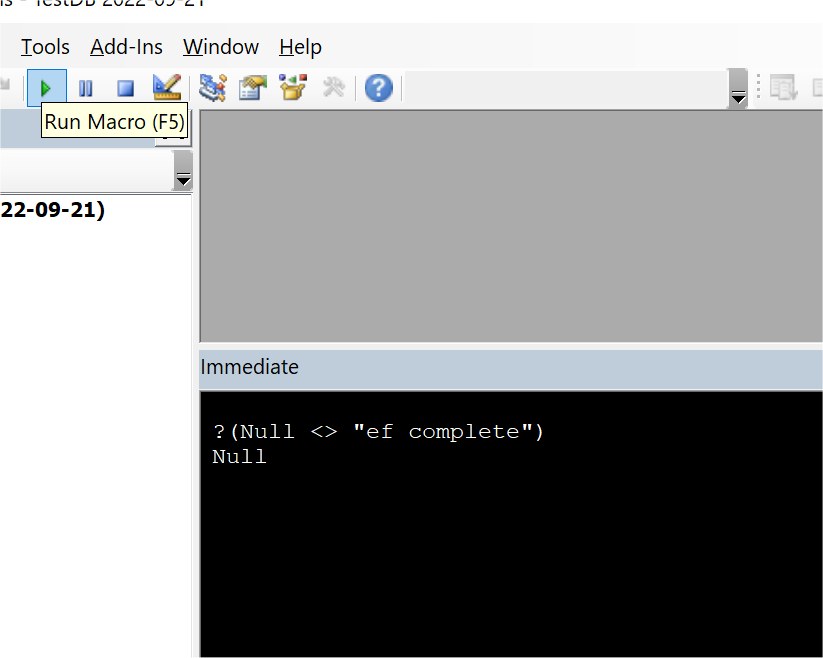
The reason it doesn't work is that in the condition [status] <> "ef complete", if [status] is null, this condition is NOT true. That's because Null <> "ef complete" doesn't evaluate to either true or false; it evaluates to NULL. You can test this in the VBA editor's immediate window (see picture below).
Comparison to Null only works with IS NULL or IsNull(). It does not work with string comparison operators: <>, >, <, =, >=, NOT IN, etc. That's because Null is not a string. So you need to add IS NULL or IsNull() to your criteria. E.g.:
status NOT IN ('ef complete', 'mail in', 'Not EF') OR status IS NULL
Another way is to turn [status] into a string by concatenating it with the empty string "":
status & "" NOT IN ('ef complete', 'mail in', 'Not EF')
The above works even without IS NULL or IsNull because status & "" becomes an empty string if status is null, allowing the use of string comparison operators.
Kevin Yip
@Reply 4 years ago
Sorry, only students may add comments.
Click here for more
information on how you can set up an account.
If you are a Visitor, go ahead and post your reply as a
new comment, and we'll move it here for you
once it's approved. Be sure to use the same name and email address.
This thread is now CLOSED. If you wish to comment, start a NEW discussion in
Visitor Forum.