<%
Sport = request("Sport")
BodyPart = request("BodyPart")
Service = request("Service")
LogInDate = request("LogInDate")
sSearch1 = Request.Form("Search1")
sSearch2 = Request.Form("Search2")
WhereStr = ""
if Sport <> "" then
WhereStr = WhereStr & "Sport LIKE '" & Sport & "%'"
end if
if BodyPart <> "" then
if WhereStr <> "" then
WhereStr = WhereStr & " AND "
end if
WhereStr = WhereStr & "BodyPart LIKE '" & BodyPart & "%'"
end if
if Service <> "" then
if WhereStr <> "" then
WhereStr = WhereStr & " AND "
end if
WhereStr = WhereStr & "Service LIKE '" & Service & "%'"
end if
if LogInDate <> "" then
if WhereStr <> "" then
WhereStr = WhereStr & " AND "
end if
WhereStr = WhereStr & "LogInDate = '" & LogInDate & "'"
end if
if LogInDate <> "" then
if WhereStr <> "" then
WhereStr = WhereStr & " AND "
end if
WhereStr = WhereStr & "sSearch1 = '" & sSearch1 & "'"
end if
if LogInDate <> "" then
if WhereStr <> "" then
WhereStr = WhereStr & " AND "
end if
WhereStr = WhereStr & "sSearch2 = '" & sSearch2 & "'"
end if
If WhereStr <> "" then

       WhereStr = "WHERE " & WhereStr

   end if
SQL = "SELECT * FROM AthleteT INNER JOIN DailyLogIn ON (AthleteT.AthleteID = DailyLogIn.AthleteID) " & WhereStr & " "WHERE (LogInDate between " & Search1 & " and " & Search2 & ") ORDER BY LogInDate DESC, LastName, FirstName"
That means you don't have a field named Search1 in your table. Again, write out your SQL string after it's constructed so we can see what it looks like.
Response.Write SQL
Diane StankevitzOP
@Reply 2 years ago
Would that be this:
Response.Write SQL = "SELECT * FROM AthleteT INNER JOIN DailyLogIn ON (AthleteT.AthleteID = DailyLogIn.AthleteID) " & WhereStr & " "WHERE (LogInDate between " & Search1 & " and " & Search2 & ") ORDER BY LogInDate DESC, LastName, FirstName"
First you set the SQL variable equal to what you want your statement to be, then you execute it. I want to see what it looks like BEFORE you execute it.
Diane StankevitzOP
@Reply 2 years ago
Would it be possible to get an example of what you are asking?
I don't want to seem uninformed, but I use you videos step by step and write exactly what it is describing and then change what things to meet my needs. I have issues committing things to memory.
If I have not mentioned it, I probably could find tutorials for free, but your videos are by far the best. I believe it is so worth the money!!!!! I have purchased the following some I have not starting, but they are fantastic!!!!!:
Details Full Course Listing > My Courses Only
Access Beginner 3Table & Field Properties, Validation
Access Beginner 4Format, Indexing, Compact, Repair
Access Beginner 5Query Criteria, Parameters, Wildcards
Access Beginner 6Is Null, OLE Objects, Pictures, Grid
Access Beginner 7Navigation Forms, Continuous Forms
Access Beginner 8Combo Boxes, Tab Order, Cycle
Access Beginner 9Contact History, Report Design
Access Expert 1Relational Database Concepts, Joins
Access Expert 2Normalization, Referential Integrity
Access Expert 3SQL Basics, Subforms, Footer Totals
Access Expert 4New Form Controls, Relationships
Access Expert 5Letter Report, Email via Outlook
Access Expert 6Print Mass Mail, Letter Templates
Access Expert 7Many-to-Many Relationships, Junction
Access Expert 8Order Entry, IIF, Calculated Fields
Access Expert 9Share Data Across Multiple Forms
Access Expert 10DLOOKUP, Quotation, Invoice
Access Expert 11Aggregate Queries, Hours per Week
Access Expert 12Report Sorting & Grouping Levels
Access Expert 13Action Queries, Update Query
Access Expert 14Update Queries, Append Query
Access Expert 15Append Query, Student Attendance
Access Expert 16Multi Query Macro, Make Table, Union
Access Expert 17Archive Old Orders, Crosstab Queries
Access Expert 18Crosstab, Find Duplicate, Unmatched
Access Expert 19Conditional Formatting, Exporting Data
Access Expert 20Mass Email, Importing & Linking Data
Access Expert 21Multi-User, Split DB, Record Locking
Access Expert 22Fix Data, Price Updates, Fix Orders
Access Expert 23Remote Entry, Paypal Transactions
Access Expert 24Import RSS Feed, SQL Server Web DB
Access Expert 25Function Guide 1: String, Logical
Access Expert 26Function Guide 2: Math, Type Convert
Access Expert 27Function Guide 3: Date Time Part 1
Access Expert 28Function Guide 4: Date Time Part 2
Access Expert 29Function Guide 5: Aggregate, Lookup
Access Expert 30Function Guide 6: Financial
Access Expert 31Charts & Graphs
Access Expert 32Reports, Median, Mode, Intro Macros
Access Advanced 1Introduction to Macros and Events
Access Advanced 2New Order Button, Change Properties
Access Advanced 3Control Properties, Lock Paid Orders
Access Advanced 4Full Sheet Labels, Groups, Submacros
Access Advanced 5Separate ShipTo Address, Drag n Drop
Access Advanced 6SQL Search Boxes, Data Macros
Access Developer 1Intro to Access VBA Programming
Access Developer 2VBA, Calculator, Commission Forms
Access Developer 3Variables, Random Numbers, For Next
Access SQL Server OnlineAccess SQL Server Online
CalendarPrint Monthly Calendar Reports
Data EncryptionScramble the Data in your Tables
SecurityProtect Your Database. Control Users
Split DatabaseSplit DB and Secure Data w Windows
SQL 1Structured Query Language Basics
SQL 2Use SQL to Manipulate Data
SQL 3Modify Database Structure with SQL
Calendar ControlReplacement for Calendar Control
Combo Box RelationalRelational Combo Boxes
Customer List FormClickable Customer List Form
ZIP Code LookupZip Code Lookup
Holiday Greeting CardsHoliday Greeting Cards
Access 2013 Beginner 1Intro to Access, Concepts, First DB
Access 2010 Beginner 2Form Design View, Formatting
ASP 101Intro to ASP, Tags, Loops, Variables
ASP 102Arrays, Select Case, Functions, Subs
ASP 103Math, String Functions, Response Obj
ASP 104Request, Session, App Variables
ASP 201Server-Side Includes, Files & Folders
ASP 202Permissions, Error Handling, Emailing
ASP 301Setting up Database, ODBC, Records
ASP 302SQL Statements, Edit, Delete Records
ASP 303Securing Web, Search Form, Header
ASP 304Contact Mgr, Relational Tables
ASP Upload TemplateUpload Images to ASP Website
Web Database SeminarBuild Web Database with ASP
FrontPage 101Plan, Create a Web, Links, Images
FrontPage 102Edit Web, Hit Counter, Include Page
FrontPage 103Tables for Layout, Home Page Design
FrontPage 201Forms, Feedback, Email Results
FrontPage 202Guest Book, Form Wizard, Validation
HTML 101Design Web, Tags, Hyperlinks, Images
Kevin Robertson
@Reply 2 years ago
Adam Schwanz
@Reply 2 years ago
Your WhereStr should be after the WHERE as well, I believe someone mentioned that earlier.
I would suggest breaking this down to the bare minimum. Pick one criteria and hard code it and test it, then build onto it piece by piece, then you can learn and adjust problems one by one as you identify them. Take out all the WhereStr stuff and start with something like
SQL = "SELECT * FROM AthleteT INNER JOIN DailyLogIn ON (AthleteT.AthleteID = DailyLogIn.AthleteID) WHERE (LogInDate between '1/1/2020' and '1/1/2021') ORDER BY LogInDate DESC, LastName, FirstName"
Diane, this is basic troubleshooting 101 for programmers. We need to see what's in your final SQL string. So after you declare it, just write it out so we can see what it says.
SQL = "SELECT..."

Response.write SQL

Response.end
And then copy and paste here what it says.
Diane StankevitzOP
@Reply 2 years ago
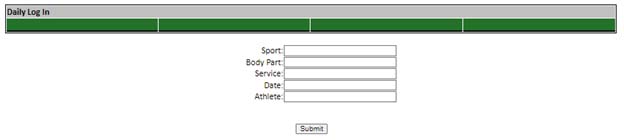
When I use a single date search function:
<%
Sport = request("Sport")
BodyPart = request("BodyPart")
Service = request("Service")
LogInDate = request("LogInDate")
WhereStr = ""
if Sport <> "" then
WhereStr = WhereStr & "Sport LIKE '" & Sport & "%'"
end if
if BodyPart <> "" then
if WhereStr <> "" then
WhereStr = WhereStr & " AND "
end if
WhereStr = WhereStr & "BodyPart LIKE '" & BodyPart & "%'"
end if
if Service <> "" then
if WhereStr <> "" then
WhereStr = WhereStr & " AND "
end if
WhereStr = WhereStr & "Service LIKE '" & Service & "%'"
end if
if LogInDate <> "" then
if WhereStr <> "" then
WhereStr = WhereStr & " AND "
end if
WhereStr = WhereStr & "LogInDate = '" & LogInDate & "'"
end if
If WhereStr <> "" then
WhereStr = "WHERE " & WhereStr
end if
SQL = "SELECT * FROM AthleteT INNER JOIN DailyLogIn ON (AthleteT.AthleteID = DailyLogIn.AthleteID) " & WhereStr & " ORDER BY LogInDate DESC, LastName, FirstName"
This works fine.
How do I switch it to a date range? Is there a video tutorial for this?
Diane StankevitzOP
@Reply 2 years ago
Diane StankevitzOP
@Reply 2 years ago
Diane StankevitzOP
@Reply 2 years ago
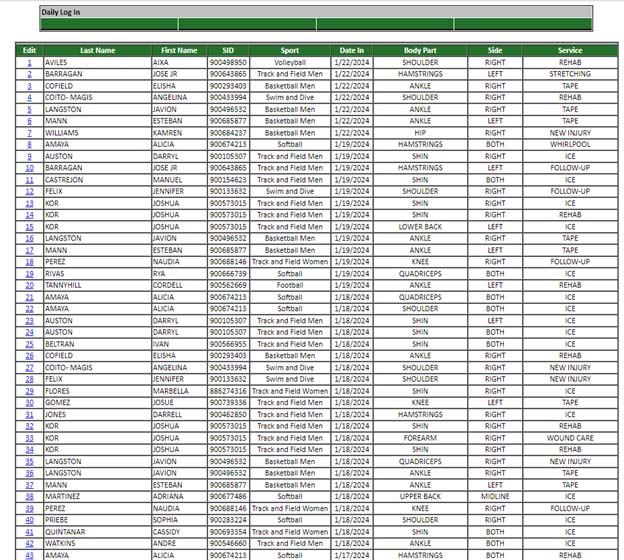
If I leave the date blanks, it retrieves every record. If I select a date, I retrieve records for just that date. Now I want to be able to search between dates.
Adam Schwanz
@Reply 2 years ago
OK so you know you have that working now, now build onto it, add the two fields back again to the form.
Personally I usually use <= and >= instead of between, but you can try it either way.
I would add
if NewFieldStartDate <> "" then

if WhereStr <> "" then

WhereStr = WhereStr & " AND "

end if

WhereStr = WhereStr & "LogInDate >= '" & NewFieldStartDate & "'"

end if

if NewFieldEndDate <> "" then

if WhereStr <> "" then

WhereStr = WhereStr & " AND "

end if

WhereStr = WhereStr & "LogInDate <= '" & NewFieldEndDate & "'"

end if
Sorry, only students may add comments.
Click here for more
information on how you can set up an account.
If you are a Visitor, go ahead and post your reply as a
new comment, and we'll move it here for you
once it's approved. Be sure to use the same name and email address.
This thread is now CLOSED. If you wish to comment, start a NEW discussion in
ASP Forum.