I made a "simple" design change and am much happier with the look of my program, but it is causing issues.
I have one "main form" that has a button menu to open other forms. When the forms are opened, I want them to move to the working area of the main form. Forms can also be opened by buttons from other forms, so I need the move to be coded into the form itself.
If I do me.move for the on load event in the form opening, it works fine. However, thinking of the future if I ever need to change the positions I don't want to have to go into every form to change it.
I tried creating a module to do this. I was going to capture the name of the opening form and use it to do the move. However, when a form is called from the button click the On Load event of the opening form has the main form as the active form when I use Screen.Activeform.Name to capture the name.
How can I get the opening forms name?
Kevin Yip
@Reply 2 years ago
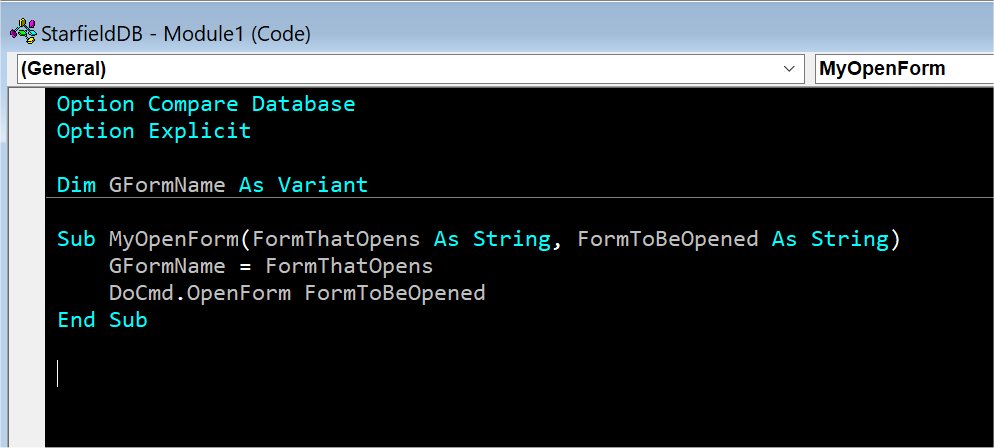
One way to do it is to have a form pass its own name to a custom function that opens another form. See the picture below as an example. When a form opens another form, run this:
MyOpenForm Me.Name, "name of form to be opened"
The custom function will then store the name of the first form in a global variable, then open the second form. At that point, you will have the names of both forms.
Kevin Yip
@Reply 2 years ago
Sorry, only students may add comments.
Click here for more
information on how you can set up an account.
If you are a Visitor, go ahead and post your reply as a
new comment, and we'll move it here for you
once it's approved. Be sure to use the same name and email address.
This thread is now CLOSED. If you wish to comment, start a NEW discussion in
Visitor Forum.