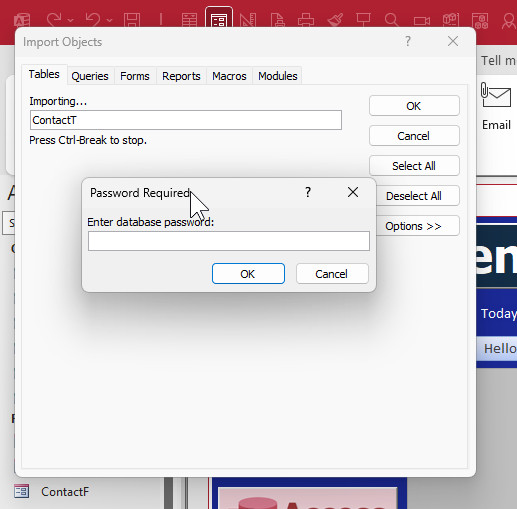
Hi, I have disabled most of the features on my FE including the shift key, set a password encryption to the BE and thought my DB is secured, but if you open a new DB and import all tables from my FE all tables are imported with all data including hidden tables :( ANY SOLUTION PLEASE..
In fact, it will ask you for the password for EACH TABLE.
Antoine ChaarOP
@Reply
2 years ago
Thank you for your prompt reply Rick, just to make things clearer, I have set a PWD encryption to my BE only, my FE is secured with user logon and PWD through a form with VBA code as I don't like to use access PWD encryption for my FE. If that what you mean so Please what might be wrong?
I see what you're saying. Yes, this is actually a well-known flaw with Access security. If you have a split database solution, even if your back end has a password, if you try to import the tables from the front end it bypasses that password because the front end is supplying the password to the back end.
I actually have a video on this subject coming out in a week or so that discusses this and some different workarounds. The easiest solution is to simply password protect your front end database as well. That way, no one can get into your back end that doesn't already have access to your front end.
Another solution is to link your tables on the fly using VBA, so when the database opens, you link the tables, and when the database closes, you unlink them. Of course, that leaves a security hole as well because as long as the database is open, someone can do this trick.
Another solution, and the one that I'm going to show in the extended cut of my video, is how to not use tables at all in your database. You can literally use a recordset connection to connect to the tables in the back end and supply the password in VBA. You never have a link to a table, so there's no security gap. I'll be showing how to do this in an upcoming extended cut video.
But of course, the only real true way to have secure tables is to use a database server like SQL Server.
Sorry, only students may add comments.
Click here for more
information on how you can set up an account.
If you are a Visitor, go ahead and post your reply as a
new comment, and we'll move it here for you
once it's approved. Be sure to use the same name and email address.
This thread is now CLOSED. If you wish to comment, start a NEW discussion in
Visitor Forum.