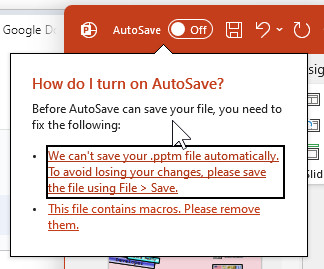
What!? PowerPoint can't AutoSave files if they have macros in them? What's this nonsense?
I guess according to GPT:
PowerPoint (like other Office applications) cannot autosave files that contain macros. This is because macros can introduce complexity and potential security risks, so PowerPoint disables the autosave feature for these types of files. If you're working with a macro-enabled PowerPoint file (with a .pptm extension), you'll need to manually save your work to avoid losing any changes.
For files without macros, autosave is available, and it's automatically enabled if you're working on a file stored in OneDrive or SharePoint.
That's ChatGPT being ChatGPT, giving a mishmash of data as it often does when it uses "fuzzy" logic. It probably got "confused" by another feature: autosave being disabled for local files. Autosave only works if the file is saved on OneDrive.
Yeah, I shouldn't even bother using AutoSave anyways. What I really need is AutoRecovery which is just fine if you don't mind it backing up every 5 or 10 minutes (instead of constantly) and if you don't collaborate with other people.
I smell a video coming up on this. LOL
Thomas Gonder
@Reply 2 years ago
As the old Jesus/Devil joke goes...Jesus saves.
I have yet to figure out that AutoRecovery. Never once have I figured out how or why it shows those prompts. Much less what I should choose.
If you are a Visitor, go ahead and post your reply as a
new comment, and we'll move it here for you
once it's approved. Be sure to use the same name and email address.
This thread is now CLOSED. If you wish to comment, start a NEW discussion in
Captain's Log.