Hmmm, since spreadsheet software arrived after my database experience, I see little use for Excel.
I haven't done a lot of "what if" analysis since university (where pencil and paper did the trick, along with a manual typewriter for my thesis; dang that was miserable). I seem to be always working in "what is" (like $18B to the penny in subsidiary applications).
One of the reasons I decided to port the ADS to Access, was so that "power users" could cull and export data to Excel (for their charts and what-ifs) easily from Access, to their heart's content. You go boys and girls, you go, meanwhile...
I mostly use Excel for stuff that doesn't have a lot of data, and I'm not planning on it having a lot of data... until it does have a lot of data... and then at that point, I move it to Access. :)
Kind of like my stock portfolio. When I first started trading, I just tracked a little bit here and there, and then as I got more and more into it, and I got to like three or four screens full of Excel data, it was time to make a database out of it.
But I still keep some stuff in Excel. For example, my YouTube revenue. Once a month, I add a new row, type in a few numbers, update the range of my line chart, and wonder why it's not growing faster. :(
Daniel de Koning
@Reply 2 years ago
Maybe I'm reading the 2nd infograph incorrectly, but I think there is an error in it in the section: Interoperability.
"Excel can't connect with Access to get data. So, if you need it to import data from Access to generate pretty-looking reports, Excel won't be of any help."
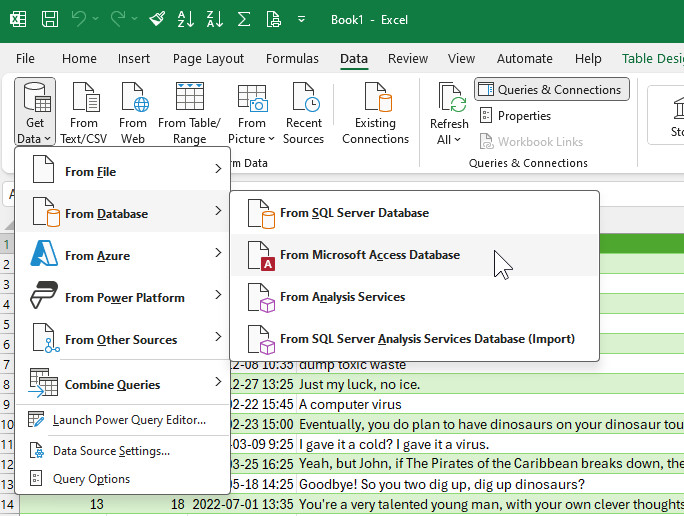
This is perfectly possible when you go to the Data Tab in Excel, import from an Access-database. You have to use Power Query to transform the data to make it manageable and tweak what is needed for your analysis. When adding/connecting the data to a 'Data Model' you are even able to create Power Pivot Tables, similiar to a Query in Access, connecting multible tables to each other. It's still no PowerBI functionality (visually much better), but with most people already having Excel installed, a good 2nd choice when looking at visualization of the data.
The ability to import data directly from Microsoft Access into Excel has been available for many versions, dating back to Excel 97 and Access 97. However, the feature became significantly more streamlined with the introduction of Power Query, which was added in Excel 2010 as a free add-in and then fully integrated into Excel 2016 as the "Get & Transform" feature. This tool made connecting to and importing data from Access databases much easier.
So, the ability to connect and import data from Access has been around for many years, but the integration was improved and simplified starting in Excel 2016 with Power Query built-in.
Sorry, only students may add comments.
Click here for more
information on how you can set up an account.
If you are a Visitor, go ahead and post your reply as a
new comment, and we'll move it here for you
once it's approved. Be sure to use the same name and email address.
This thread is now CLOSED. If you wish to comment, start a NEW discussion in
Captain's Log.