Computer Learning Zone CLZ Access Excel Word Windows

Formal education will make you a living; self-education will make you a fortune.

-Jim Rohn
 
Home   Courses   TechHelp   Forums   Help   Contact   Merch   Join   Order   Logon  
 
Back to Internet Forum    Comments List
Upload Images   @Reply   Bookmark    Link   Email   Next Unseen 
YouTube videos as creator
Bruce McCormick 
   
2 years ago
Oh cool, i'm the first to post here in 8 years???

OK, here goes. I never have uploaded anything to YouTube. As Lindsey Buckingham (Fleetwood Mac) once wrote "I can't sing, I ain't pretty, and my legs are thin". Making that so much worse is that in prep for implanted dentures my dentist has pulled all but two of my teeth. Maybe she's making a necklace, i don't know-

Recently i made a video using my iPhone with the intent to send to a daughter about troubleshooting a problem with her car. The 10 minute video is a GB in size!!! Heck, i've got some full length movies on my drive smaller than that.

As it could help others out i thought it might be a good idea to upload it, as hack as it is, but how do i condense it? I tested reducing it from 1080p/30fps, but the size reduction was nothing compared to what i proportionately expected.

I did post question to a YouTube help forum, but i've heard nothing over the past several days.

Anyone know what i should do, what i should be expecting, and why Mr. Rost does not start a YouTube Beginner's channel???

Thank you!

Best Regards,
-Bruce
Sami Shamma  @Reply  
             
2 years ago
Hi Bruce

Get yourself a cheap video editor like VSDC that will properly format your video to YouTube specs.

Richard concentrates on making videos that will attract a larger audience and in keeping with the current mission of the site.
Sami Shamma  @Reply  
             
2 years ago
you said it yourself; you are the first to post here in 8 years.
Kevin Yip  @Reply  
     
2 years ago
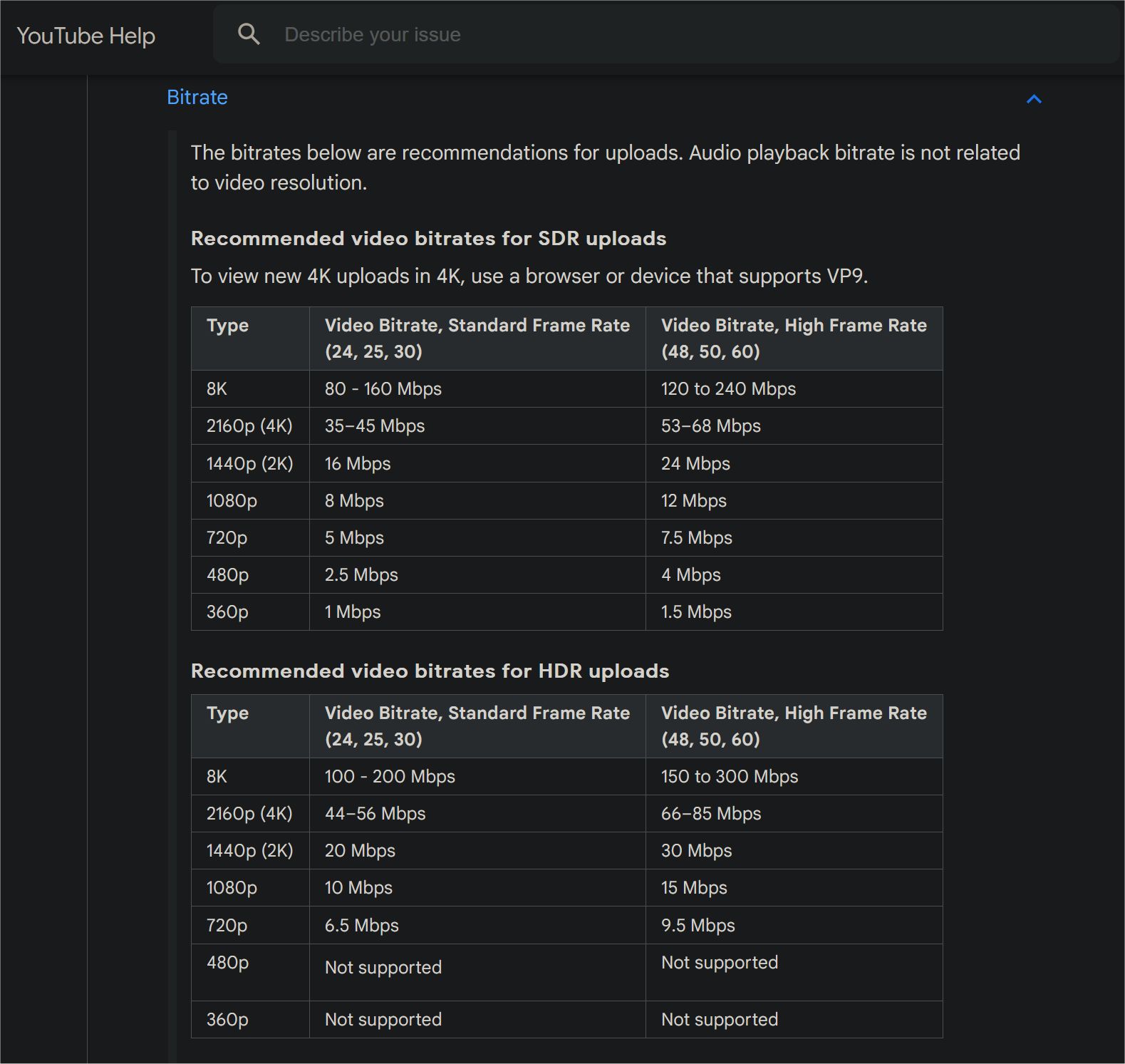
1 gigabyte for a 10-minute video is not out of the ordinary in this day and age.  Below are YouTube's recommended bit rates for various resolutions and frame rates (see picture below).  At 12Mbps, as recommended for a 1080p/60fps video, a 10-minute video would be 900 megabytes (0.9 gigabyte).  Content plays a factor too: a fast-moving, detail-rich video would have a much bigger file size than a video of the same length and bit rate that shows only a simple, static object.

To reduce video file size, if you shoot videos on your phone, set a lower res and/or frame rate on your phone's camera app and settings.  If you capture videos on your PC like Richard does with his videos, set a lower res and frame rate in your video capture software.

If you've already made the video and want to reduce its size, you need to "re-encode" the video to a lower res and frame rate with a video-encoding software.  This is the toughest route to take because re-encoding is time-consuming and the software may be hard to use and/or expensive for the average users.  Reducing the video specs would also reduce picture quality, naturally.  You wouldn't want to spend 40 minutes (the estimated time to re-encode a 10-minute video) only to end up getting a degraded video.
Kevin Yip  @Reply  
     
2 years ago

Alex Hedley  @Reply  
            
2 years ago
Download https://handbrake.fr/ or https://www.ffmpeg.org/ and play about with those settings.

I'll try and find the config I use to compress.
Alex Hedley  @Reply  
            
2 years ago
Did you download the YouTube app on your phone? Is there still the creator one?
Did you try uploading it from there? It usually handles the compression etc for you.
Richard Rost  @Reply  
          
2 years ago
Here's the easy way... Upload the video to YouTube. Let them finish processing it. They will compress it keeping most of the original quality. Then download the file they create if you want to use it elsewhere.
Kevin Yip  @Reply  
     
2 years ago
If you download your own video, YouTube only lets you download it at up to 720p.  Richard records his videos at 720s so this is not a problem for him.  But if your original video is 1080p or higher, you can only download at 720p at most.  To download at the original resolution, you need some third-party, quasi-legal downloading utility.
Bruce McCormick OP  @Reply  
   
2 years ago
Much appreciated! Will work on hammering it out more this weekend. I never did anything but watch YouTube and when i looked at the file size i was going to upload i figured i must have messed up real bad somewhere! And my explanation of what i am doing in the video sounds more like a troll from under a bridge... But that's all OK, especially if going through this will start teaching me how this is done!

Once again, everyone, i greatly appreciate your support.

Hmmmmm. 8 years... I was still living in Colorado Springs back then...
Bruce McCormick OP  @Reply  
   
2 years ago
Oh, and everything is still on my phone-
Bruce McCormick OP  @Reply  
   
2 years ago
@ Mr. Shamma - Downloaded and shall look into, thank you!

@ Mr. Yip - Wow. Well at least i am now relieved a bit; i really thought (compared to the movie video i have) that i should be trying to get to a file size about one ninth of what i have. That was real confusing...

@ Mr. Hedley - YouTube app? Hmmm, oh sure, the YouTube app (i type as thinking "must go look for and download something called the YouTube app")-

@ Mr. Rost - TY, i'll go to the site again and look for how!

and i  probably should do some work today, bills need to be paid... Ah, the realities of life-

This thread is now CLOSED. If you wish to comment, start a NEW discussion in Internet Forum.
 

Next Unseen

 
New Feature: Comment Live View


The following is a paid advertisement
Computer Learning Zone is not responsible for any content shown or offers made by these ads.
 

Learn
 
Access - index
Excel - index
Word - index
Windows - index
PowerPoint - index
Photoshop - index
Visual Basic - index
ASP - index
Seminars
More...
Customers
 
Login
My Account
My Courses
Lost Password
Memberships
Student Databases
Change Email
Info
 
Latest News
New Releases
User Forums
Topic Glossary
Tips & Tricks
Search The Site
Code Vault
Collapse Menus
Help
 
Customer Support
Web Site Tour
FAQs
TechHelp
Consulting Services
About
 
Background
Testimonials
Jobs
Affiliate Program
Richard Rost
Free Lessons
Mailing List
PCResale.NET
Order
 
Video Tutorials
Handbooks
Memberships
Learning Connection
Idiot's Guide to Excel
Volume Discounts
Payment Info
Shipping
Terms of Sale
Contact
 
Contact Info
Support Policy
Mailing Address
Phone Number
Fax Number
Course Survey
Email Richard
[email protected]
Blog RSS Feed    YouTube Channel

LinkedIn
Copyright 2026 by Computer Learning Zone, Amicron, and Richard Rost. All Rights Reserved. Current Time: 6/9/2026 6:31:38 PM. PLT: 1s