Whisk AI
By Richard Rost

 19 months ago
Whisk AI Image Generator from Google Labs
In this tutorial, I will show you how to use Google's experimental tool Whisk to create and merge unique images. You'll learn how to start with a subject, select a scene and style, and generate combined images that range from watercolor cityscapes to Star Trek adventures.
I'll also demonstrate how to start with simple text to create customized image generations, bringing your fantasy scenes to life in a distinctive artistic style. Explore the exciting possibilities of AI image creation with Whisk, as I walk you through different ways to experiment and craft personalized images.
Links
Keywords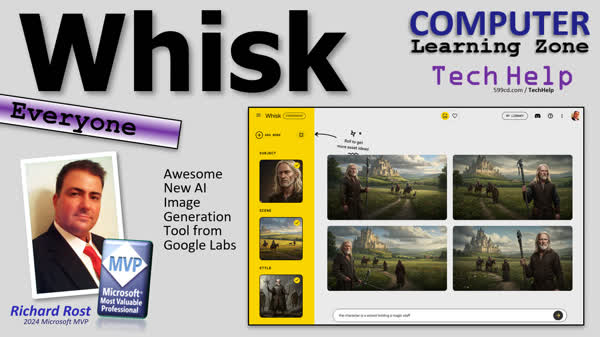
TechHelp Computer, AI image generation, Google Labs Whisk, image merging tool, experimental AI tools, Valentine's Day theme, Start From Scratch feature, drag and drop image, cityscape background, watercolor style images, avatar generator alternative, Star Trek themed images, text to image generation, fantasy RPG style, Larry Elmore art, wizard character creation, AI tools experimentation.
 Subscribe to Whisk AI
Get notifications when this page is updated
More InformationTranscript Got a fun one today, folks. I like to keep abreast of what's going on in the realm of AI. I'm especially interested in how I can integrate AI into my Microsoft Access Databases, but I also really love image generation too. And there are a lot of cool tools out there. I just came across one today, though. It's from Google Labs. It's called Whisk, and it's really neat. It lets you generate images, but more importantly, you can merge multiple images together to create something totally new. Let me give you a couple of demonstrations.
All right, you can find Whisk at https://labs.google/fx/tools/whisk. I'll put a link down below. I expect this will change. It's still listed as experimental, which means it's still in the lab, so they haven't released it as a full-fledged product yet, but it's super cool. Now, it's all set up for Valentine's Day since Valentine's Day is tomorrow. But I'm going to come down here and click on Start From Scratch, and it loads up this page. This is what I like. This is a lot of fun.
What you can do is start with a subject like the person that you want in the picture, a scene where they are, and then a style. All right, so I've got some pictures I put together here. I've got a picture of me. I'm a boat. And here's a cityscape. And I got a watercolor painting here. All right, so I'm just going to simply drag these in here. Not the scene. I want to... Oh yeah, that was right. This is the subject right there. Look and drag and drop it. It analyzes it. All right, for the scene, I'll put that cityscape in there. Okay. And then for the style, I want a watercolor painting. Okay.
Then, generate your combined images. You could type in additional details down here, but the character is eating an ice cream cone, whatever. And then hit this. It takes a second. It does its thing. And there we go. It does pause the recordings. It took about 30 to 45 seconds. But look, the watercolor painting kind of looks like me a little bit. It's not supposed to be exact. It's not like some of the other ones that I actually like avatar generators where it does as best it can to keep your face. This is just for like a rough image. But there's the cityscape in the background. And that looks like a watercolor. And here is the entire prompt that it put together for you. You can edit this if you want to. Pretty neat. Let's do it on another one.
For this one, we're going to change it up a little bit. I got a picture of me again. For the scene, I'm going to put in their classic Star Trek image right there on the bridge of the Enterprise looking at a Klingon Bird of Prey. Okay. And then for the style, I'm just going to leave it blank and see what it does by combining these two images together. You don't have to put a style on it. Okay. Not exactly what I was looking for. So I'll put some additional details down here. The character is sitting at the helm like that. And then we'll see if it changes it. So I'm actually sitting at the helm this time, instead of just looking at the camera. Okay. Better. But how about sitting at the helm looking back at the camera? Let's try that. So you can keep adjusting and tweaking these. Oh, this one's got two people, but that's not bad. And you can keep playing with this and adjusting this.
Another thing you could do is not use pictures at all and just go straight from text. Let's start over again. Subject. Enter text. Human male. Middle-aged. Long, blonde hair, beard. Okay. Generate that. That takes a second. I like it. Okay. We're going to go with open plains, men riding horseback, castle in the distance, and generate. Okay. Looks pretty good. And then style. We're going to go fantasy, RPG like D&D. And my favorite artist is Larry Elmore. Style. Just like that. And then we'll generate that. And that looks pretty good. Let me see. I can't blow this up. Can you? Can't blow this up over here? No. Well, it looks pretty good for what I can see. Let's see. What is this? No, that's the prompt. You can download it here. I'm still experimenting with a lot of this myself.
But let's combine all these three things. Actually, let's put a thing in here. How about a character? Is a wizard holding a magic staff? Let's try that. And go. And that's pretty good. He's got two staves there. Staves. I like this one. No, that's a really good one. Yeah. Beautiful. Excellent. So there you go. That's it. Nice quick one today. I just whenever I come across a tool that really blows my socks off, I like to share it with you guys. If you have any really cool AI tools, let me know about them. I love experimenting with this kind of stuff. And yeah, it's just it's getting more and more fun as time goes on with this AI image generation. But that's going to be your TechHelp video for today. I hope you learned something. Have some fun. Live long and prosper, my friends. I'll see you next time.
TOPICS:
Using Whisk for image generation
Merging multiple images with Whisk
Starting an image creation from scratch
Selecting a subject for image generation
Choosing a scene for image generation
Applying a style to generated images
Adding additional details for customization
Generating images from only text prompts
Experimenting with different scene and style combinations
Creating fantasy-themed images with Whisk
Adjusting image prompts for desired results
Exploring the effects of different artistic styles
COMMERCIAL:
In today's video, we're exploring a fascinating AI tool from Google Labs called Whisk. This experimental tool lets you generate and merge images, creating something entirely new. Whether starting with a subject, scene, or style, Whisk offers endless creative possibilities. We'll demonstrate how to use photos and text prompts to craft unique visuals. Along the way, we'll tweak settings to achieve the desired effects, whether you're sitting at the helm of the Starship Enterprise or journeying through a fantasy RPG. It's a quick walkthrough of how AI can enhance your creative projects. You'll find the complete video on my YouTube channel and on my website at the link shown. Live long and prosper my friends. Intro In this video, we take a look at Whisk, an experimental image generation tool from Google Labs. I'll show you how to combine multiple images to create unique results, start an image from scratch by selecting subjects, scenes, and styles, and even generate pictures using only text prompts. We'll experiment with different options for customizing your artwork, including fantasy and sci-fi themes, and explore how to adjust prompts for better results. If you're interested in AI-powered image creation, this demonstration will give you a hands-on look at what Whisk can do. Quiz Q1. What is the main focus of the Whisk tool discussed in the video?
A. Generating 3D models
B. Creating spreadsheets
C. Merging and generating images
D. Analyzing big data
Q2. Where can Whisk be found according to the video?
A. labs.google.com/tools/wISC
B. labs.microsoft.com/wISC-tools
C. labs.google/fx/tools/whisk
D. google.com/labs/tools/WISC
Q3. What is the current status of Whisk as mentioned in the video?
A. Full-fledged product
B. In beta testing
C. Under maintenance
D. Listed as experimental
Q4. What kind of scenes can be used with Whisk when creating images?
A. Only abstract scenes
B. A scene where the subject is located
C. Only historical scenes
D. Only still life scenes
Q5. According to the video, what can users do if they are not satisfied with the initial image generated by Whisk?
A. Use the undo button to start over
B. Add additional details to adjust the image
C. Save the image and edit it in another program
D. Request assistance from customer support
Q6. How does the presenter suggest users can create images in Whisk without using any existing pictures?
A. Scan physical images
B. Enter descriptive text prompts
C. Use stock photos from the internet
D. Use a pre-existing template
Q7. What is a feature of Whisk that is emphasized in the video with the use of text prompts?
A. Ability to animate short films
B. Ability to generate detailed technical diagrams
C. Ability to create a rough image from text descriptions
D. Ability to produce high-resolution photographs
Q8. What style does the presenter use when generating an image with text prompts in the video?
A. Science fiction, influenced by Isaac Asimov
B. Abstract expressionism, influenced by Pablo Picasso
C. Fantasy, RPG like D&D, influenced by Larry Elmore
D. Surrealism, influenced by Salvador Dali
Q9. What does the presenter indicate about the ability to view details within the generated image?
A. Users can zoom in to see finer details
B. Users cannot blow the image up within the interface
C. Users can adjust resolution settings for clarity
D. Users can preview enhancements in real-time
Q10. What is the main benefit the presenter highlights about experimenting with AI tools like Whisk?
A. They provide financial opportunities
B. They enhance productivity in manufacturing
C. They make image generation more enjoyable and creative
D. They guarantee accuracy in professional designs
Answers: 1-C; 2-C; 3-D; 4-B; 5-B; 6-B; 7-C; 8-C; 9-B; 10-C
DISCLAIMER: Quiz questions are AI generated. If you find any that are wrong, don't make sense, or aren't related to the video topic at hand, then please post a comment and let me know. Thanks. Summary Today's TechHelp tutorial from the AI Learning Zone takes a look at an intriguing tool from Google Labs called Whisk. This AI-powered software enables users to generate images and combine multiple images to create something entirely new. While I'm always interested in incorporating AI into Microsoft Access databases, I'm particularly fascinated by image generation tools. Let me walk you through a couple of demonstrations to show you just how WISC works.
You can access Whisk at Google Labs' website, although it is still in an experimental phase and hasn't been fully launched as a standalone product. Since Valentine's Day is just around the corner, the interface is themed accordingly. I'll start from scratch on this page to show you how fun this can be.
Whisk allows you to begin with defining a subject, a scene, and a style. For example, I combined a picture of myself, a boat, a cityscape, and a watercolor painting. By dragging and dropping the image elements into the tool, it analyses them to produce a composite image. Though some additional details such as "the character is eating an ice cream cone" can be added, even without it, Whisk does a pretty good job. The final output is a watercolor painting featuring the cityscape in the background.
For another demonstration, I experimented with a classic Star Trek scene depicting the Enterprise's bridge with a Klingon Bird of Prey. Initially, I left the style blank, but the outcome wasn't what I expected. By adding specific details such as a character sitting at the helm, the resulting image became more accurate. Through further tweaking, like adding a view of the character looking back at the camera, the tool illustrates significant adaptability.
You can also opt to forgo images and start with text descriptions. I tried generating an image using the prompt: "Human male, middle-aged, long blonde hair, beard," paired with a setting of "open plains, men riding horseback, castle in the distance" and a "fantasy, RPG like D&D" style inspired by artist Larry Elmore. As the image came together, I was pleased with the results, even as some fine-tuning was necessary. Adding a text description of a "wizard holding a magic staff" further refined the image, resulting in an impressive creation.
Overall, I find that Whisk is a delightful tool for image generation, offering considerable customization and creativity options. If you come across other exciting AI tools, I'd love to hear about them. Exploring methods like this continues to become more enjoyable as AI technology evolves. I hope you found this TechHelp tutorial informative and entertaining. You can find a complete video tutorial with step-by-step instructions on everything discussed here on my website at the link below. Live long and prosper, my friends. Topic List Using Whisk for image generation
Merging multiple images with Whisk
Starting an image creation from scratch
Selecting a subject for image generation
Choosing a scene for image generation
Applying a style to generated images
Adding additional details for customization
Generating images from only text prompts
Experimenting with different scene and style combinations
Creating fantasy-themed images with Whisk
Adjusting image prompts for desired results
Exploring the effects of different artistic styles Primary Topics Whisk AI tool, experimental image generation, merging images, subject selection, scene selection, image style application, text prompt generation, prompt customization, artistic style effects Secondary Topics fantasy-themed images, RPG art, workflow experimentation |





