Computer Learning Zone CLZ Access Excel Word Windows

Education is a system of imposed ignorance. Teachers should be guides and facilitators, not taskmasters who impose fixed knowledge.

-Noam Chomsky
 
Home   Courses   TechHelp   Forums   Help   Contact   Merch   Join   Order   Logon  
 
Back to Excel Forum    Comments List
Upload Images   @Reply   Bookmark    Link   Email   Next Unseen 
Need Help with a Vb Code
Teresa Meek 
     
13 months ago
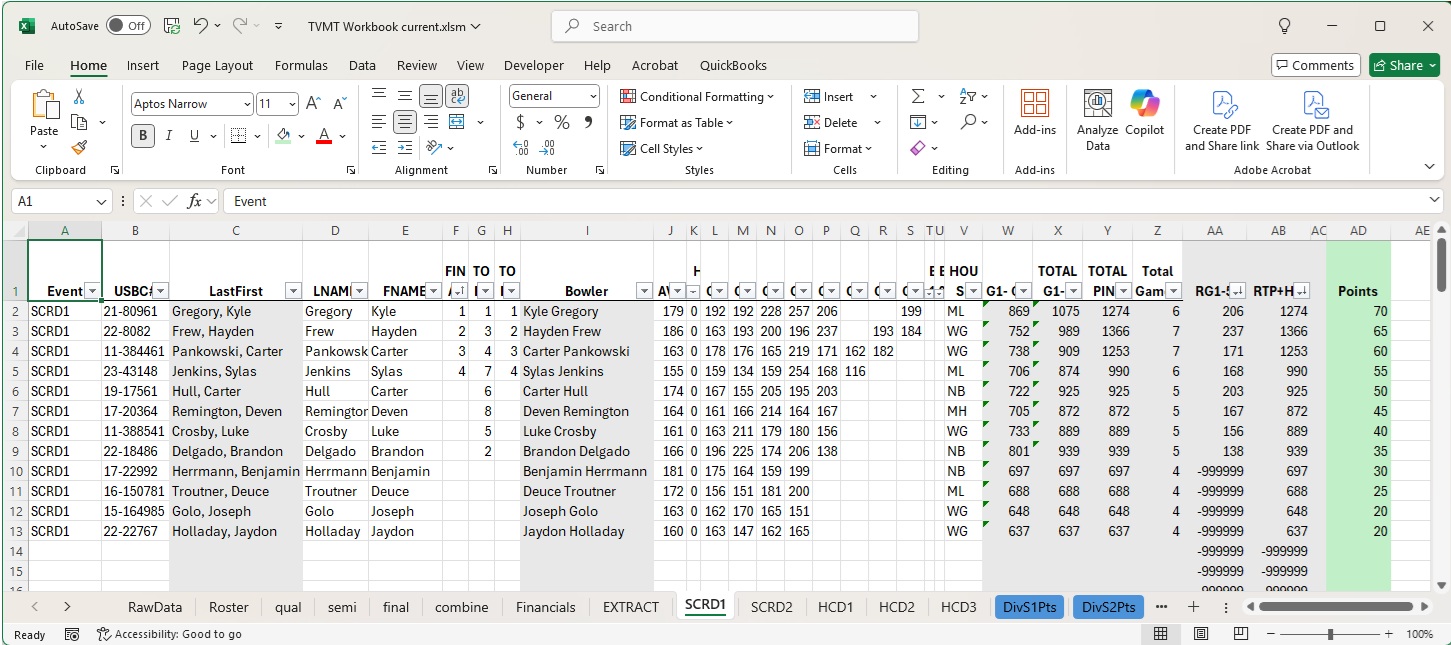
I have a workbook that I am using to automate tournament result. My next step is getting to a point leaderboard sheet. Here is the senario...
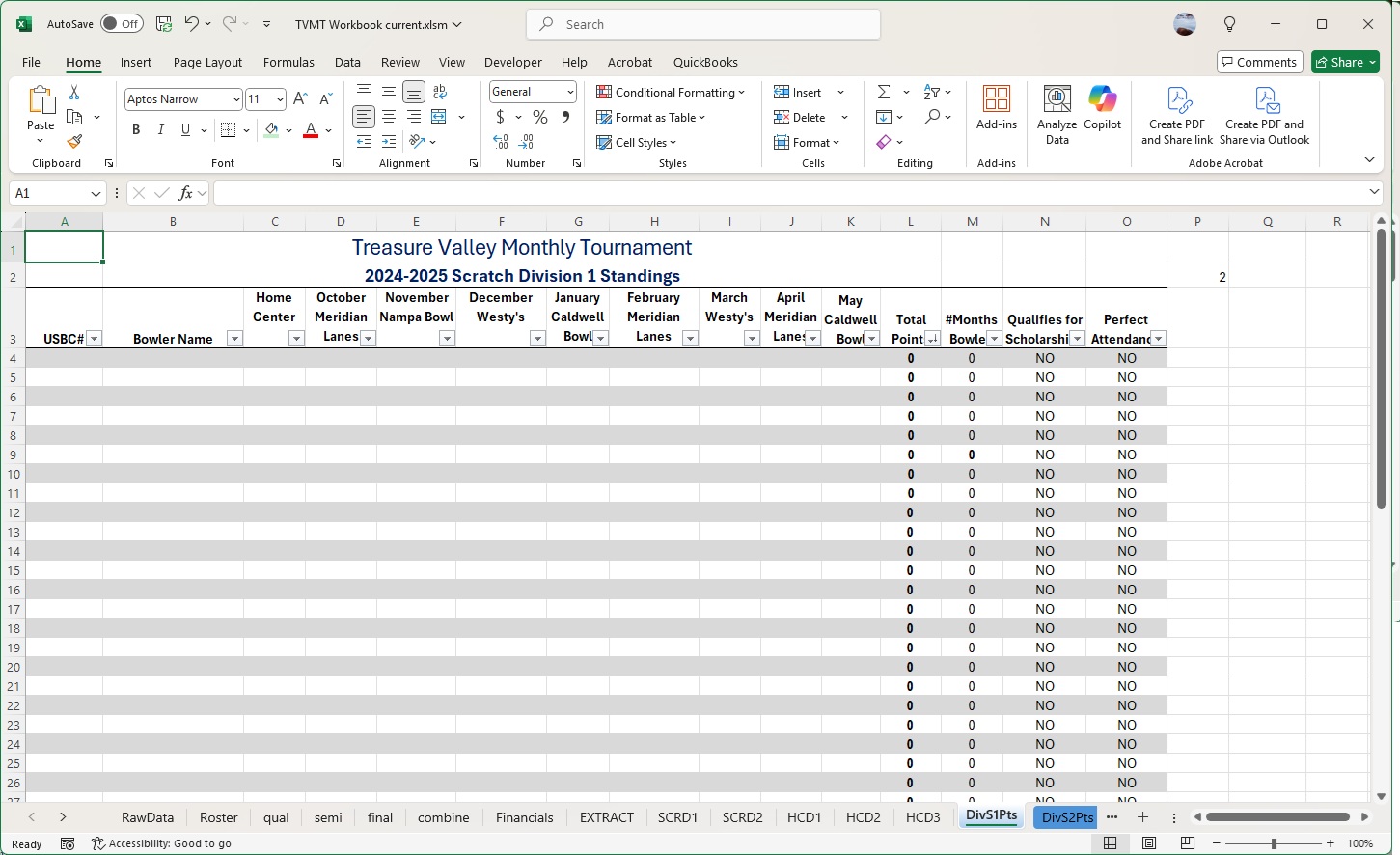
I need a formula to take SCRD1 ,column AD and fill it into DivS1Pts, column d by first comparing the SCRD1  column B, and if it already exists, then place the value from column AD into column d in DivS1Pts. If it does not exist, add data from SCRD1  column B into DivS1Pts column a, add the data from SCRD1  column I into DivS1Pts column B, add the data from SCRD1  column V into DivS1Pts column c, add the data from SCRD1  column AD into DivS1Pts column d.
Teresa Meek OP  @Reply  
     
13 months ago

Teresa Meek OP  @Reply  
     
13 months ago

Teresa Meek OP  @Reply  
     
13 months ago
This task needs to be done each month for each of the 5 Divisions (SCRD1, SCRD2, HCD1, HCD2, HCD3) into (DivS1Pts, DivS2Pts, DivH1Pts, DivH2Pts, DivH3Pts). The VB code I got back from chatgpt runs and I get the "sync complete" but there is no data in the DivS1Pts tab. The code is as follows...

DetailsSub SyncDataFromSCRD1ToDivS1Pts()
    Dim ws1 As Worksheet, ws2 As Worksheet
    Dim lastRow1 As Long, lastRow2 As Long
    Dim i As Long, foundRow As Variant
    Dim lookupVal As String
    Set ws1 = ThisWorkbook.Sheets("SCRD1 ")
    Set ws2 = ThisWorkbook.Sheets("DivS1Pts")
    lastRow1 = ws1.Cells(ws1.Rows.Count, "B").End(xlUp).Row
    For i = 2 To lastRow1 ' Assuming row 1 is headers
        lookupVal = ws1.Cells(i, "B").Value
         ' Look for the value in DivS1Pts column A
        foundRow = Application.Match(lookupVal, ws2.Columns("A"), 0)
        If Not IsError(foundRow) Then
            ' If found, update DivS1Pts column D with value from SCRD1  column AD
            ws2.Cells(foundRow, "D").Value = ws1.Cells(i, "AD").Value
        Else
            ' If not found, add a new row at the bottom
            lastRow2 = ws2.Cells(ws2.Rows.Count, "A").End(xlUp).Row + 1
            ws2.Cells(lastRow2, "A").Value = ws1.Cells(i, "B").Value
            ws2.Cells(lastRow2, "B").Value = ws1.Cells(i, "I").Value
            ws2.Cells(lastRow2, "C").Value = ws1.Cells(i, "V").Value
            ws2.Cells(lastRow2, "D").Value = ws1.Cells(i, "AD").Value
        End If
    Next i
    MsgBox "Sync complete!"
End Sub

Rodger Dill Jr  @Reply  
     
13 months ago
Just quickly looking at this the syntax for Cells is a row number and/or a column number not an "A" or a "B" change those to the corresponding numbers so A=1 and B=2, and so on. . .
You have
     lookupVal = ws1.Cells(i, "B").Value
Change to
    lookupVal = ws1.Cells(1, 2).Value

This thread is now CLOSED. If you wish to comment, start a NEW discussion in Excel Forum.
 

Next Unseen

 
New Feature: Comment Live View


The following is a paid advertisement
Computer Learning Zone is not responsible for any content shown or offers made by these ads.
 

Learn
 
Access - index
Excel - index
Word - index
Windows - index
PowerPoint - index
Photoshop - index
Visual Basic - index
ASP - index
Seminars
More...
Customers
 
Login
My Account
My Courses
Lost Password
Memberships
Student Databases
Change Email
Info
 
Latest News
New Releases
User Forums
Topic Glossary
Tips & Tricks
Search The Site
Code Vault
Collapse Menus
Help
 
Customer Support
Web Site Tour
FAQs
TechHelp
Consulting Services
About
 
Background
Testimonials
Jobs
Affiliate Program
Richard Rost
Free Lessons
Mailing List
PCResale.NET
Order
 
Video Tutorials
Handbooks
Memberships
Learning Connection
Idiot's Guide to Excel
Volume Discounts
Payment Info
Shipping
Terms of Sale
Contact
 
Contact Info
Support Policy
Mailing Address
Phone Number
Fax Number
Course Survey
Email Richard
[email protected]
Blog RSS Feed    YouTube Channel

LinkedIn
Copyright 2026 by Computer Learning Zone, Amicron, and Richard Rost. All Rights Reserved. Current Time: 5/9/2026 8:45:46 AM. PLT: 1s