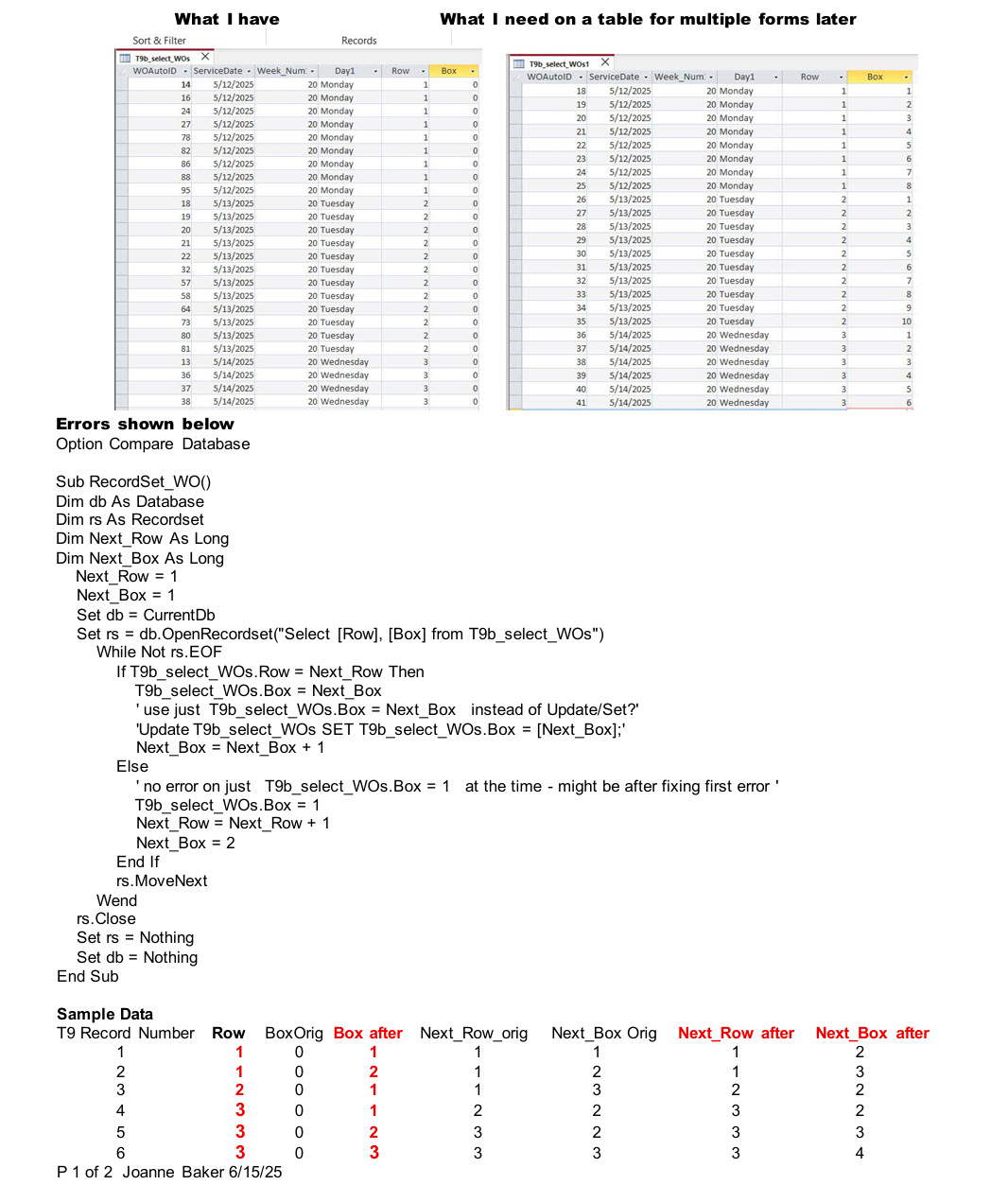
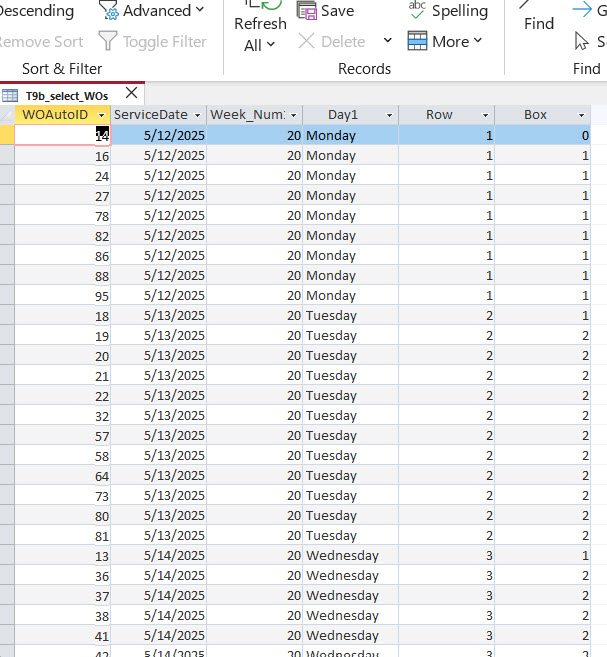
Hello, I am trying to updated a field on records in a table and I believe I need a do while loop, but am not having success. The table has dates of a week - 10-12 rows for each date Sun - Sat. While still on one date, I would like to update a field on each record with 1 - 10 or 12 or until the next date changes. Thank you for any help you can provide. Joanne
Loop should work fine, personally I'd use a recordset probably though. Recordsets
Joanne BakerOP
@Reply 15 months ago
Thank you for responding Adam. I will study recordsets before trying Do While again. I do some minor development but may have taken on more than I am capable of with this project for my son. So for now I pick and choose topics when I hit a snag. I'm almost 80 and don't want to become an expert developer, although I love Richard's classes. Thank you again for your assistance, Adam. I wish you success and enjoyment in all you do. Joanne
Sami Shamma
@Reply 15 months ago
Recordset is definitely the way to go.
Joanne BakerOP
@Reply 15 months ago
Joanne BakerOP
@Reply 15 months ago
Thank you Adam and Sami. I attached a photo of what I am trying to do and will send a second message with the errors I receive.
Thanks for any help.
Joanne
Joanne BakerOP
@Reply 15 months ago
Joanne BakerOP
@Reply 15 months ago
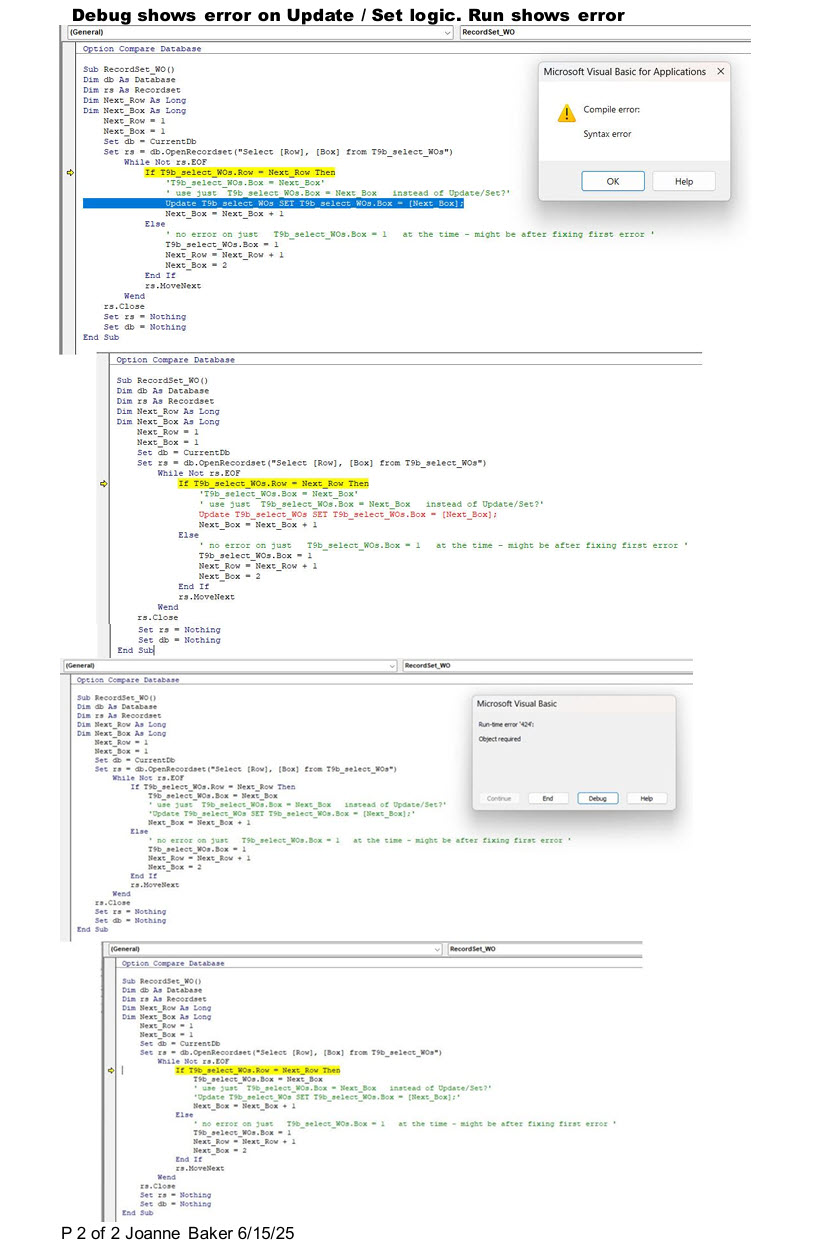
These are the error messages - one when I tried using Update / Set and one without that.
As I said I am an amateur with both Access and sql. Thanks very much for any info as to what I am doing wrong.
Joanne
Sami Shamma
@Reply 15 months ago
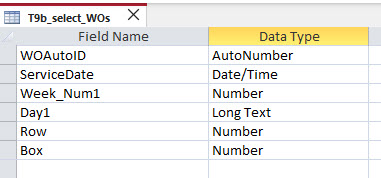
Is ".row" and ".box" part of your field names?
Please share that table in design view.
If you put a dot in a field name, it's going to cause you an enormous amount of pain.
Joanne BakerOP
@Reply 15 months ago
Joanne BakerOP
@Reply 15 months ago
Thanks Sami - yes, Row and Box are fields on the T9b_select_WOs table. Row is already populated. I am trying to populate Box from 1 to xx until Row changes. Thanks for looking at this.
Joanne
Joanne BakerOP
@Reply 15 months ago
I should mention there is no dot in the field name .. just Table.field thanks
Sami Shamma
@Reply 15 months ago
You have already opened a record set for this table. The line that is giving you error should read:
If rs!Row = Next_Row Then
Joanne BakerOP
@Reply 15 months ago
Joanne BakerOP
@Reply 15 months ago
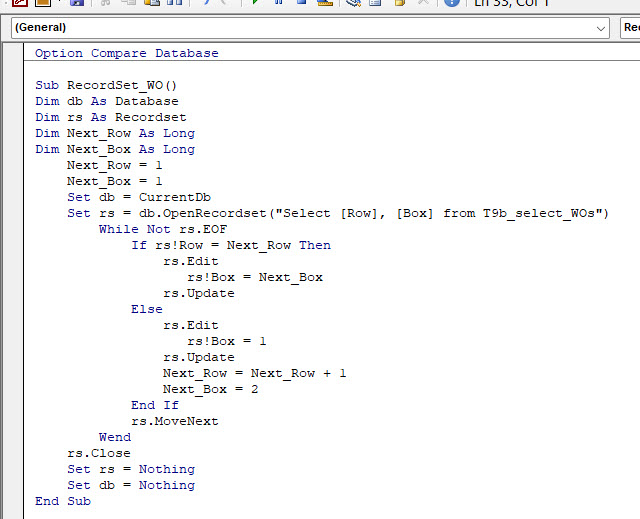
Thank you Sami for getting me past that error! I looked up some logic for recordset edit/update and was able to run this code.
My logic is not quite right (results in next photo), but I can work on that.
Thank you so much!! Adam also!
Joanne
Joanne BakerOP
@Reply 15 months ago
Joanne BakerOP
@Reply 15 months ago
I'll work on the lotic to get the Box numbers sequential now.
Again, I am very grateful for your help!
Joanne
Sami Shamma
@Reply 15 months ago
Joanne Can you write in English what you expect the code to do?
Joanne BakerOP
@Reply 15 months ago
You are kind to look further. I should be able to adjust the code to account for the first record, then count up with the boxes. But since you asked - hopefully this is clear. Many thanks again, Sami!
The table is sorted by row - there will be from 1 to 10 records with Row = 1, then 1-to ten records with Row = 2, etc.
like so the first 15 records could have row numbers like this: 1,1,1,1,2,2,2,3,4,4,4,4,4,4,4,4 etc.
At the start, the first record will have Row = 1. I want the boxes for all records with Row 1 to count up - 1,2,3,4, etc.
Then when row 2 starts, I want the box numbers to start from 1 again for all the records with row 2.
First 15 records:
Row Box
1 1
1 2
1 3
1 4
2 1
2 2
2 3
3 1
4 1
4 2, etc Thanks again Sami! Have a nice rest of the week. Joanne
Sorry, only students may add comments.
Click here for more
information on how you can set up an account.
If you are a Visitor, go ahead and post your reply as a
new comment, and we'll move it here for you
once it's approved. Be sure to use the same name and email address.
This thread is now CLOSED. If you wish to comment, start a NEW discussion in
Visitor Forum.