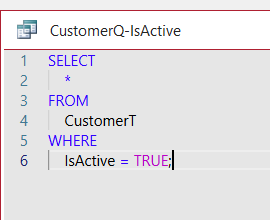
I enjoyed learning about all of this but I am curious about one thing. I run Access 365 and there are a few differences in this compared to the one for 2010. One is the way SQL places all commands on separate lines as Richard mentioned. But when I try to type it all on one line, it is so much more work because of all the moving things around to do that. Also my view shows numbers to the far left, I assume are just for number lines. Is there anyway to removed them and have the SQL commands type in one line without having to go through all the back space, shift, etc.?
Ken WykoffOP
@Reply 11 months ago
Donald Blackwell
@Reply 11 months ago
Hi Ken,
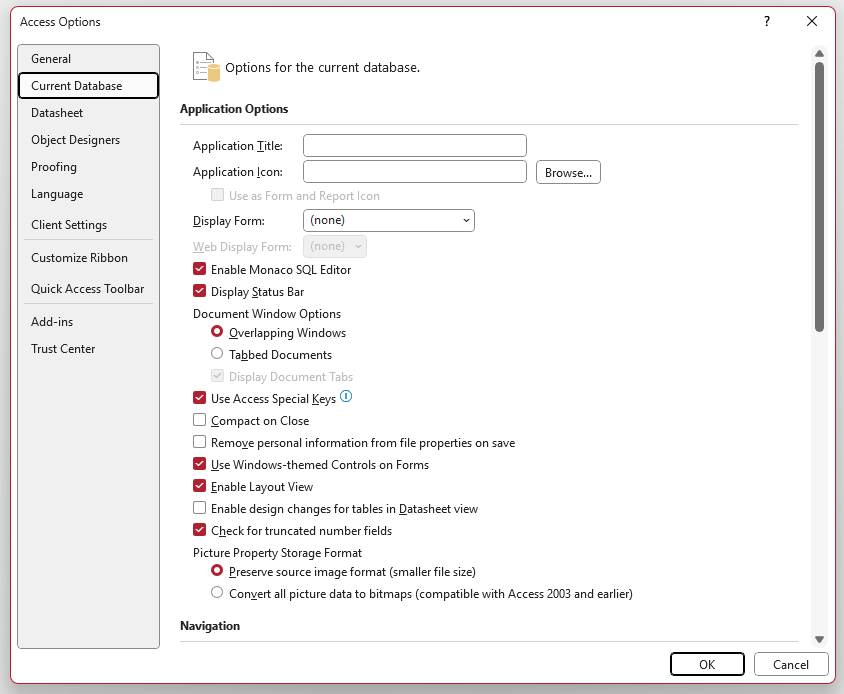
The reason yours looks different is because it has the new Monaco SQL editor enabled. You can disable this by going to:
File->Options->Current Database and uncheck the box next to the "Enable Monaco SQL Editor"
Donald Blackwell
@Reply 11 months ago
Ken WykoffOP
@Reply 11 months ago
Thank you Donald. I appreciate your help.
Sorry, only students may add comments.
Click here for more
information on how you can set up an account.
If you are a Visitor, go ahead and post your reply as a
new comment, and we'll move it here for you
once it's approved. Be sure to use the same name and email address.
This thread is now CLOSED. If you wish to comment, start a NEW discussion in
Access SQL Seminar Part 1.