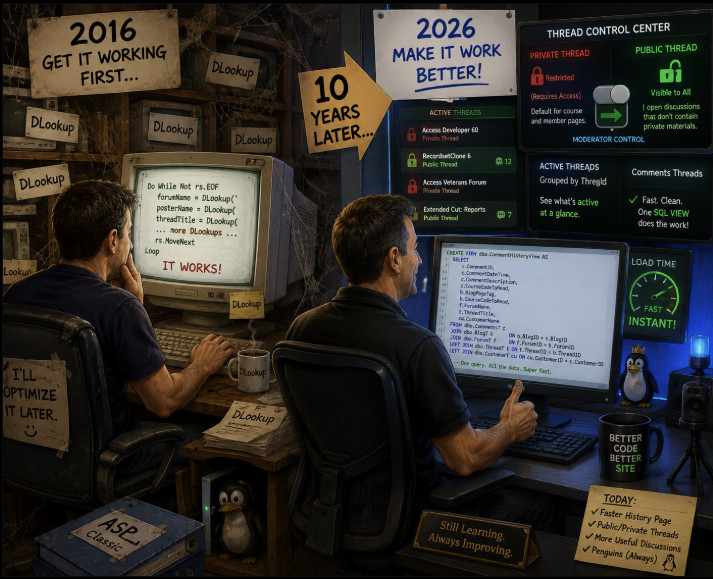
I made a small change to the website today that gives me a little more flexibility over which comment discussions are public and which remain private. Normally, if you're on a public page, such as one of my regular forums, TechHelp pages, Video Quizzes, and so on, the comments are public just like they've always been. You won't see anything different on those pages.
However, pages that require a particular course or membership to read are a little different. For example, if you're taking one of my Developer classes or watching an Extended Cut, the comments underneath that page are normally private as well. This is intentional. I want students to feel comfortable asking detailed questions about a lesson, posting pieces of source code, discussing examples from the class, and so on without worrying that they're making paid course material publicly available.
The same applies to certain private areas of the site, such as some member forums. On those pages, you'll now see a banner above the discussion that says Private Thread. That means the discussion is restricted based on the normal permissions for that page. You can feel comfortable posting source code or discussing material from relevant to a specific private video/course/page.
I've now added the ability for moderators to override that setting for an individual discussion and mark it as a Public Thread. Why would I do that? Because sometimes a perfectly good discussion happens underneath a private lesson, but there's nothing private about the discussion itself.
For example, someone might post a general question about Recordsets underneath one of my Developer lessons. If the resulting discussion doesn't contain lesson source code, paid material, personal information, or anything else that needs to remain private, there's no reason other Access users shouldn't be able to read and benefit from it.
In those cases, the moderators and I can now review the discussion and make that particular thread public without making the lesson itself public. Someone who hasn't purchased the course still can't access the course page or its private material, but they can read the discussion that we've specifically opened to everyone.
When this happens, you'll see a green Public Thread banner. The little blue question mark next to it brings you here. Here's a sample thread. This is inside our Moderator's forum which most of you can't see (snicker) but you can see this specific thread because magic.
This should allow me to gradually open up more useful discussions to everyone while still keeping course-specific conversations private when they need to be. It also means more useful questions and answers can be found through the Comments pages, search engines, and eventually Google, instead of good information being hidden simply because the conversation happened to take place underneath a members-only lesson.
Private will remain the default for discussions attached to restricted material. I'm not automatically throwing everything open to the public. I'll review threads and make them public when I'm comfortable that there's nothing in the conversation that should remain private.
It's a small change behind the scenes, but I think it'll make the forums and comment system a lot more useful over time.
I also gave the Comment History page a much-needed tune-up today, and I have to admit I was a little disappointed with 10-year-ago me when I looked at the old code. LOL.
When I originally built that page, it basically looped through the comments and then performed two or three DLookups inside the loop to retrieve things like the forum information, thread information, and other related data. If you've taken my classes recently, you already know what I'm going to say: don't put DLookups inside a loop if you can possibly avoid it. That's a great way to turn one database query into dozens or even hundreds of little queries.
Of course, there's another thing I teach all the time: get it working first, then make it work better later. Well, 10-year-ago me definitely followed the first half of that advice. He got it working. Apparently he forgot about the "make it work better later" part. :)
So today I finally paid off that technical debt. I replaced all of those individual lookups with a proper SQL Server view that joins everything together on the server. Instead of repeatedly going back to the database for information while processing each comment, the server now gives the page everything it needs in one query.
The difference is dramatic. The old Comment History page could take 10-20 seconds to load. The new version is essentially instantaneous. That's the power of letting SQL Server do the work behind the scenes.
Because it's now nice and fast, I've also made the Comment History page public. You can use it to browse individual comments chronologically, and there are links at the bottom that let you continue backward through older comments.
You'll also see little lock symbols next to some discussions that are normally private. Those indicate that the page or course associated with that discussion normally requires access. However, because of the new public-thread override I described above, you may occasionally see a lock and still be able to read the discussion. I still need to update the lock display so it understands the new override. That's on my list, but I'm not getting to it today. :)
There are now two useful ways to browse comment activity on the site, and they serve slightly different purposes.
The regular Comment History page shows individual comments. If one discussion has ten replies, you'll see those individual replies as separate entries in the history. It's useful when you want to see exactly what's been posted recently and work your way backward through the activity.
The newer Comments Threads page is grouped by discussion. Instead of showing every individual reply as another item, it shows you the latest active threads. So if ten people have replied to the same discussion, that's still one thread in the list. It's a better way to see which conversations are currently active without one busy discussion taking over the whole page.
I thought about combining them, but I actually like having both. Sometimes I want to see the individual stream of comments, and sometimes I just want to see which discussions have recent activity. They're two different views of the same general information, and each is useful in its own way.
So that's today's little bit of website housekeeping: faster queries, fewer DLookups, a public Comment History page, better access to active discussions, and the new ability to selectively open useful conversations that happen to live underneath otherwise private material.
Not bad for something that started with me looking at some decade-old ASP and asking, "Who the hell wrote this garbage?"
If you are a Visitor, go ahead and post your reply as a
new comment, and we'll move it here for you
once it's approved. Be sure to use the same name and email address.
This thread is now CLOSED. If you wish to comment, start a NEW discussion in
Captain's Log.