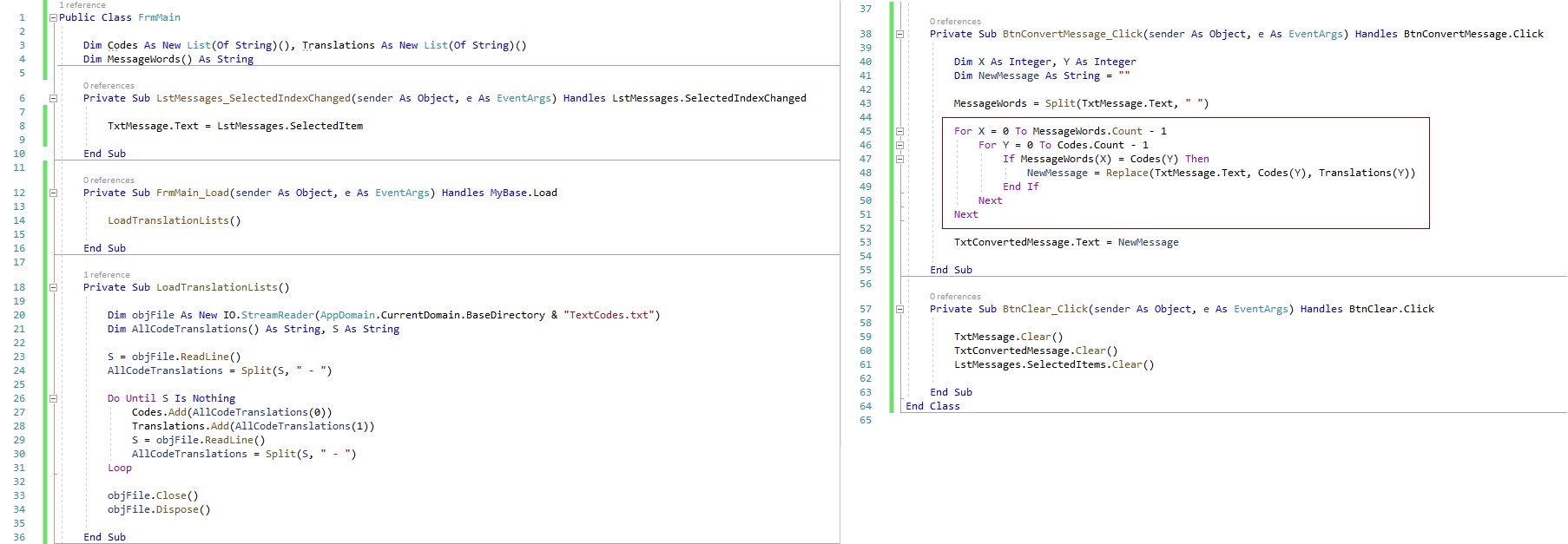
I am working in a text conversion program to convert abbreviations to their translation. It works if their is only one abbreviation, but if there is more than one it only converts the last one. Anyone got any ides? Thanks in advance.
If ANY replacement is made, I would start the whole loop over again from the top. If you just move down the characters in the string, and the string changes, the results could be unpredictable.
Kevin RobertsonOP
@Reply 5 years ago
I finally got it working. I decoded to rebuild the string word by word.
Private Sub BtnConvertMessage_Click(sender As Object, e As EventArgs) Handles BtnConvertMessage.Click
Dim X As Integer, Y As Integer
Dim NewMessage As String = "", CurrentWord As String
Dim MatchString As String
MessageWords = Split(TxtMessage.Text, " ")
For X = 0 To MessageWords.Count - 1
CurrentWord = MessageWords(X)
NewMessage &= CurrentWord & " "
For Y = 0 To Codes.Count - 1
MatchString = Translations(Y)
If CurrentWord = Codes(Y) Then
NewMessage = Replace(NewMessage, Codes(Y), Translations(Y))
End If
Next
Next
If you are a Visitor, go ahead and post your reply as a
new comment, and we'll move it here for you
once it's approved. Be sure to use the same name and email address.
This thread is now CLOSED. If you wish to comment, start a NEW discussion in
Visual Basic Forum.