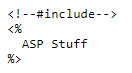
I can not get the following include line to work. but when I copy the code from the openconnection-process.asp and insert it it works fine. <% <!--#include file = "openconnection-process.asp"-->
response.write Conn
SQL = "Select * from envoyT ORDER BY id" rs.Open SQL, Conn
Same with the bottom one too. Outside of all ASP tags.
Dg EwingOP
@Reply 5 years ago
Great, error #1 fixed
now I have:
<!--#include file = "openconnection-process.asp"-->
<%
but now I am getting:
Active Server Pages error 'ASP 0116'
Missing close of script delimiter
/openconnection-process.asp, line 4
The Script block lacks the close of script tag (%>).
This is the openconnection-process.asp and line 4 is the first code line that has <%: [note i blanked out stuff that works if I don't use include ]:
Line 4 <%
Server.ScriptTimeout = 30
' ?????????????/This is RR code see Winhost Lesson 9 and ASP 302 part 3 1:15
Dim CONNECTSTRING, Conn, rs, SQL
CONNECTSTRING ="Provider=sqloledb; Data Source=s24.winhost.com; Initial Catalog=i blanked out ; Uid=i blanked out; password = i blanked out;"
Set Conn= Server.CreateObject("ADODB.
%>
Dg EwingOP
@Reply 5 years ago
the code was not pasted correctly due to my post being too long but this is the last few lines.
Set Conn= Server.CreateObject("ADODB.Connection")
Conn.open CONNECTSTRING
Set rs = Server.CreateObject("ADODB.Recordset")
%>
Should
<!--#include file = ../process/"closeconnection-process.asp"--> be
<!--#include file="../process/closeconnection-process.asp"-->
Dg EwingOP
@Reply 5 years ago
Dg EwingOP
@Reply 5 years ago
Thanks Alex, I have never understood the ../ path notation. so maybe I will learn about that also. I recall one of RR's vid where he uses "virtual" vs "file" if the files are not in the same folder. So I have moved everything to the root to eliminate that nuance .
However I do not think that the path was the problem and now that I added ../ the file wasn't found. before I added ../ the file was found and errored on line 4 (the first line of code, I have 3 blank lines). I then deleted the 3 blanks lines and the error msg said line 1. So i know that it is trying to read the file. I will revert to ...file = "openconnection-process.asp" and upload an image of the 2 files and image of the error msg.
Dg EwingOP
@Reply 5 years ago
Dg EwingOP
@Reply 5 years ago
the top file is the executed file and the middle is "include" file and the bottom is the error
Dg EwingOP
@Reply 5 years ago
holy moley.....I just added as the first line of code what the error said was missing: %>....so the very first code is a "close" and then the 2nd is an open <% and it works!!! ???? what is that about
Dg EwingOP
@Reply 5 years ago
Dg EwingOP
@Reply 5 years ago
All this time that I have wasted, mine and yours....I KNOW what the problem was.
look at line 19 of the "openconnection-process.asp" and yell at me for using >% as the close and not %>....it was telling me that I needed a close at the first line of code and I took that literally "at" line 4 , but should have recognized it needed a close for the open "of" line 4 at line 19 which I thought I had ...
geez....I have spent more time on chasing "silly" typos/syntax than writing all of the code.
Any way thanks for your help and support...and keep up the good stuff.
If you are a Visitor, go ahead and post your reply as a
new comment, and we'll move it here for you
once it's approved. Be sure to use the same name and email address.
This thread is now CLOSED. If you wish to comment, start a NEW discussion in
ASP Forum.