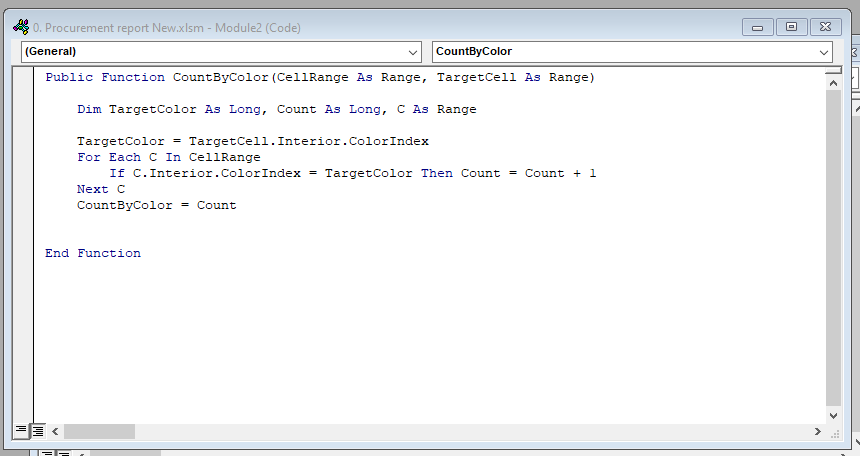
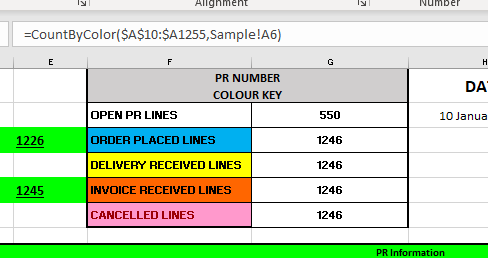
Hi All Happy New Year to everyone! I have an Excel Sheet where I use conditional formatting to change the colour of a row of cells depending on the values of other cells in the Worksheet. Now I want to count those cells based on their colour. I Googled and got a VB code which I added to the sheet but that is giving me an error of "No Colour" when I insert the function. Has anyone else encountered this before? I have tried to troubleshoot this myself but am not smart enough to figure it out :( I am happy to share the sheet with whoever is prepared to help so they can pick up what I have done wrong. Thanks in advance
Adam Schwanz
@Reply 4 years ago
Why count the color? Why not just count the fields with the criteria that is the same criteria that sets a color?
If Red is a number >5 then just count the numbers >5 instead of counting how many reds.
Adam Schwanz
@Reply 4 years ago
Could you share an image? Maybe I'm misunderstanding what you're doing. Snip & Sketch
Lisa KerOP
@Reply
4 years ago
Hi Adam.
Thanks for the quick reply.
So what I have is a list of PRs (purchase requisitions).
The PR number's colour changes depending on whether there is an Order raised (it goes blue), whether the goods are received (it goes yellow) or if we have received the supplier invoice (it goes orange).
I want to know the following:
Total count of Open PRs
Count of PRs with Orders Placed
Count of PRs with goods received
Count of PRs with invoices received
In other words I have a total of 100 PRs. 50 have had orders placed, 20 are open, 10 are goods received and 20 have had their invoices received.
So I can't just count the field that uses the conditional format because some of them will have met all the criteria so will be counted 3 x under Order Placed, GRN and Invoice received.
Not sure if I am making sense?
Lisa KerOP
@Reply
4 years ago
Scott Axton
@Reply 4 years ago
Based on the picture it appears to me that your color is using the status field (Column) to determine the color.
Correct?
Even though your PR may have gone through many steps, a PR can only have one current status. True?
You need to have 4 counters based on your description above.
Opn, Ord, Gds, and Inv.
If Status = "Open" then
Opn = Opn + 1
End If
If Status = "Order" then
Ord = Ord + 1
End If
If Status = "Goods" then
Gds = Gds + 1
End If
If Status = "Invoice" then
Inv = Inv + 1
End If
So using the screenshot Ord = 3 and Inv = 2
Is that what you want?
Hi Lisa. One of my other students just asked me about this a few days ago. I've got some VBA code to count cells by their color. I'll put it together in a Fast Tip video. Haven't done one for Excel in a while. Stay tuned...
Yeah, code looks good. Let's see the sheet with the formula in the formula bar.
Lisa KerOP
@Reply
4 years ago
Lisa KerOP
@Reply
4 years ago
@Richard Rost
The cell location where the Sample Colours are is on another sheet in the workbook called "Sample"
Also, the top area of the range will always be A10 but the bottom will keep increasing which is why no $ at the second cell range number.
Yeah, neither of those two things should matter. Try putting them together on one sheet and see what happens. MsgBox the color values and make sure they match. I'd really have to see your workbook file in order to tell you for sure.
Lisa KerOP
@Reply
4 years ago
Hi @Richard Rost
Would it be possible for me to email you the sheet?
I am getting nowhere fast.
Kevin Robertson
@Reply 4 years ago
Lisa,
Send your sheet to me if you want and I can take a look. I can't guarantee anything as I'm no expert, but I will try to get it working for you. [email protected]
Lisa KerOP
@Reply
4 years ago
Thanks so much @Kevin Robertson.
Email sent.
Kevin Robertson
@Reply 4 years ago
Lisa,
Like I said I am no expert, but I did some testing and was able to get the correct values with static Fill Colors but couldn't get it to work with Conditional Formatting. Maybe Richard to give some insights into this issue.
Yeah... I spent about half an hour going over this. Honestly, I'm not sure why it's not working. I'm not getting an error message, but I'm getting the wrong count.
If I MsgBox the TargetCell, I get nothing... which tells me it's not properly sending the range value for the target cell. If I put that code into ANY other workbook I have, it works just fine, so this tells me there's got to be some other code in your workbook that's conflicting with mine. Try it in a blank new workbook without any other code and I bet it works.
I would suggest moving your data over to a new blank workbook. Set up the CountByColor code. See if it works (and I bet it does). Then pull over any other code you need for functionality, one sub at a time, and that will tell you what's conflicting. I see a lot of other stuff in your VBA... ribbon code and such... and any of that could be the problem.
Lisa KerOP
@Reply
4 years ago
Thank you so much Richard for your efforts. I will give it a shot.
Apologies for the late reply - it has been a nightmare of a month!
Sorry, only students may add comments.
Click here for more
information on how you can set up an account.
If you are a Visitor, go ahead and post your reply as a
new comment, and we'll move it here for you
once it's approved. Be sure to use the same name and email address.
This thread is now CLOSED. If you wish to comment, start a NEW discussion in
Excel Forum.