Computer Learning Zone CLZ Access Excel Word Windows

In the beginning, there was physics.

-Neil deGrasse Tyson
 
Home   Courses   TechHelp   Forums   Help   Contact   Merch   Join   Order   Logon  
 
Back to Active Server Pages Forum    Comments List
Upload Images   @Reply   Bookmark    Link   Email   Next Unseen 
Missing Text
Joe Hood 
      
4 years ago
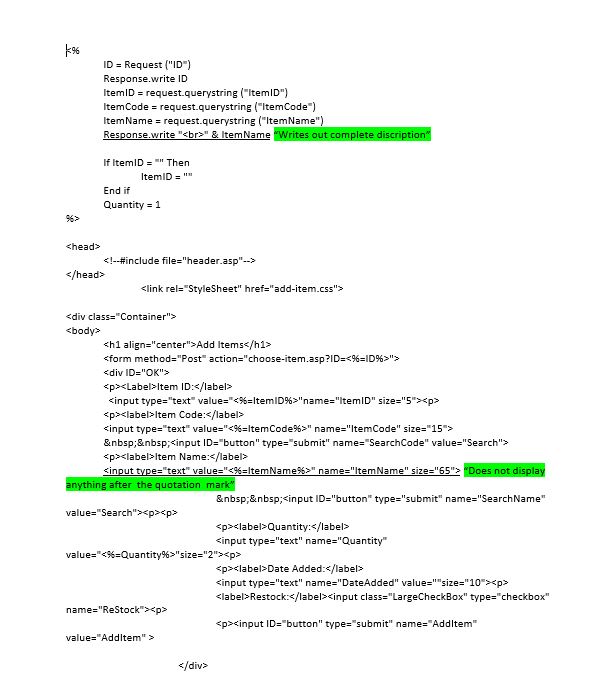
Hello Everyone, Had a quick question regarding ASP Classic. I am using a variable to put a querystring value into a form text field. It works just fine except for the occasions where there is a single quotation in the middle of the ItemName. Example: 6" PVC 90. In these cases it truncates the ItemName in the form text field. I can use response.write to display it at the top of the page, but it will not fill in the text field beyond the ". That said if I add the item to my table the entire string is still there. Is there a way to get it displayed correctly in the text field? As always any help is very much appreciated.
Joe Hood OP  @Reply  
      
4 years ago

Alex Hedley  @Reply  
           
4 years ago
You could try converting " to & quote ;
Alex Hedley  @Reply  
           
4 years ago
Or chr(34)
Joe Hood OP  @Reply  
      
4 years ago
Will do Sir! Thanks again.
Joe Hood OP  @Reply  
      
4 years ago
Hello Alex, Not sure I understand how to make this conversion. Can you point me in the right direction whenever you get a chance.
Thanks Joe
Richard Rost  @Reply  
          
4 years ago
You should use Server.HTMLEncode whenever saving values to your table that could have quotes in them (single or double). I cover this in ASP 103, I believe.
Joe Hood OP  @Reply  
      
4 years ago
Got it my Friend! I will head back to ASP 103 and re-watch. Now that you mention it, I do remember you teaching that. Very much appreciated. :)
Joe Hood OP  @Reply  
      
4 years ago
Worked like a charm for the in-string single and double quotes. However i still have quite a few # symbols and the &'s in our Item Names. Is there a way to handle those as well.
Alex Hedley  @Reply  
           
4 years ago
& num ;
& amp ;
Richard Rost  @Reply  
          
4 years ago
There's also a URLEncode function too. That's good for ? & and # which you'll find in querystrings.
Joe Hood OP  @Reply  
      
4 years ago
Perfect, i will try these things out tomorrow. Appreciate yours and Alex's help as always. Have a Great rest of the day!

This thread is now CLOSED. If you wish to comment, start a NEW discussion in Active Server Pages Forum.
 

Next Unseen

 
New Feature: Comment Live View


The following is a paid advertisement
Computer Learning Zone is not responsible for any content shown or offers made by these ads.
 

Learn
 
Access - index
Excel - index
Word - index
Windows - index
PowerPoint - index
Photoshop - index
Visual Basic - index
ASP - index
Seminars
More...
Customers
 
Login
My Account
My Courses
Lost Password
Memberships
Student Databases
Change Email
Info
 
Latest News
New Releases
User Forums
Topic Glossary
Tips & Tricks
Search The Site
Code Vault
Collapse Menus
Help
 
Customer Support
Web Site Tour
FAQs
TechHelp
Consulting Services
About
 
Background
Testimonials
Jobs
Affiliate Program
Richard Rost
Free Lessons
Mailing List
PCResale.NET
Order
 
Video Tutorials
Handbooks
Memberships
Learning Connection
Idiot's Guide to Excel
Volume Discounts
Payment Info
Shipping
Terms of Sale
Contact
 
Contact Info
Support Policy
Mailing Address
Phone Number
Fax Number
Course Survey
Email Richard
[email protected]
Blog RSS Feed    YouTube Channel

LinkedIn
Copyright 2026 by Computer Learning Zone, Amicron, and Richard Rost. All Rights Reserved. Current Time: 5/7/2026 7:15:51 PM. PLT: 1s