If I want to use a cell to select a date and the put the selected date in another cell. How would I do it? Is there a way to make it a date picker pop-up?
Kevin Robertson
@Reply 4 years ago
There is an Active-X control for 32-bit Excel.
On the Developer tab, click the Insert button, then in the Active-X Controls section click More Controls.
The control you are looking for is Microsoft Date And Time Picker Control 6.0.
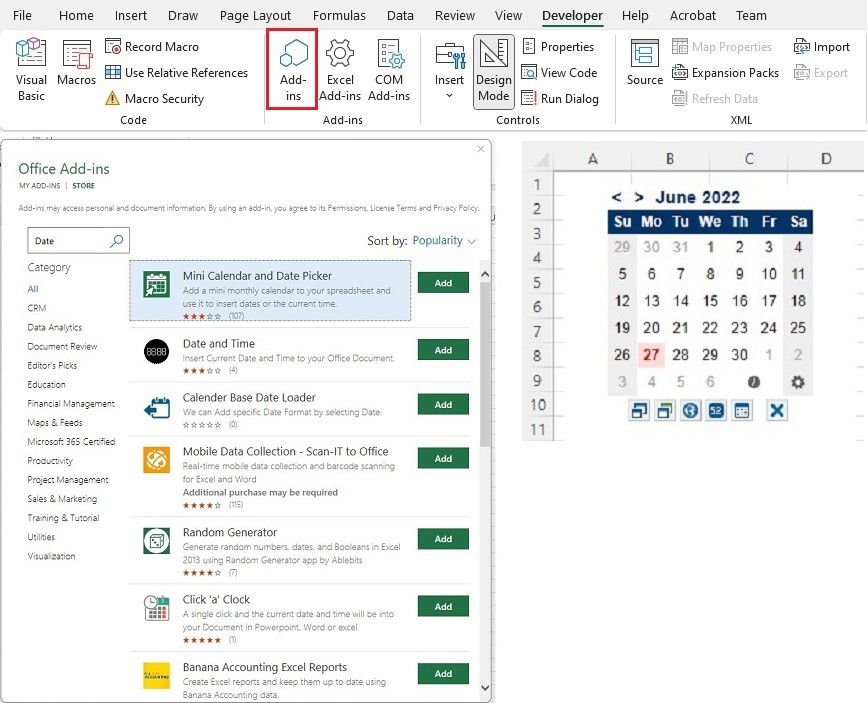
If you have 64-bit Excel the afore mentioned control is not available, but there is a pretty cool add-in.
Again on the Developer tab:
- Click the Add-in button
- Click on Store
- Type Date into the Search Box
- Click the Add button for your selected Add-in
- Click Continue
The Add-in shown in the screenshot below is the only on I have tested.
It includes a button to insert the current time.
Note: If the Developer tab is not showing you can turn it on in the Excel Options.
Kevin Robertson
@Reply 4 years ago
Sorry, only students may add comments.
Click here for more
information on how you can set up an account.
If you are a Visitor, go ahead and post your reply as a
new comment, and we'll move it here for you
once it's approved. Be sure to use the same name and email address.
This thread is now CLOSED. If you wish to comment, start a NEW discussion in
Excel Forum.