I know that I can click the button autofit row, but is there a way to make either an entire sheet automatically autofit all rows, or automatically resize the row size to autofit a specific row?
Dan Jackson
@Reply 4 years ago
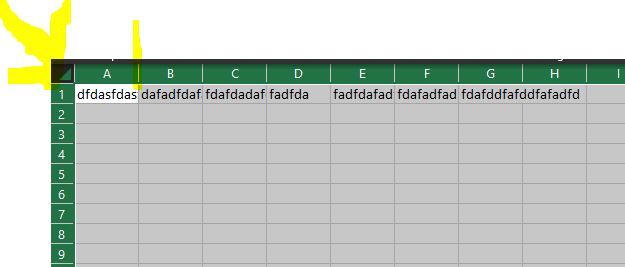
You Can! Click the button at the top left where "A" from the columns and "1" from the rows join to select the entire sheet, then double click the line between any of the rows/columns
Dan Jackson
@Reply 4 years ago
Dan Jackson
@Reply 4 years ago
Dan Jackson
@Reply 4 years ago
The example shows columns but you can do exactly the same with rows. Also, if you find the text isn't sitting right in the cell, try the Wrap Text option on the Ribbon > Home > Alignment above merge and centre
Sorry, only students may add comments.
Click here for more
information on how you can set up an account.
If you are a Visitor, go ahead and post your reply as a
new comment, and we'll move it here for you
once it's approved. Be sure to use the same name and email address.
This thread is now CLOSED. If you wish to comment, start a NEW discussion in
Excel Forum.