We live on a hunk of rock and metal that circles a humdrum star that is one of 400 billion other stars that make up the Milky Way Galaxy which is one of billions of other galaxies which make up a universe...
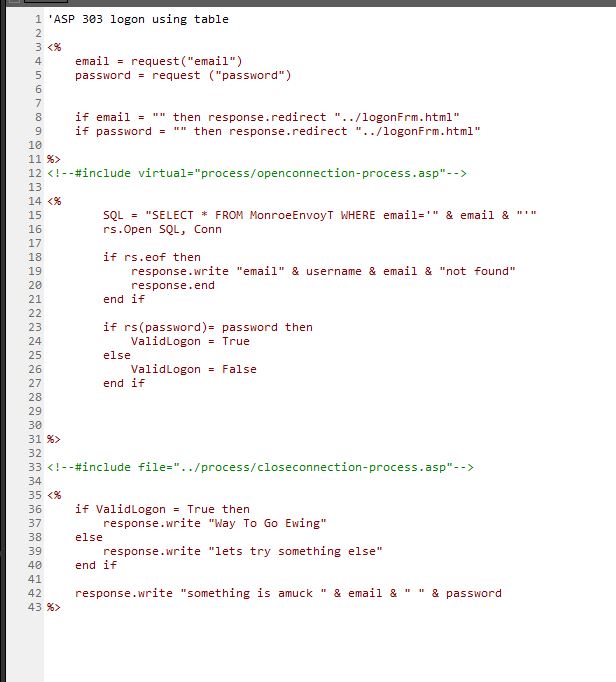
I can not find my problem. the open connection works as i used it to read and write the only record in a test table. but this logon process does not work. It is not reading the record.
When you said rs(password) you were saying whatever value password had e.g. Fred2.
So rs("Fred2"), and Fred2 isn't a FIELD in your Table.
There's a few different ways to get it
objField = objRecordset.Fields.Item("ProductID")

objField = objRecordset.Fields("ProductID")

objField = objRecordset.Fields.Item(0)

objField = objRecordset.Fields(0)
Dg EwingOP
@Reply 4 years ago
isnt that what i am trying to say:
if the value in the rsPassword filed is equal to the value of form's value lets say ok that is good rs Password value = forms Password value
Fred2=Fred2
rs(password)=password
??
Dg EwingOP
@Reply 4 years ago
I would thought that rs("password") = password
would be
password<>Fred2
and rs('password") = "password"
would be password=password (both the name not value)
Kevin Yip
@Reply 4 years ago
Hi Dg, certain syntax requires a *literal* string value of "password" because a string is expected by that particular syntax. But other times it doesn't, and isn't. Access does the same thing. The two lines below do the same thing. But when a literal string is required, it needs the quotes:
Using literal strings to refer to field names lets you manipulate them in ways that can make coding easier. For instance, if you have the 20 field names MyField1, MyField2, MyField3, ... up to MyField20, and you want to assign each them a value, instead of writing 20 lines of code, you only need 3 lines of code with a For Next loop:
Dim i As Integer
For i = 1 to 20
Me("Field" & i) = SomeValue
Next i
Since the field name is a string, you can concatenate it with something else to turn it into something else. You can't do that if you use the syntax Me!Field1, etc.
Sorry, only students may add comments.
Click here for more
information on how you can set up an account.
If you are a Visitor, go ahead and post your reply as a
new comment, and we'll move it here for you
once it's approved. Be sure to use the same name and email address.
This thread is now CLOSED. If you wish to comment, start a NEW discussion in
ASP Forum.