Kevin's suggestion is the best one, but if you want simple security and aren't worried about your users hacking you: Simple Security, Track Log On
Chris LopezOP
@Reply 2 years ago
Thanks for the replies, I have the tracker set up, but that still doesnt tell me how to put the current user on the main screen, unless i missed something.
Kevin Robertson
@Reply 2 years ago
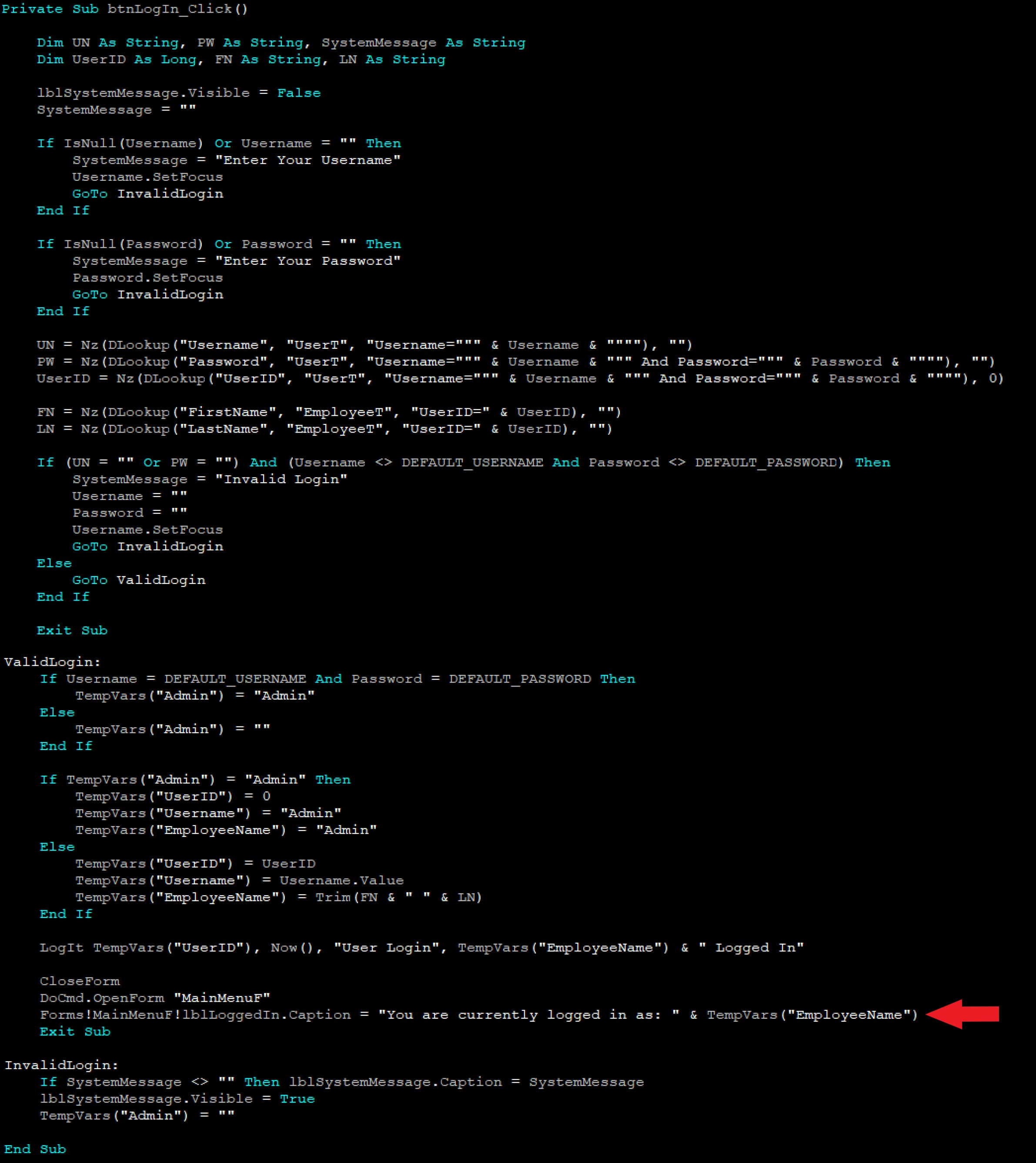
Here is some login code from one of my databases to give you an idea. The line of code with the arrow puts the name of the current user on the Main Menu Form. Modify the code to your specific needs.
Kevin Robertson
@Reply 2 years ago
Chris LopezOP
@Reply 2 years ago
So i would use a code like that in the VBA builder for the Text box that i want that to show in?
Sorry, only students may add comments.
Click here for more
information on how you can set up an account.
If you are a Visitor, go ahead and post your reply as a
new comment, and we'll move it here for you
once it's approved. Be sure to use the same name and email address.
This thread is now CLOSED. If you wish to comment, start a NEW discussion in
Visitor Forum.