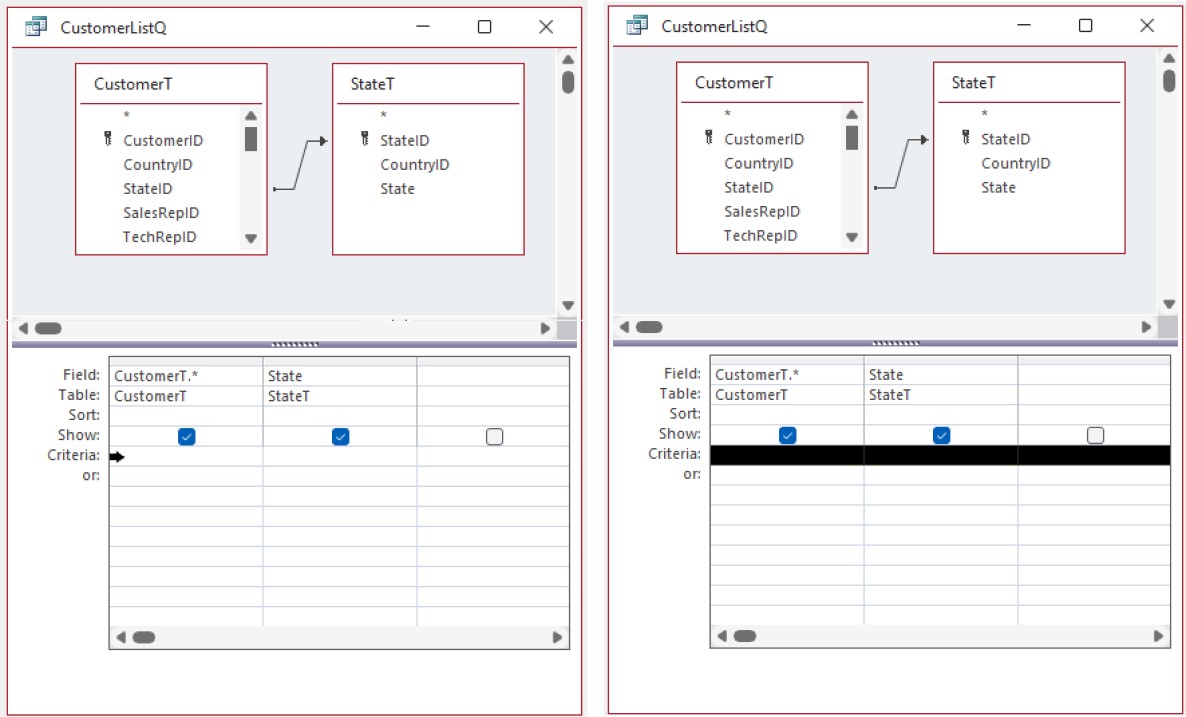
Can anyone tell me how to select an entire row of query criteria in design view ? By complete accident I managed to select an entire row of query criteria, AND managed to paste it in another query row. I Have no idea how I managed to select the entire row, but it proved very useful. Can anyone tell me how I acheived that ? I've tried to reproduce the action by numerous combinations of keys and mouse clicks but cant make anything work. Any help very much appriciated. Nick.
Kevin Robertson
@Reply 2 years ago
Move your pointer to the very start of the Criteria row until you get the black right-facing arrow, then click to select the entire row.
Kevin Robertson
@Reply 2 years ago
Sorry, only students may add comments.
Click here for more
information on how you can set up an account.
If you are a Visitor, go ahead and post your reply as a
new comment, and we'll move it here for you
once it's approved. Be sure to use the same name and email address.
This thread is now CLOSED. If you wish to comment, start a NEW discussion in
Visitor Forum.