Computer Learning Zone CLZ Access Excel Word Windows

In learning you will teach, and in teaching you will learn.

-Latin Proverb
 
Home   Courses   TechHelp   Forums   Help   Contact   Merch   Join   Order   Logon  
 
Multiple Columns in a Form
By Richard Rost   Richard Rost on LinkedIn Email Richard Rost   4 years ago

A student recently asked me this question which I'm going to be using for an upcoming TechHelp video, Extended Cut, and Developer class. I spent all day playing with the Developer solution, and by the time I was done I was too tired to record the videos, so I figured I'd share this here now in case anyone has any ideas or comments for things you'd like to see added.

Here's the question:

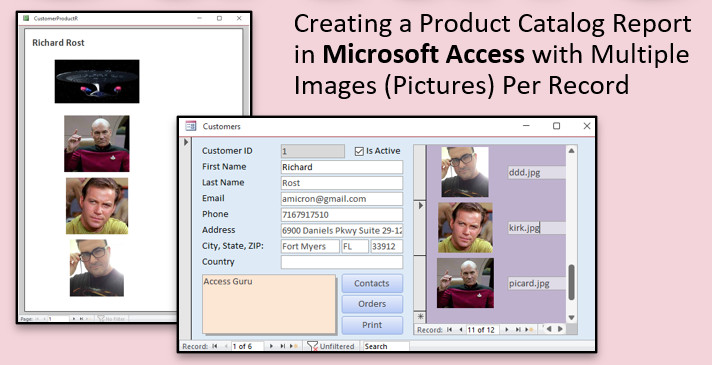
I'd like to create a report that I can print out or send as a PDF to my customers showing each of my products. I've used your technique from the Images video to display pictures and not store them in the database. That works great, however is there any way I can show multiple images per product? I sell furniture, and sometimes the customer wants to see the same item from multiple angles. Thanks!

So the basic TechHelp video is going to cover putting multiple images into a form with a subform, and creating a simple report to show the images using a grouping level. Yeah, we're going to cheat and use a customer form, but the concept is the same whether it's products, customers, employees, properties, or whatevever you want. It's basically displaying multiple images per record.

Then the Extended Cut is going to cover creating a subreport with multiple columns, which I don't have a TechHelp for yet, but I cover in Access Expert 7 and Expert 9:

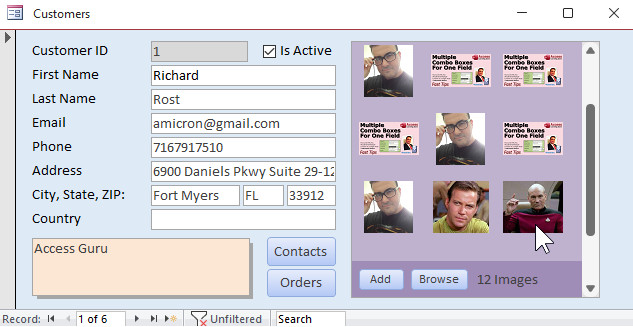
Now here's the cool / tricky part. The upcoming Developer lesson is going to include displaying the images in a subform in columns. This took some VBA trickery, including some recordset magic, but I finally got it to work:

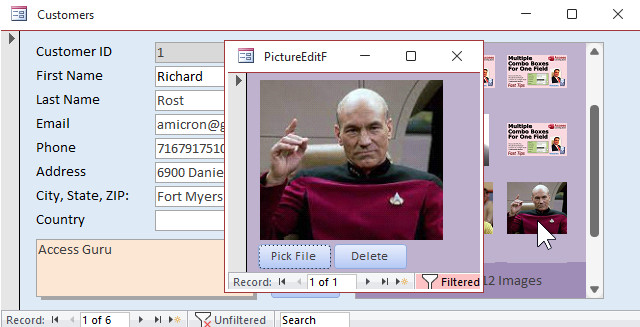
You can click on one of the images to see / edit / delete it:

I got it working like a champ. I included the File Picker code from the Code Vault too. So if any of you have any suggestions for additional things you'd like to see, let me know.

Developer Students: your homework is to try to figure out how I did this before I post the video, which will probably be on Tuesday, since Monday is a holiday.

Good luck!

Update

The course that covers how to do this is Access Developer 38.


Comments for Multiple Columns in a Form
 
Age Subject From
4 yearsD38 PostedRichard Rost


Start a NEW Conversation
 
Only students may post on this page. Click here for more information on how you can set up an account. If you are a student, please Log On first. Non-students may only post in the Visitor Forum.
 
Subscribe
Subscribe to Multiple Columns in a Form
Get notifications when this page is updated


The following is a paid advertisement
Computer Learning Zone is not responsible for any content shown or offers made by these ads.
 

Learn
 
Access - index
Excel - index
Word - index
Windows - index
PowerPoint - index
Photoshop - index
Visual Basic - index
ASP - index
Seminars
More...
Customers
 
Login
My Account
My Courses
Lost Password
Memberships
Student Databases
Change Email
Info
 
Latest News
New Releases
User Forums
Topic Glossary
Tips & Tricks
Search The Site
Code Vault
Collapse Menus
Help
 
Customer Support
Web Site Tour
FAQs
TechHelp
Consulting Services
About
 
Background
Testimonials
Jobs
Affiliate Program
Richard Rost
Free Lessons
Mailing List
PCResale.NET
Order
 
Video Tutorials
Handbooks
Memberships
Learning Connection
Idiot's Guide to Excel
Volume Discounts
Payment Info
Shipping
Terms of Sale
Contact
 
Contact Info
Support Policy
Mailing Address
Phone Number
Fax Number
Course Survey
Email Richard
[email protected]
Blog RSS Feed    YouTube Channel

LinkedIn
Copyright 2026 by Computer Learning Zone, Amicron, and Richard Rost. All Rights Reserved. Current Time: 5/8/2026 2:12:30 PM. PLT: 1s
PermaLink  Multiple Columns in a Form