Free Lessons
Courses
Seminars
TechHelp
Fast Tips
Templates
Topic Index
Forum
ABCD
 
Home   Courses   TechHelp   Forums   Help   Contact   Merch   Join   Order   Logon  
 
Back to Access Forum    Comments List
Upload Images   @Reply   Bookmark    Link   Email   Next Unseen 
Can You Turn Query Criteria On/Off
Richard Garber 
     
12 months ago
I have a query that runs fine till I tried to do ... this...

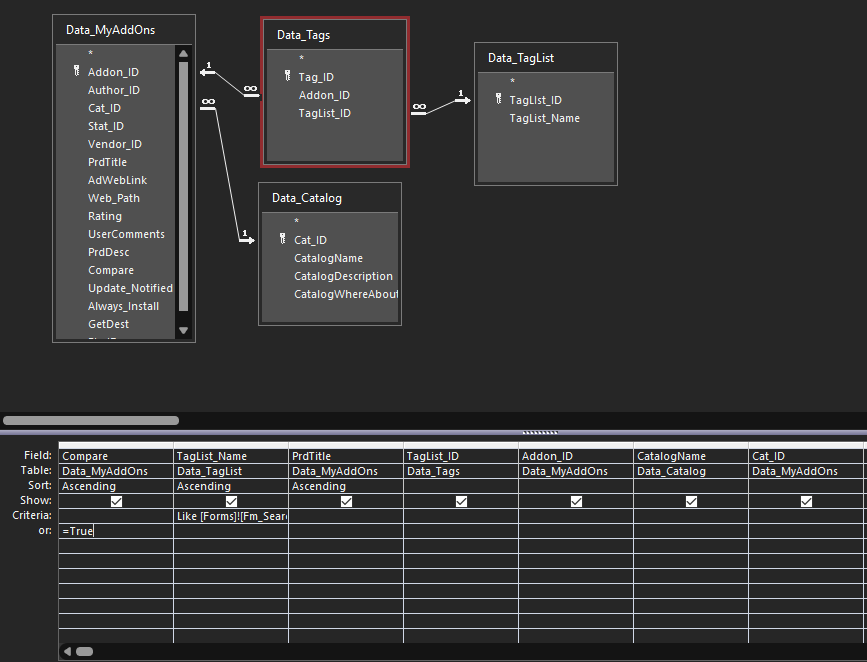
I added criteria into the first column and put it in as an OR but I don't really want to run it except when I need it to. I created a button on the form hoping I could say to the first criteria, "run now". The second criteria, I would prefer it not run when the first criteria runs and vice versa. I'm going to upload a picture of the query in a moment so you can see what I'm talking about. - Rich


Richard Garber OP  @Reply  
     
12 months ago

Richard Garber OP  @Reply  
     
12 months ago
What I got is a form based on this query above only as it stands now there is no criteria in the first column. There is a situation I ran into when I only want this same query to execute the first criteria and not the second. And then I want to flip it back to normal. I thought about something like creating a flag (like an unbound field) that acts like a switch and the criteria would say something like if switch is a certain value ignore this criteria. And vice versa for the other criteria, if switch is this value, then don't ignore this criteria... Any help be appreciated.
Richard Rost  @Reply  
          
12 months ago
Just use a checkbox on a form. Value From a Form
Richard Rost  @Reply  
          
12 months ago
The best way is to not use a query and to write the SQL yourself for the form's recordsource.

DetailsIf MyCheckBox Then
   SQL = "SELECT stuff..."
else
   SQL = "SELECT other stuff..."
End If
Me.RecordSource = SQL


This is covered in multiple Developer lessons like Access Developer 26.
Richard Garber OP  @Reply  
     
12 months ago
Regarding your second suggestion, you can stick something like that into Property Sheet Record Source box?

BTW, I don't understand your first suggestion. There is a checkbox on the form in each record that when checked is mostly just a visual cue to the user. It doesn't really do much except executes a refresh routine to manipulate all the records with a checkmark to the top of the list. The list being the record set. Or maybe you mean something like an option box to run one query or another? I'm confused here.

I do like that second suggestion as the queries themselves would be fairly simple.
Richard Rost  @Reply  
          
12 months ago
I apologize... I saw the "D" Developer badge next to your name so I assumed you would be familiar with Event programming. You could just use an After Update event on the checkbox itself to rewrite the RecordSource property. Watch this... Record Source
Richard Rost  @Reply  
          
12 months ago
If that doesn't help let me know.
Richard Garber OP  @Reply  
     
12 months ago
Thanks Rich. I don't know much about the 'things' under the names here, I don't know where they all came from. I would like to go through some courses and get to be more intelligent on Access. Lots of gaps in my understanding of Access. As they say, just enough to be dangerous.
Richard Garber OP  @Reply  
     
12 months ago

Richard Garber OP  @Reply  
     
12 months ago
Reference this post with the pic above.

Here's what I did, and it works, but it's not the end of it I just realized.

I followed your instructions with your post about using SQL except I did this. Instead of creating a SQL I substituted the query I needed...

and I added a button labeled [ShowAllComps]. And then in the onClick property added:

    Me.RecordSource = "Qry_SearchByComp"  (Qry_SearchByComp is a copied version of the query in the OP except I added true under Comp and deleted the criteria under TagList_Name.)

So now, when I press the [ShowAllComps] button, the listing changes to show only those records with a checkmark. And in my [reset] button, I added in the OnClick property

me.recordsource = "Qry_SearchByTagName"

But there is a problem with this and it's something I've seen this form do before. When I click the [ShowAllComps] button it's bringing up the list properly but showing all the tags for that record instead of just the one tag I clicked with the checkmark. Here I'll show you... (see pic above)

I only placed a checkmark in the Grid System tag. But when I click the [Only Comp] button I'm seeing all the tags for the record Blender UV Unwrapping Disco displayed. And I'm seeing this every time I place a tag, the tags that show are for the whole record. A record can have as many tags. So that's wrong. What I can't figure now is where in the QBE is my goof. Use the picture in the OP, it's pretty much the same query except I deleted the criteria under TagList_Name and added True in the Criteria under Comp.

Please help, my brain is broken from all of this.
Richard Garber OP  @Reply  
     
12 months ago
I'm thinking out loud here that maybe what I need to do is add a field in the Taglist Table that when the Compare checkbox is clicked that I need to also flag that new Taglist field too. Then I could change the Qry_SearchByComp to sort by the new TagList field instead of Compares. Compare is kind of a record level thing. It doesn't distinguish between tags. Just thinking out loud...
Richard Rost  @Reply  
          
12 months ago
Yeah, this is one of the reasons why it's better to write the SQL for this instead of relying on those form fields. Then instead of having that logic in the query, you would just say:

SQL = "SELECT * FROM CustomerT WHERE FirstName=""" & FirstNameField & """"

Or something like that. You're not relying on a query to get the value from the form.
Richard Rost  @Reply  
          
12 months ago
And also don't forget that sometimes it's better to just set it aside and come back to it another day. You don't know how many projects I was working on and I stayed up late trying to figure out why something won't work. I put it on the shelf, I come back the next morning after sleeping on it, and the answer just comes to me. So if you're feeling frustrated, just walk away. Have a drink (whether it's water, coffee, or something alcoholic) - whatever you need. The answer may come to you in the shower tomorrow morning.

This thread is now CLOSED. If you wish to comment, start a NEW discussion in Access Forum.
 

Next Unseen

 
New Feature: Comment Live View


The following is a paid advertisement
Computer Learning Zone is not responsible for any content shown or offers made by these ads.
 

Learn
 
Access - index
Excel - index
Word - index
Windows - index
PowerPoint - index
Photoshop - index
Visual Basic - index
ASP - index
Seminars
More...
Customers
 
Login
My Account
My Courses
Lost Password
Memberships
Student Databases
Change Email
Info
 
Latest News
New Releases
User Forums
Topic Glossary
Tips & Tricks
Search The Site
Code Vault
Collapse Menus
Help
 
Customer Support
Web Site Tour
FAQs
TechHelp
Consulting Services
About
 
Background
Testimonials
Jobs
Affiliate Program
Richard Rost
Free Lessons
Mailing List
PCResale.NET
Order
 
Video Tutorials
Handbooks
Memberships
Learning Connection
Idiot's Guide to Excel
Volume Discounts
Payment Info
Shipping
Terms of Sale
Contact
 
Contact Info
Support Policy
Mailing Address
Phone Number
Fax Number
Course Survey
Email Richard
[email protected]
Blog RSS Feed    YouTube Channel

LinkedIn
Copyright 2026 by Computer Learning Zone, Amicron, and Richard Rost. All Rights Reserved. Current Time: 4/30/2026 2:56:26 PM. PLT: 1s