Free Lessons
Courses
Seminars
TechHelp
Fast Tips
Templates
Topic Index
Forum
ABCD
 
Home   Courses   TechHelp   Forums   Help   Contact   Merch   Join   Order   Logon  
 
Back to Access Forum    Comments List
Upload Images   @Reply   Bookmark    Link   Email   Next Unseen 
Outputting Trends in Usable Format
Sandi Cushion 
      
11 months ago
I have a database which tracks the journey of applications. The application normally proceeds through the stages in one direction but can also go back to previous stages if further or new checks are required.  What I want to do is be able to look at the Log table (LogT) (circa 75k records) this records all the changes that have happened to the cases: the date the case changes stage.  For example, it came into the system on June 1 at stage 1, and then on the June 3 it went into stage 2.  Finally, it gets to the final stage on June 15. I want to be able to output the movement of the cases to see any trends.  The problem is, there are very many records (75k at the moment) and I'm not sure how to output the results so that it's in a usable format.  Is this something that needs to be output to Excel? I am trying to NOT use Excel if possible.
Sandi Cushion OP  @Reply  
      
11 months ago
The title should read 'Outputting Trends in USABLE Format!
Kevin Robertson  @Reply  
          
11 months ago
Sandi Changed it for you.
Sandi Cushion OP  @Reply  
      
11 months ago
Thank you!!
Tom Juric  @Reply  
     
11 months ago
1. Do you want to see the trace? ie Date entered Stage1-->Date entered Stage2--> ... --> etc
2. Or do you want to see how many days at each stage
3. Does Application HAVE to go through all 15 stages or can it skip stages
4. Can you show exactly what you want output to look like?
Sandi Cushion OP  @Reply  
      
11 months ago
Thanks Tom, There are 5 stages and the application can come onto the external system (which my database reads from) at any stage. It can go through the stages and back and forth! what a pain I know. I just want to be able to see how many days are usually between each stage.  I think I am going to have to let Access do the hard work and then just export the results to Excel.
Tom Juric  @Reply  
     
11 months ago
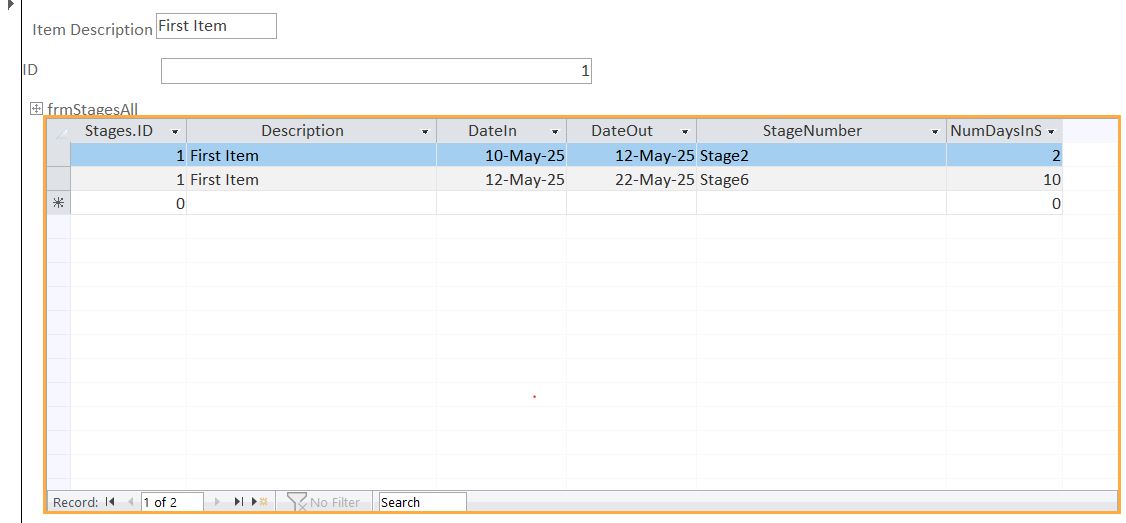
I have a Table1 with each ID, Item Description
I have a Table2 with each item showing Stage#, DateIn, DateOut, and Days in Stage (calculated)
Form1 Showing Items (ID, Description) and a button to open Form3 that will show data from Table2. CLICK on this button and Stage information will display for whatever Item is currently in Form1

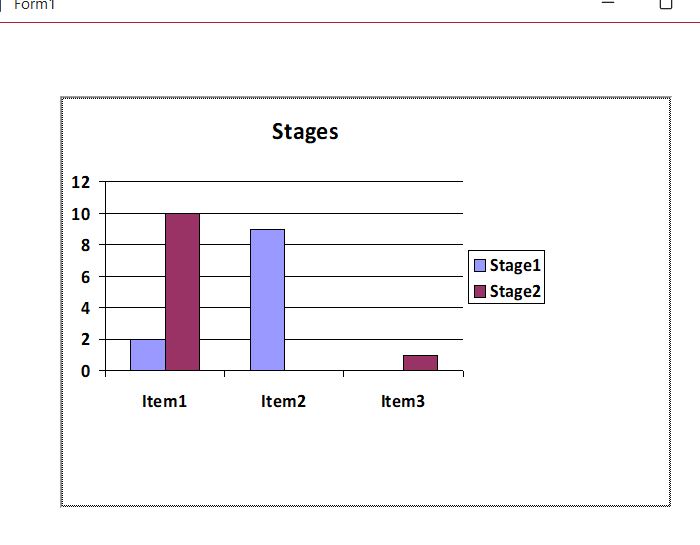
Below is a picture of results. Is it anywhere close to what you need?

Can't figure out how to paste the picture


Tom Juric  @Reply  
     
11 months ago

Tom Juric  @Reply  
     
11 months ago

Sandi Cushion OP  @Reply  
      
11 months ago
Thanks Tom!  that's a big help.  I've been on holiday (vacation) for the last week, hence my delay in replying.  Eventually what I am looking for is being able to get a summary based on all the records in the Log table.  Something that will say, cases tend to be sitting at stage 2 for an average of 5 days and stage 3 for two day... something like that.  I can't really see how I am going to show this.  I think the problem is I want it to show a trend based on all the records I have in the table currently, which can be quite numerous.  I'll play with what you have given me though and see how I get on.  Thank you

This thread is now CLOSED. If you wish to comment, start a NEW discussion in Access Forum.
 

Next Unseen

 
New Feature: Comment Live View


The following is a paid advertisement
Computer Learning Zone is not responsible for any content shown or offers made by these ads.
 

Learn
 
Access - index
Excel - index
Word - index
Windows - index
PowerPoint - index
Photoshop - index
Visual Basic - index
ASP - index
Seminars
More...
Customers
 
Login
My Account
My Courses
Lost Password
Memberships
Student Databases
Change Email
Info
 
Latest News
New Releases
User Forums
Topic Glossary
Tips & Tricks
Search The Site
Code Vault
Collapse Menus
Help
 
Customer Support
Web Site Tour
FAQs
TechHelp
Consulting Services
About
 
Background
Testimonials
Jobs
Affiliate Program
Richard Rost
Free Lessons
Mailing List
PCResale.NET
Order
 
Video Tutorials
Handbooks
Memberships
Learning Connection
Idiot's Guide to Excel
Volume Discounts
Payment Info
Shipping
Terms of Sale
Contact
 
Contact Info
Support Policy
Mailing Address
Phone Number
Fax Number
Course Survey
Email Richard
[email protected]
Blog RSS Feed    YouTube Channel

LinkedIn
Copyright 2026 by Computer Learning Zone, Amicron, and Richard Rost. All Rights Reserved. Current Time: 5/7/2026 2:58:55 AM. PLT: 0s