Free Lessons
Courses
Seminars
TechHelp
Fast Tips
Templates
Topic Index
Forum
ABCD
 
Home   Courses   TechHelp   Forums   Help   Contact   Merch   Join   Order   Logon  
 
Back to Access Forum    Comments List
Upload Images   @Reply   Bookmark    Link   Email   Next Unseen 
Button Action Carry Values to Child Table
Allan Hunter 
   
10 months ago
Apologies for not-very-informative thread title.  

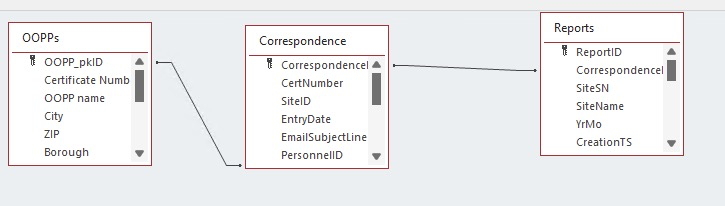
Assume I'm doing data entry on a form that shows records from the Correspondence table.  Each record in Correspondence is the unique record of a given calender month/year's reporting for a specific organization.  The Organization table can be considered to be the parent table, linked by ProgramID to multiple Correspondence records which are specific to Year and Month.

A third table, Reports, is where the actual reporting figures go; insofar as each Organization may sent anywhere from 1 to 60 reports each month, Reports is a child table of Correspondence.

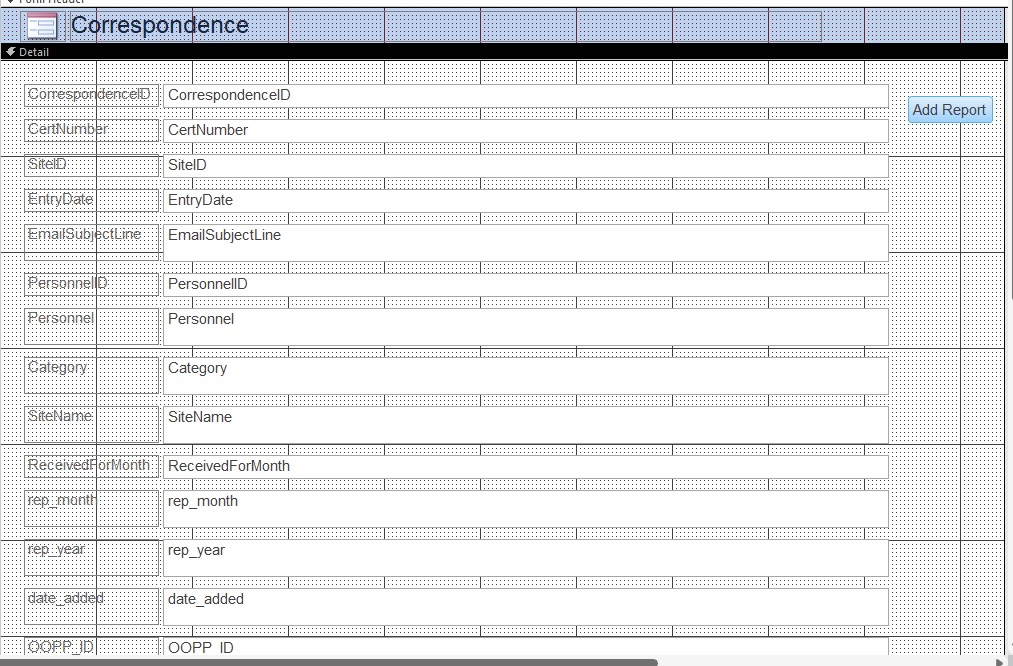
Visible on the Correspondence form are the ProgramID (brought forward from Organization), Year, Month, email subject line, DateReceived, and a button to which I haven't attached any useful functionality yet (that's where I'm stuck).

What I want the button to do is as follows:

Go to the Form that shows records from Reports.  Make a new child record there that is linked to Correspondence by CorrespondenceID.  Inherit (fill in) the ProgramID, the Year, and the Month (brought over from the Correspondence record I was sitting on when I clicked the button).

I should now be staring at the first of "n" Reports records I'm going to create here, on the Reports form.


I don't know whether I should attempt this as a vbscript or as a SQL query.  I'm unclear on how to make a SQL query do the navigation (landing ON the newly-created Reports record) or how to get visual basic to generate a record in the related Reports table.
Raymond Spornhauer  @Reply  
          
10 months ago
You'll need to post pictures so we know exactly what you're talking about.

When you're asking for help, you need to be very specific on the terms you're using.  

Example:
You start out talking about a Correspondence Form, then later it sounds like you're referring to a "Form that shows records from Reports"?  This is why it's good to use the Conventions Rick uses when naming Forms and Reports.  All the table names, form names, and report names start blending together, especially for someone who's not looking at your database.
Allan Hunter OP  @Reply  
   
10 months ago
Each form in this thread is named for its underlying table.  That would not necessarily always be the case in every situation, but it IS the case here.  A form that shows records from Reports, that would be the Reports form.  The Correspondence form shows records from the Correspondence table.  I want a button that is on the Correspondence form to generate a new related record in Reports, carrying over certain field information from the Correspondence record that was the active record when I clicked the button.

Do you still think you would benefit from a screen shot or entity rel diagram?
Raymond Spornhauer  @Reply  
          
10 months ago
Your description requires anyone to make a whole lot of assumptions on how you've built your database.  Making blind suggestions will not help you.
Allan Hunter OP  @Reply  
   
10 months ago
There's not much built — I'm replicating in Access what I have in FileMaker and mostly I have tables defined with primary and foreign keys, and relationships, and I have some very rudimentary forms, one each for the relevant tables.  The button I'm trying to implement is the first element of any complexity.

Feel free to ask questions.  I'll probably learn as much from the questions you ask as from anything else.
Allan Hunter OP  @Reply  
   
10 months ago

Allan Hunter OP  @Reply  
   
10 months ago

This thread is now CLOSED. If you wish to comment, start a NEW discussion in Access Forum.
 

Next Unseen

 
New Feature: Comment Live View


The following is a paid advertisement
Computer Learning Zone is not responsible for any content shown or offers made by these ads.
 

Learn
 
Access - index
Excel - index
Word - index
Windows - index
PowerPoint - index
Photoshop - index
Visual Basic - index
ASP - index
Seminars
More...
Customers
 
Login
My Account
My Courses
Lost Password
Memberships
Student Databases
Change Email
Info
 
Latest News
New Releases
User Forums
Topic Glossary
Tips & Tricks
Search The Site
Code Vault
Collapse Menus
Help
 
Customer Support
Web Site Tour
FAQs
TechHelp
Consulting Services
About
 
Background
Testimonials
Jobs
Affiliate Program
Richard Rost
Free Lessons
Mailing List
PCResale.NET
Order
 
Video Tutorials
Handbooks
Memberships
Learning Connection
Idiot's Guide to Excel
Volume Discounts
Payment Info
Shipping
Terms of Sale
Contact
 
Contact Info
Support Policy
Mailing Address
Phone Number
Fax Number
Course Survey
Email Richard
[email protected]
Blog RSS Feed    YouTube Channel

LinkedIn
Copyright 2026 by Computer Learning Zone, Amicron, and Richard Rost. All Rights Reserved. Current Time: 5/19/2026 1:18:59 PM. PLT: 0s