Free Lessons
Courses
Seminars
TechHelp
Fast Tips
Templates
Topic Index
Forum
ABCD
 
Home   Courses   TechHelp   Forums   Help   Contact   Merch   Join   Order   Logon  
 
Back to Access Forum    Comments List
Upload Images   @Reply   Bookmark    Link   Email   Next Unseen 
Log On
Kevin Robertson 
          
10 months ago
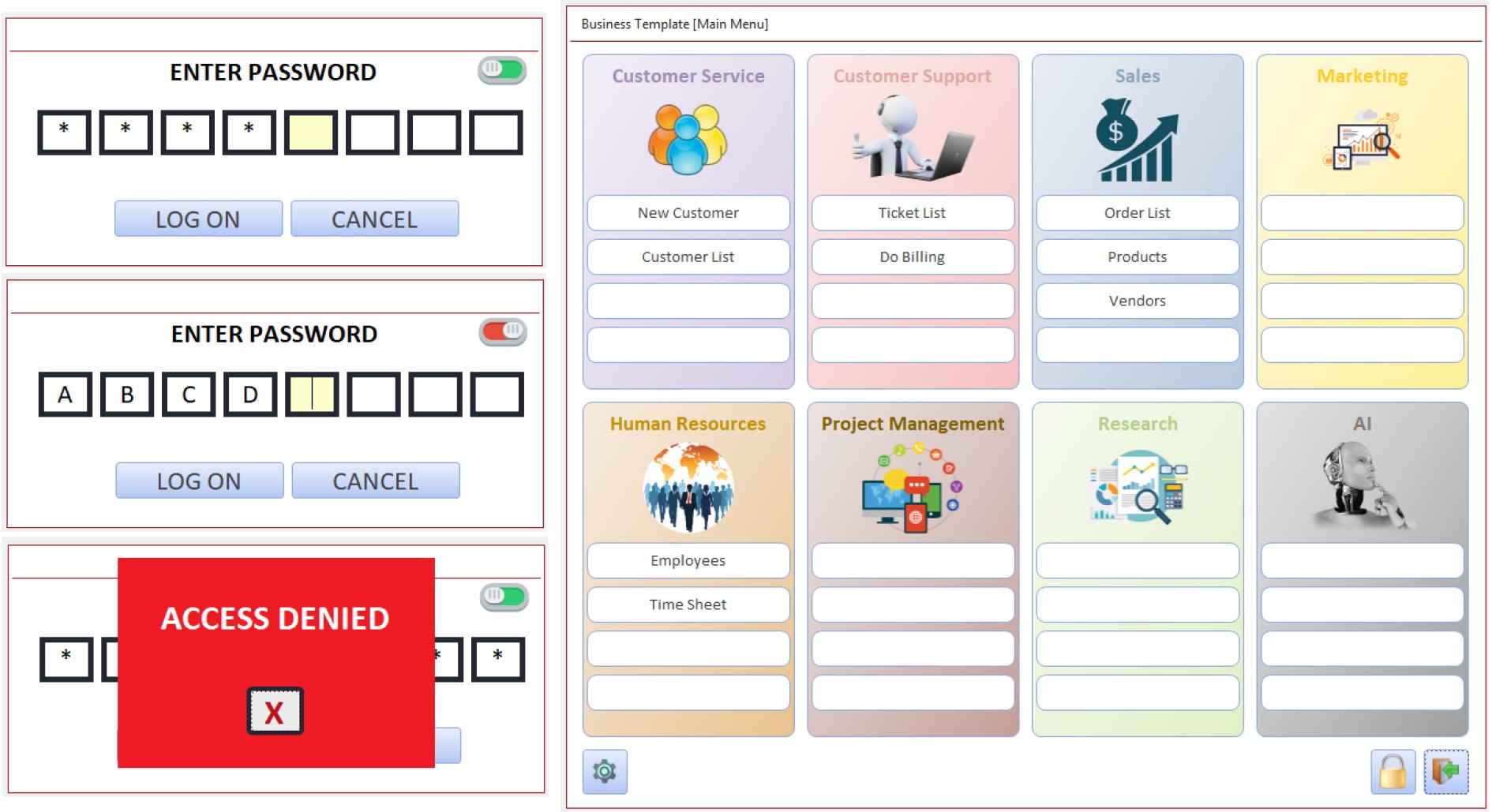
Just thought I would share my new log on form and the Form that loads with a successful log on attempt (this is a work in progress).

The Rectangle control doesn't have the ability to show rounded corners and you can't have a gradient fill (which is what I wanted and would be a great future enhancement). To get around this, since I didn't want to create each rectangle in a graphics program, I used disabled Buttons instead. This helped me achieve the look and feel I was looking for.
Kevin Robertson OP  @Reply  
          
10 months ago

Richard Rost  @Reply  
          
10 months ago
Super sweet dude. Nice work.
Sami Shamma  @Reply  
             
10 months ago
That looks really cool.
Raymond Spornhauer  @Reply  
          
10 months ago
Very nice.  I like that your images are not just squares with images in them, but transparent shapes.

-Raymond
Donald Blackwell  @Reply  
       
10 months ago
Looks nice.

I've been using buttons as background for the gradients for a while. Work really nice for creating rounded (looking) text boxes and adding "frames" that have a 3d effect using bevels etc. Like on a notes field to make it look like a bulletin board or something.
Raymond Spornhauer  @Reply  
          
10 months ago
I've been using power point to generate gradients which work really well.  Has a lot of options too.

-Raymond
Brent Davis  @Reply  
     
10 months ago
Damn nice!!!
Jerry Fowler  @Reply  
       
10 months ago
Very nice project Kevin, cudos on your great work
Martin Fairbairn  @Reply  
    
10 months ago
It looks super cool but I'm sorry to rain on the parade. I don't see the point of having a fixed number of boxes for a password that might be anything from 5 to 30 characters ....
Kevin Robertson OP  @Reply  
          
10 months ago
Martin A password doesn't have to contain any number of characters. That is a decision for the developer to make (or the client if building for someone else). The restriction is a choice I made for this project.
Richard Rost  @Reply  
          
10 months ago
Yeah, I use PowerPoint and Word to generate objects and then make them images in Access. I think I showed this in a video too.
Lisa Snider  @Reply  
       
10 months ago
Looks great Kevin!
Martin Fairbairn  @Reply  
    
10 months ago
Kevin, you point well noted.
Dave Clark  @Reply  
           
9 months ago
Hey Kevin, Thank You for the response!  This looks better then what I wanted!!  So two pics with on_click events that toggle back   and forth, tied to a field in a table only if necessary.

This thread is now CLOSED. If you wish to comment, start a NEW discussion in Access Forum.
 

Next Unseen

 
New Feature: Comment Live View


The following is a paid advertisement
Computer Learning Zone is not responsible for any content shown or offers made by these ads.
 

Learn
 
Access - index
Excel - index
Word - index
Windows - index
PowerPoint - index
Photoshop - index
Visual Basic - index
ASP - index
Seminars
More...
Customers
 
Login
My Account
My Courses
Lost Password
Memberships
Student Databases
Change Email
Info
 
Latest News
New Releases
User Forums
Topic Glossary
Tips & Tricks
Search The Site
Code Vault
Collapse Menus
Help
 
Customer Support
Web Site Tour
FAQs
TechHelp
Consulting Services
About
 
Background
Testimonials
Jobs
Affiliate Program
Richard Rost
Free Lessons
Mailing List
PCResale.NET
Order
 
Video Tutorials
Handbooks
Memberships
Learning Connection
Idiot's Guide to Excel
Volume Discounts
Payment Info
Shipping
Terms of Sale
Contact
 
Contact Info
Support Policy
Mailing Address
Phone Number
Fax Number
Course Survey
Email Richard
[email protected]
Blog RSS Feed    YouTube Channel

LinkedIn
Copyright 2026 by Computer Learning Zone, Amicron, and Richard Rost. All Rights Reserved. Current Time: 5/19/2026 1:59:15 PM. PLT: 1s