Free Lessons
Courses
Seminars
TechHelp
Fast Tips
Templates
Topic Index
Forum
ABCD
 
Home   Courses   TechHelp   Forums   Help   Contact   Merch   Join   Order   Logon  
 
Back to Access Forum    Comments List
Upload Images   @Reply   Bookmark    Link   Email   Next Unseen 
Access Booklet Template
Mark Smith 
   
9 months ago
Hello. I've been using the Booklet Template for 3 years and it's been working great.  However, I made some changes to the "customers" (adding/deleting) and now it's not printing correctly.  Page 1 is blank and then it's fine up through page 21 (there are 42 pages total).  On the other side of page 21 and 22, the paper is blank and then it's fine again to the end.  I'm not sure what happened.  Please help.  Thanks.
Richard Rost  @Reply  
           
9 months ago
Hey Mark, thanks for the post. It's tough to troubleshoot without being able to see exactly what's going on. It sounds like the changes to the customers section might have affected the report layout somehow. Were you able to save a backup before making those edits? If so, it might help to compare the two versions and see what changed between them. That would give us a better idea of what might be causing the issue1. If you can share more details or upload screenshots, I'd be happy to take a closer look... but your best bet is to probably go back to the last known working version.
John Valencic  @Reply  
     
9 months ago
Had this same problem with a multiple page report and it ended up the footer wad too large, I shrank the footer and everything worked fine after that... Just my 2¢
Richard Rost  @Reply  
           
9 months ago
Yes, even changing things that don't seem like they would make a difference can make a difference. For example, I bought a new printer one time and the new printer driver was just slightly different from the old one. I had to redesign a few reports just to change the widths of the sections because the new printer had different minimum margins than the old one. So even things like that can change your database.
Mark Smith OP  @Reply  
   
9 months ago
Hi Richard & John,  The printer I use is the same one as before so I don't think that's it.  I don't know enough about Access to change the footer.  What I was doing is updating the names using the DirectoryT table because I discovered I could click the name column to put them in alpha order since I have several hundred.  Trying to use the Customer Form and use search was very cumbersome.  So maybe I screwed it up by using that table.  Let me know if there is anything you would like me to send.  I really appreciate the help!
Richard Rost  @Reply  
           
9 months ago
Well, like I said, the first thing that I would try is to go back to the last previous known working version if you have saved that. And make sure that still works. That will tell you that it's not a printer configuration error, like you didn't change something in the printer settings.
Mark Smith OP  @Reply  
   
9 months ago
Hi Richard.  I printed the original database that I downloaded from your website and it printed correctly.  The only thing I can think to do is just re-enter everything into a new database or just glue together the middle pages.
Richard Rost  @Reply  
           
9 months ago
Well, you shouldn't have to re-enter everything. You could probably copy the data over. Try bringing the tables over unless you've made major changes to the tables; it should still work. You must have just changed something in the code somewhere because that was not an easy database to build. There's a lot of weird intricacies in those reports, so just try bringing over the tables.
Mark Smith OP  @Reply  
   
9 months ago

Mark Smith OP  @Reply  
   
9 months ago
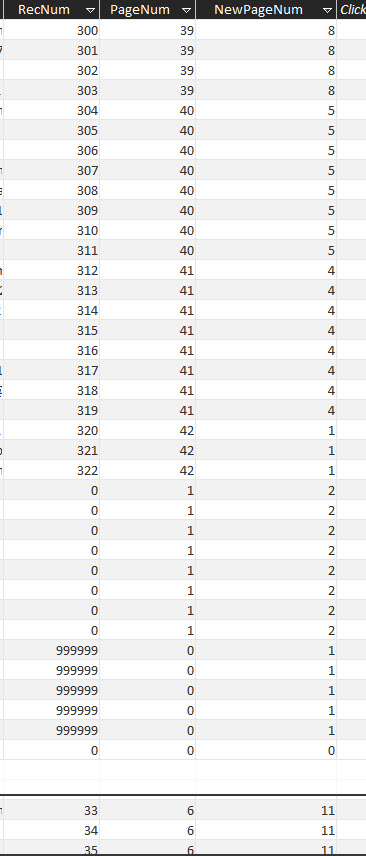
Hi Richard.  I re-watched the video regarding the booklet template and was comparing what I have to what was in the video.  I noticed that my DirectoryT table doesn't look right.  I'm not sure what happened but I think it's why the pages aren't printing correctly.  I've uploaded a screenshot.  Thanks.
Mark Smith OP  @Reply  
   
9 months ago
Wasn't sure if the pdf was of any help.  Let me know if you need to see more.
Richard Rost  @Reply  
           
8 months ago
Yeah, it's hard to tell from just that. If you put your data in the stock database and it worked, it's got to be some modification that you made. That screenshot alone isn't enough to really tell.

This thread is now CLOSED. If you wish to comment, start a NEW discussion in Access Forum.
 

Next Unseen

 
New Feature: Comment Live View


The following is a paid advertisement
Computer Learning Zone is not responsible for any content shown or offers made by these ads.
 

Learn
 
Access - index
Excel - index
Word - index
Windows - index
PowerPoint - index
Photoshop - index
Visual Basic - index
ASP - index
Seminars
More...
Customers
 
Login
My Account
My Courses
Lost Password
Memberships
Student Databases
Change Email
Info
 
Latest News
New Releases
User Forums
Topic Glossary
Tips & Tricks
Search The Site
Code Vault
Collapse Menus
Help
 
Customer Support
Web Site Tour
FAQs
TechHelp
Consulting Services
About
 
Background
Testimonials
Jobs
Affiliate Program
Richard Rost
Free Lessons
Mailing List
PCResale.NET
Order
 
Video Tutorials
Handbooks
Memberships
Learning Connection
Idiot's Guide to Excel
Volume Discounts
Payment Info
Shipping
Terms of Sale
Contact
 
Contact Info
Support Policy
Mailing Address
Phone Number
Fax Number
Course Survey
Email Richard
[email protected]
Blog RSS Feed    YouTube Channel

LinkedIn
Copyright 2026 by Computer Learning Zone, Amicron, and Richard Rost. All Rights Reserved. Current Time: 5/6/2026 1:24:23 PM. PLT: 0s