Free Lessons
Courses
Seminars
TechHelp
Fast Tips
Templates
Topic Index
Forum
ABCD
 
Home   Courses   TechHelp   Forums   Help   Contact   Merch   Join   Order   Logon  
 
Back to Access Forum    Comments List
Upload Images   @Reply   Bookmark    Link   Email   Next Unseen 
Access Slideshow
Joseph Bergman 
     
9 months ago
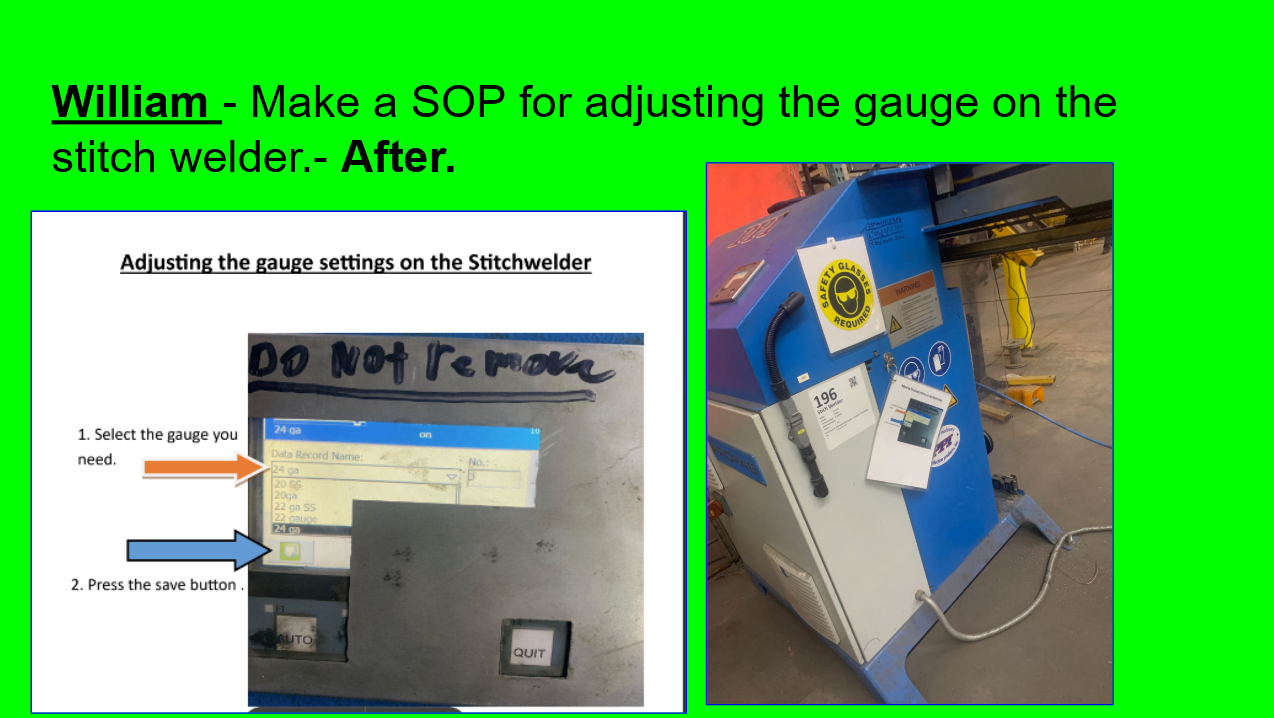
Our Company is heavily focused on Lean Manufacturing. All the employees do Weekly and Monthly Projects. We have a slide show running in the office, Lunch Room, and by the time clock showing the improvements. Right now HR is spending an hour a week roughly updating the slideshow. For my monthly project this Month I want to create a slide show in access.

There is between 1 and 4 pictures for each improvement.

I have thought of two ways to do this

1) would be just Use like 5 image controls. Resize and show what is needed per record

2) would be to use an Edge Browser and Dynamically write html Code.

Option one would be fairly simple. I think option two would be the better long term solution.

If I go with option 2, Is it possible to load the HTML Code from a long text field in a table? Or should I write a file and store it on the machine locally?


Would love to hear any ideas someone has on this.


Richard Rost  @Reply  
          
9 months ago
What I would do is just store all the images in a folder. You wouldn't even have to store their file names in the database. Just give the database the location of that folder.

And then you could have the folder just pick one at random and display it, and then wait 30 seconds or whatever, and then pick another one at random and display it. If you would just want a slideshow that just continuously rotates, then if you want to add new pictures, just drop them in that folder. And if you want to delete the old ones just delete them. You can sort them by file date right in the Windows File Explorer.

This would actually make a pretty cool project if you'd like to see a TechHelp video out of it. I'll add it to the list.
Juan Rivera  @Reply  
            
9 months ago

Product Catalog

Check this out and see if you like it.
Joseph Bergman OP  @Reply  
     
9 months ago
Richard I like that idea I will run it by everyone.

It might be hard to get them to switch. So a little more detail, We already track the data in our access. So we know all the improvements, Who made them, the dates they were started and finished. Along with all the picture file locations for the project.

Right now the Slide show will first show the Before images then it will flash the after images with a little description about the project and Who did it the background of the slide show is a different color to indicate if the Project has been started, Finished or is an extra (bonus)project.

Since we already have all the data in ACCESS  once I have this form built should be able to run it with out any extra work just based on dates the projects were created and status.
Joseph Bergman OP  @Reply  
     
9 months ago
Juan   This is closer to what I had as an Idea one. Just instead of a continous form I would use some programing to Position, size and Show the image controls, this way it can all fit on one screen
Joseph Bergman OP  @Reply  
     
9 months ago

Juan Rivera  @Reply  
            
9 months ago
I did one where i had two check boxes did the form and a picture on thr right and one on the left.  check mark were leftside right side when I got ready to print i tool the left side marked it to the right side and marked a new picture right.  object was in construction I show the 1st picture befroe we started. and then the right was what it looks like now.  as you move through the project you move the last picture displayed to the left and add a new on the right.  you update your document and the pictures kind of tell a story as time passes by.  when you get done with your project you have a small set of documets showing the progress.  I also track % of project completed, % of dollars spent and if we will finish on time or go over.    just a thought of how it can be done it works for me.
Matt Hall  @Reply  
          
9 months ago
In my database, I use a temporary folder to dump all of my external files into.  I have a simple form to associate documents to records automatically, to prevent typo's.  This copies them to the correct folder, names them, associates them to the correct record, verifies them, and deletes the file from the temporary folder.  The temporary folder is also where I copy the files in the event that I made a mistake and need to undo everything previously done to dis-associate them from one record and associate them to another.

If you limit the display to records that are only completed within the last so-may days, they would just drop out of rotation once they get old enough.  You could retain all of the pictures without deleting anything.

It sounds like you have everything you need for the form like owner name, description, start date, completion date, etc..

Maybe, if you could get a copy of the database with sample data, you could build to whatever they have developed.  Convincing them to try it may depend on how simple it is to implement with what they already have.  Maybe just copying a few objects in could do it.
Bill Carver  @Reply  
      
9 months ago
What exactly changes on the slides?
Juan Rivera  @Reply  
            
9 months ago
On my slide I start with a project picture before it starts and every week i get a new one.  the last picture i move to the left of the slide and the right is the latest this way they see some progress as the weeks go by.picture this a picture of an egg and a chick just hatch next slide the pictur ot just hatched chick and thr chick a week older so by the time six weeks go by you have from an egg to full gtown. slow progtrss but this gets buy in from customer showing progress.
Bill Carver  @Reply  
      
9 months ago
do you need to keep the old images or just the current image
Juan Rivera  @Reply  
            
9 months ago
I keep all in case i have to do a Power Point they sit in the database as llinks I just use the check box left or right to dislay them in the document. let me know if you will like a snapshot of the table if this is confusing.

This thread is now CLOSED. If you wish to comment, start a NEW discussion in Access Forum.
 

Next Unseen

 
New Feature: Comment Live View


The following is a paid advertisement
Computer Learning Zone is not responsible for any content shown or offers made by these ads.
 

Learn
 
Access - index
Excel - index
Word - index
Windows - index
PowerPoint - index
Photoshop - index
Visual Basic - index
ASP - index
Seminars
More...
Customers
 
Login
My Account
My Courses
Lost Password
Memberships
Student Databases
Change Email
Info
 
Latest News
New Releases
User Forums
Topic Glossary
Tips & Tricks
Search The Site
Code Vault
Collapse Menus
Help
 
Customer Support
Web Site Tour
FAQs
TechHelp
Consulting Services
About
 
Background
Testimonials
Jobs
Affiliate Program
Richard Rost
Free Lessons
Mailing List
PCResale.NET
Order
 
Video Tutorials
Handbooks
Memberships
Learning Connection
Idiot's Guide to Excel
Volume Discounts
Payment Info
Shipping
Terms of Sale
Contact
 
Contact Info
Support Policy
Mailing Address
Phone Number
Fax Number
Course Survey
Email Richard
[email protected]
Blog RSS Feed    YouTube Channel

LinkedIn
Copyright 2026 by Computer Learning Zone, Amicron, and Richard Rost. All Rights Reserved. Current Time: 5/1/2026 10:32:40 PM. PLT: 1s