5 hours
ago: Doing some maintenance on the server today. If you've placed an order and it hasn't processed yet, hang in there. Should be ready soon. I've got the car up on the jack and the tires are off...
Dismiss
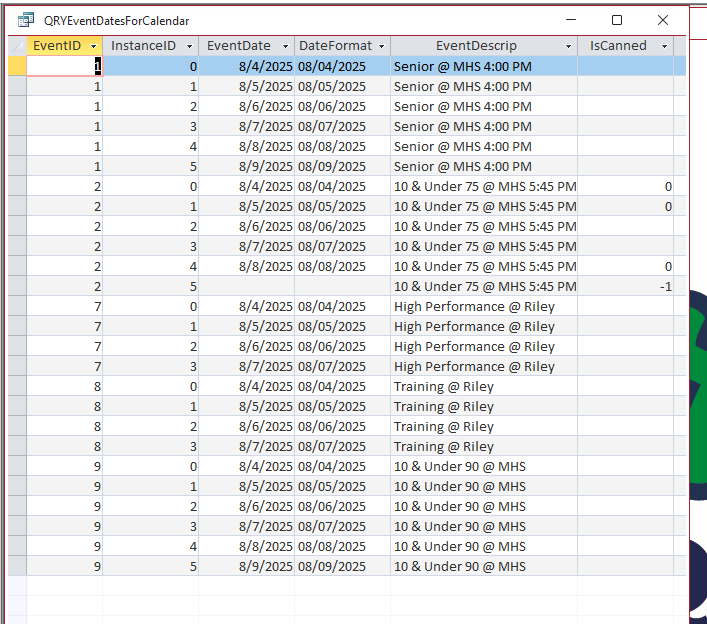
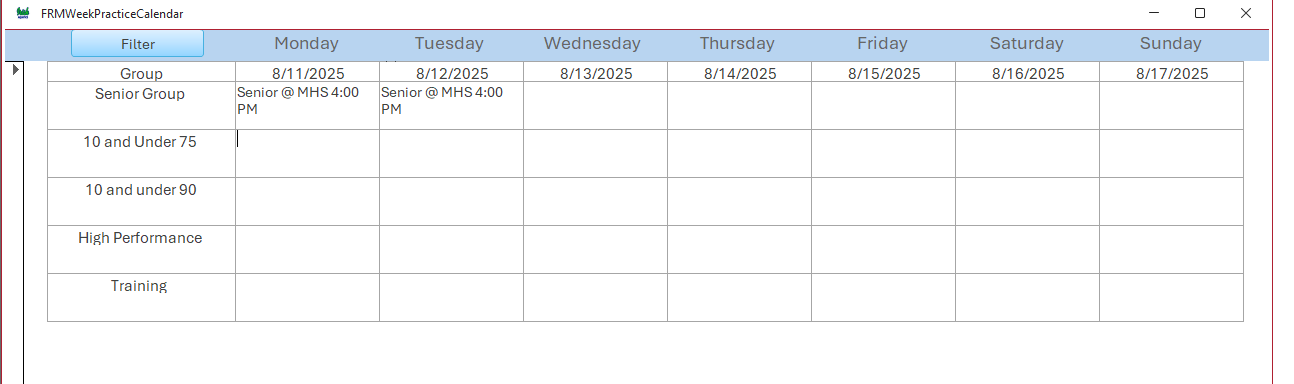
Hello, I am trying to use like to display a value that contains certain parts and I am having trouble with the syntax. Below is the dlookup. It works for the "Senior" part if it is exactly like that. I would likt to be able to show the whole description. =DLookUp("EventDescrip","QRYEventDatesForCalendar","DateFormat=#" & [Monday] & "#" And "Senior") For example: Senior @ MHS 4:00 PM when it finds "senior" thank you for your help. Brain
Okay, there's a lot to unpack with this. What is date format? Is that a field? And also Monday, is that a field? Because the way it's written right now, you've got a field named date format and a field named Monday, and Monday is a date field. And then you just got the word senior in there. I don't understand this. So show me a sample of what the data looks like - straight from your table. And then I can help you write the proper criteria for that. You're going to need two different fields here. I'm assuming you've got a date field and you've got a text field that has that word senior in it. If that's all crammed inside the same field, then we're going to have to do some different type of searching.
Brian HeintzbergerOP
@Reply 14 months ago
Brian HeintzbergerOP
@Reply 14 months ago
Brian HeintzbergerOP
@Reply 14 months ago
Ok, i apologize if I wasn't more clear. I am doing a practice schedule for a youth swim team and we have 5 training groups. I modified the repeating events from allen browne. I copied the query from his occurence subform to use with this calendar form. I want to do it on load to show the practices for a selected week. The Monday is the monday date, then I have tuesday wed and so on for those dates. I am trying to pull the event description out of the query and display it with the correct date on the calendar. Once I get this part working I have to do an attendance portion as well. I have an athletes table to link to these practices. Maybe Im going about this totally wrong. Thanks again for your help.
Brian
Brian HeintzbergerOP
@Reply 14 months ago
Oh, I also have an events table where it stores only the one practice.
All right, so since my job is to teach you this stuff and not necessarily just do it for you, I'm going to give you a list of videos that I want you to watch. After you've watched those, let me know...
That DateFormat field is taking a date value and converting it over to text. That's why it lines up on the left side of the column like that. You lose the ability to treat it like a date. So if what you want to do is just display it formatted that way, save that to the very last step. Don't do it in an underlying query.
So go watch those videos so I know you have a basic understanding of all the concepts you're going to need to fix this problem. We'll take it from there.
Brian HeintzbergerOP
@Reply 14 months ago
Will do, I wasn't aware that it changed it to text. I will get back with you, thanks for your time.
Yeah, that was a mistake I used to always make in my databases back when I started off. Whenever you use the Format function like that, it will convert any numeric values over to text. The way you can tell is that it lines up on the left side of a column instead of the right side. You can still work with the value, but you have to treat it like text. You can't treat it like a date value anymore. For example, using it in a range of dates. So stick with the original date value until the very last step, and then if you want to print it and display it in that format, use the Format function at that point.
Brian HeintzbergerOP
@Reply 14 months ago
Very good, I will plug away at it. thanks again
Brian HeintzbergerOP
@Reply 14 months ago
Brian HeintzbergerOP
@Reply 14 months ago
Brian HeintzbergerOP
@Reply 14 months ago
Brian HeintzbergerOP
@Reply 14 months ago
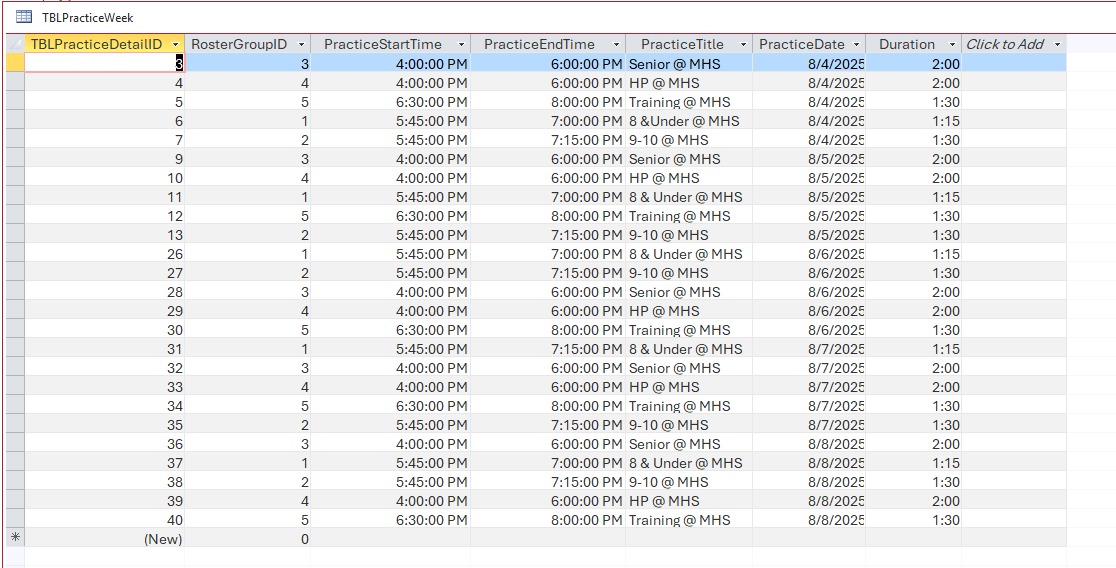
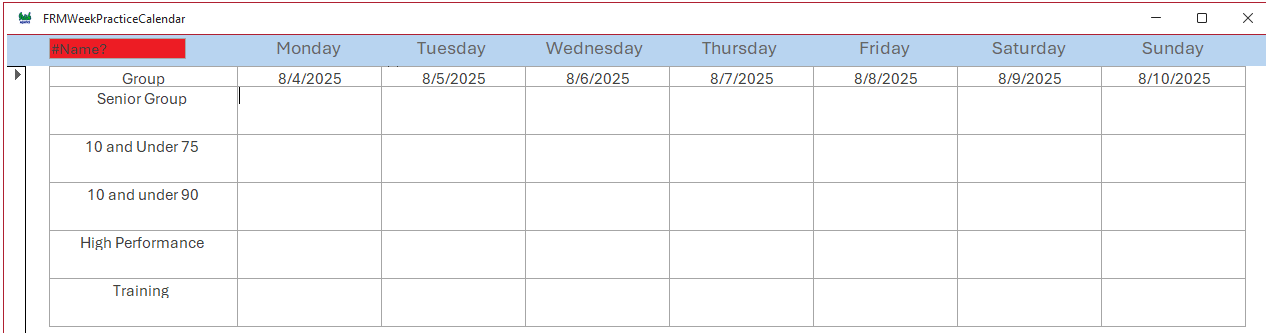
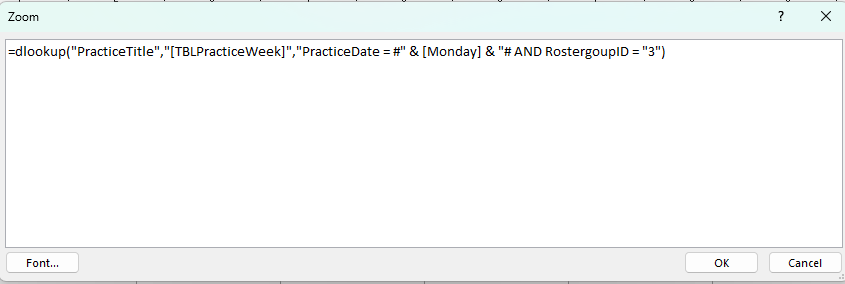
ok so I watched all those videos, I have the syntax wrong somewhere here. I changed the table. Monday is the date field in the calendar. I want to show the practice description on the calendar based on the date and the rostergroupid for those days. I was just gonna do a dlookup for each of those text boxes. Im stuck.
Kevin Robertson
@Reply 14 months ago
You have an extra quote before the number 3.
=DLookup("PracticeTitle","TBLPracticeWeek","PracticeDate=#" & [Monday] & "# AND RostergoupID=3")
Not sure why your date field is called Monday???
Brian HeintzbergerOP
@Reply 14 months ago
Thank you for the quick response. I can change the date field to MondayDate. It's the day on the calendar form
Sorry, only students may add comments.
Click here for more
information on how you can set up an account.
If you are a Visitor, go ahead and post your reply as a
new comment, and we'll move it here for you
once it's approved. Be sure to use the same name and email address.
This thread is now CLOSED. If you wish to comment, start a NEW discussion in
Access Forum.