5 hours
ago: Doing some maintenance on the server today. If you've placed an order and it hasn't processed yet, hang in there. Should be ready soon. I've got the car up on the jack and the tires are off...
Dismiss
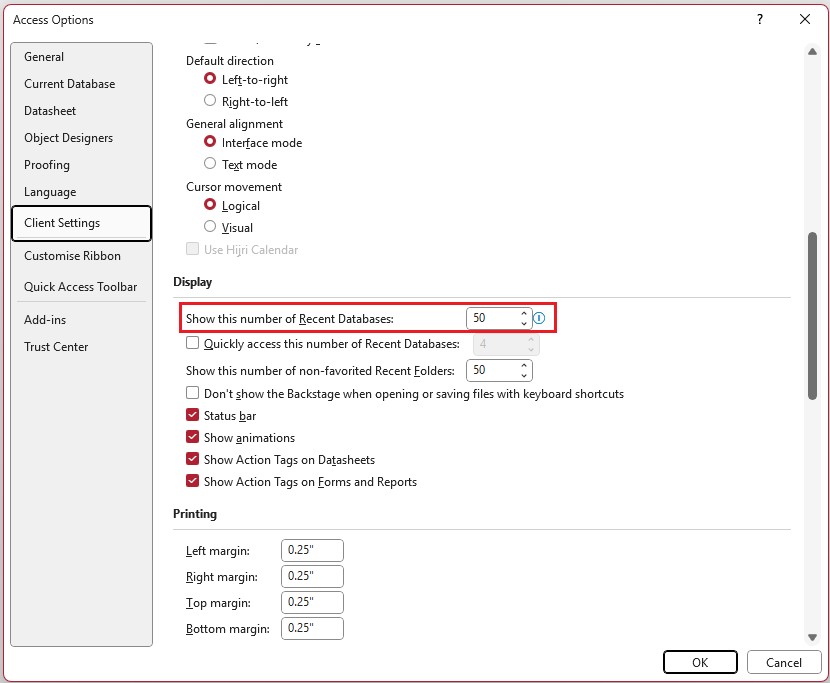
Good Morning, I have been trying to get my previously opened databases to remain visible so that I don't need to hunt them down on my computer. I have set the settings in the Client Settings area several times, and by the next day, they have all disappeared. Is there something I am missing out on? This has happened since the last Office update. Any ideas would be appreciated.
Thanks, Ken
Adam Schwanz
@Reply 14 months ago
Sorry I don't understand what you are asking. What does remain visible mean? You leave multiple databases open? Or you just have shortcuts on your desktop? What is disappearing, your databases or the settings?
Could be a lot of outside influence on this too. Is this your personal machine or a company machine? Does your company have any Ephemeral virtual machines or terminals that your logging into? Any more information would help.
I've never seen that happen before, but honestly, I never use that list. I put shortcuts to any databases that I work on on a regular basis on my desktop or I drop them in my database folder and then I just open up that folder. I don't think I've used that previous file list for any app other than Word. Maybe Excel.
What Alex said. Your back-ups can show up in that "recent database" list also. It's pretty easy to accidently open a back-up and be working in there. Using shortcuts eliminates that issue.
Ken WykoffOP
@Reply 14 months ago
Thanks, everyone. Shortcuts on the desktop is a great idea. Was just curious if anyone else has experienced that problem.
Ken WykoffOP
@Reply 14 months ago
Kevin Kevin that is exactly what I was talking about. I placed amounts in both of those and made sure I clicked the squares and it works but once you shut the computer down it is gone the next day. I honestly think that last update had an issue. So the suggestions of making shortcuts on the desktop is a great idea till that gets adjusted.
Sorry, only students may add comments.
Click here for more
information on how you can set up an account.
If you are a Visitor, go ahead and post your reply as a
new comment, and we'll move it here for you
once it's approved. Be sure to use the same name and email address.
This thread is now CLOSED. If you wish to comment, start a NEW discussion in
Access Forum.