Free Lessons
Courses
Seminars
TechHelp
Fast Tips
Templates
Topic Index
Forum
ABCD
 
Home   Courses   TechHelp   Forums   Help   Contact   Merch   Join   Order   Logon  
 
Back to Open Form    Comments List
Upload Images   @Reply   Bookmark    Link   Email   Next Unseen 
Open a Form to a Specific Record Directly by Id
Cliff Hall 
      
8 months ago
I want to type in a value (say 31) into an unbound text box on the main menu, push a button, and have a form open to the record whose ID is the same as the value I typed.  I prefer not to open a customer list, select a record, then push a button to open the specific record as shown in this video.  
It seems to me I should be able to do that with a Where Condition in the button event such as CustomerID (in the form) = CustomerIDSearch (in the undound text box).  But the ID is a number and the text box is, what, text? (so mismatched data types).  What is the syntax please?
Thank you

Alex Hedley  @Reply  
           
8 months ago
Kevin Robertson  @Reply  
          
8 months ago
Show us your exact line of code.
Richard Rost  @Reply  
          
8 months ago
It shouldn't matter if the number is typed into a text box. Access does pretty good automatic type conversion. You just need to include that search box in your WHERE condition.

DoCmd.OpenForm "MyFormNameF",,,"CustomerID=" & CustomerIDFieldTextBoxName

If you want to make sure that the user actually typed in a number before you try running that command and possibly get an error, you can use the IsNumeric function to check first.
Cliff Hall OP  @Reply  
      
8 months ago
Thank you Gentlemen - I will look at these ideas and report back.
Cliff Hall OP  @Reply  
      
7 months ago
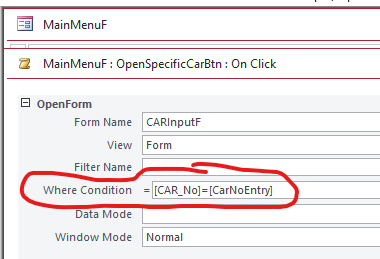
Kevin Here is what I am trying: [CAR_No]=[CarNoEntry]
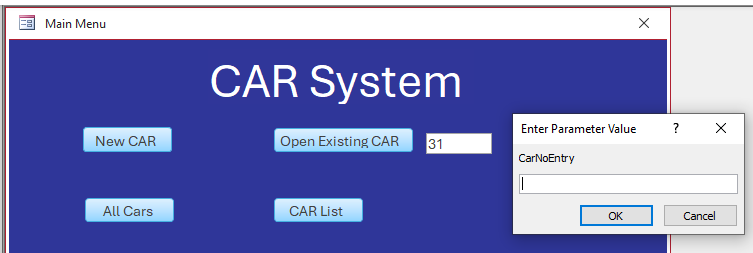
CAR_No is the Autonumber ID of the record I want to open in the form.  CarNoEntry is the text box value I want the user to enter the number into.   E.g., They type 31 in the text box, and the form opens at record 31.
Cliff Hall OP  @Reply  
      
7 months ago
here is an image of the form where condition with wrong syntax
Cliff Hall OP  @Reply  
      
7 months ago

Cliff Hall OP  @Reply  
      
7 months ago
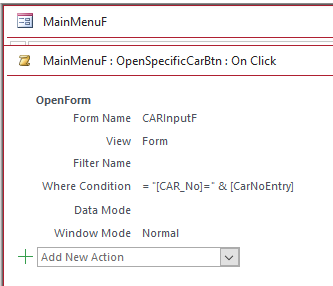
Alex Thank you.  That is the right conversion, but my syntax is still wrong
Cliff Hall OP  @Reply  
      
7 months ago
Richard Thanks Richard - that would work, except I want to use the Where condition if I can.
In fact I have a work around by accident.  Because my syntax is wrong, when I click the button Access pops up a box asking for a parameter.  But I would really like to know how to do the where condition properly.  It should be able to be done.
Cliff Hall OP  @Reply  
      
7 months ago

Cliff Hall OP  @Reply  
      
7 months ago
I should say that I am not using CustomerID, as you can see.  I said that in my original post to make it analogous to the Open Form video.
Kevin Robertson  @Reply  
          
7 months ago
I don't understand why you want your users to type in the ID instead of selecting it from a list with identifying data. What if you have 5,000 records how will you remember each ID?

You could use the Button Wizard to create the Button then look at the Embedded Macro the Wizard builds for you.

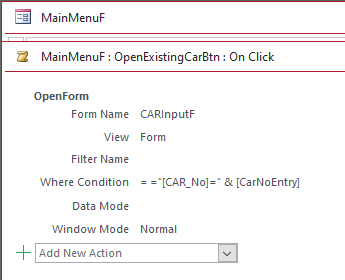
Here is the correct syntax: ="[CAR_No]=" & [CarNoEntry]
Cliff Hall OP  @Reply  
      
7 months ago

Cliff Hall OP  @Reply  
      
7 months ago
Thanks Kevin.  It is still not working, even with that syntax.  Don't know why.    
The reason I want users to type in an ID is that these are Corrective Action Reports (CARs), so they could be about any customer or product.  We create one to deal with a specific problem, find the root cause, solve it, and close it.  So there are only a handful of these open at any one time, and they are referred to by the ID.
Kevin Robertson  @Reply  
          
7 months ago
You are missing the equals sign at the start.
Cliff Hall OP  @Reply  
      
7 months ago
@Kevin  - your suggestion about using the button wizard worked!  I see I missed out an = sign.  Seemed wrong to me to have two in a row.  It is solved.  Thank you very much.
Cliff Hall OP  @Reply  
      
7 months ago

Richard Rost  @Reply  
          
7 months ago
This is one of the reasons why I hate macros.
Cliff Hall OP  @Reply  
      
7 months ago
Kevin Snap!.  Thanks.

This thread is now CLOSED. If you wish to comment, start a NEW discussion in Open Form.
 

Next Unseen

 
New Feature: Comment Live View


The following is a paid advertisement
Computer Learning Zone is not responsible for any content shown or offers made by these ads.
 

Learn
 
Access - index
Excel - index
Word - index
Windows - index
PowerPoint - index
Photoshop - index
Visual Basic - index
ASP - index
Seminars
More...
Customers
 
Login
My Account
My Courses
Lost Password
Memberships
Student Databases
Change Email
Info
 
Latest News
New Releases
User Forums
Topic Glossary
Tips & Tricks
Search The Site
Code Vault
Collapse Menus
Help
 
Customer Support
Web Site Tour
FAQs
TechHelp
Consulting Services
About
 
Background
Testimonials
Jobs
Affiliate Program
Richard Rost
Free Lessons
Mailing List
PCResale.NET
Order
 
Video Tutorials
Handbooks
Memberships
Learning Connection
Idiot's Guide to Excel
Volume Discounts
Payment Info
Shipping
Terms of Sale
Contact
 
Contact Info
Support Policy
Mailing Address
Phone Number
Fax Number
Course Survey
Email Richard
[email protected]
Blog RSS Feed    YouTube Channel

LinkedIn
Copyright 2026 by Computer Learning Zone, Amicron, and Richard Rost. All Rights Reserved. Current Time: 4/30/2026 2:03:17 AM. PLT: 1s