Free Lessons
Courses
Seminars
TechHelp
Fast Tips
Templates
Topic Index
Forum
ABCD
 
Home   Courses   TechHelp   Forums   Help   Contact   Merch   Join   Order   Logon  
 
Back to Access Forum    Comments List
Upload Images   @Reply   Bookmark    Link   Email   Next Unseen 
Continuous Form with Optional Junction Combo
Miikka Sohlman 
     
9 months ago
Hi Richard,

I'm working on a Files table where:
- some files are related only to a supplier (e.g. retail prices)
- some are related to both a supplier and a customer (e.g. customer-specific discounts)

I already have a SupplierXCustomer junction table for valid pairings.

At first, I considered putting both SupplierID (mandatory) and CustomerID (optional) in the Files table. But since the junction table already manages legal pairings, I'm leaning toward storing SupXCusID instead of CustomerID.

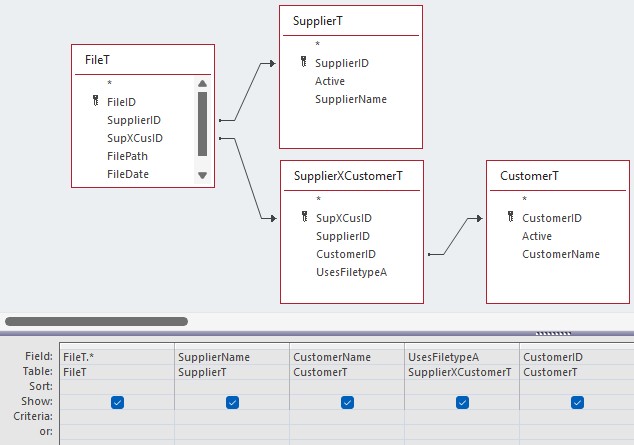
I'll post pics in the folloup comment, see pic 1 for the relationships.
(It's a simplified mockup table with imaginary entities, not my actual DB)

The problem:

I'm building a continuous form for Files. I want the user to select a supplier and, optionally, a customer using combo boxes.

- The supplier combo is straightforward.
- The customer combo has been much harder than expected.

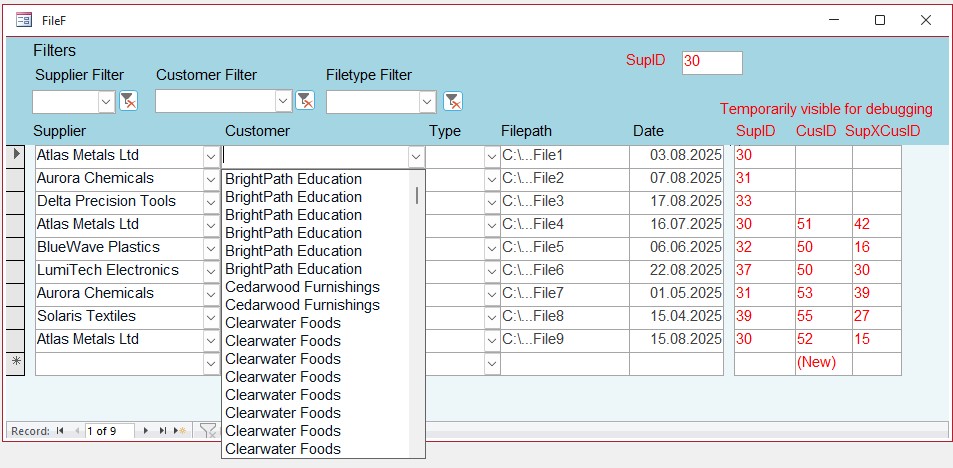
If I pull customers directly from the junction table, I get duplicates.
(see pic 2)

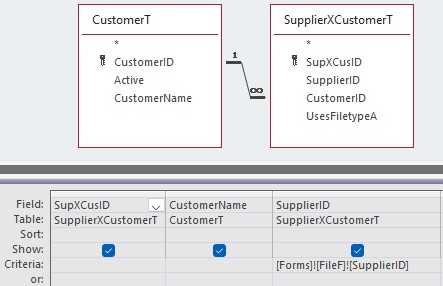
To fix that, I limited the customer combo's rowsource with a criteria on
SupXCus.SupplierID = [Forms]![FileF]![SupplierID].

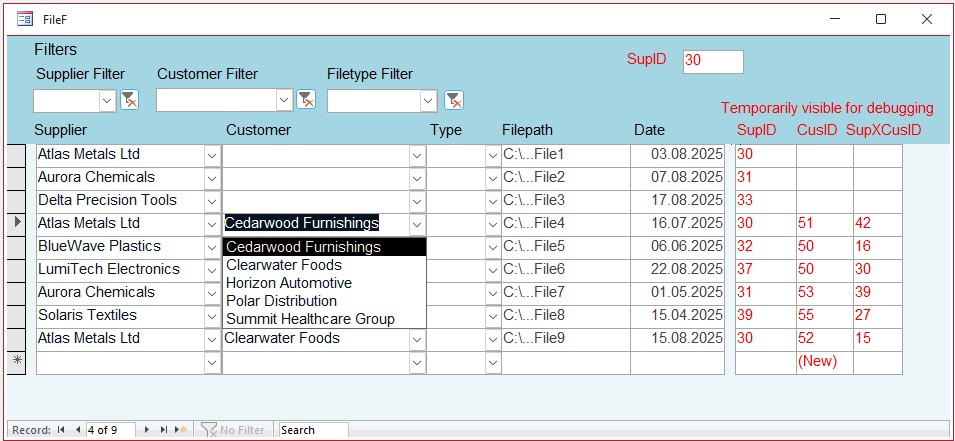
I also added SupXCusCombo.Requery in the Form_Current event so the combo refreshes after a supplier is chosen. It works.
(see pic 3 and 4)

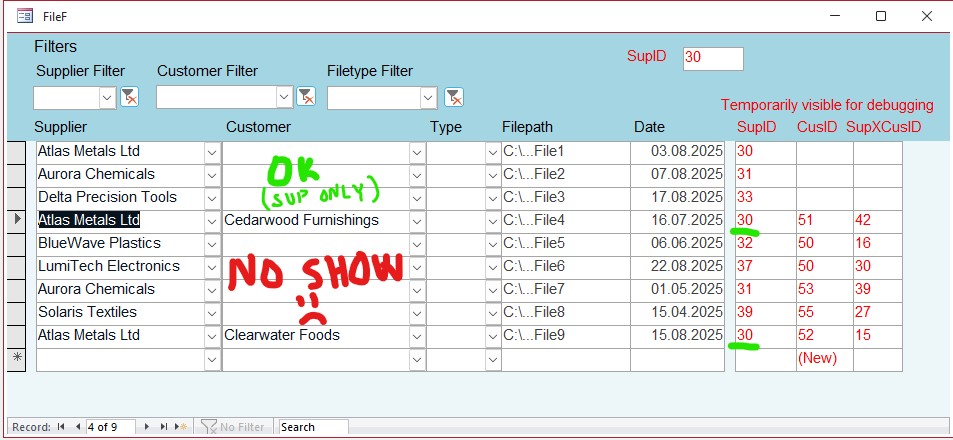
But when browsing through the unfiltered list of files, the customer combo only shows customers for the currently selected supplier. That makes the other records look like they're missing a customer. At this point I've spent countless hours and I'm pulling my hair out.
(see pic 5)

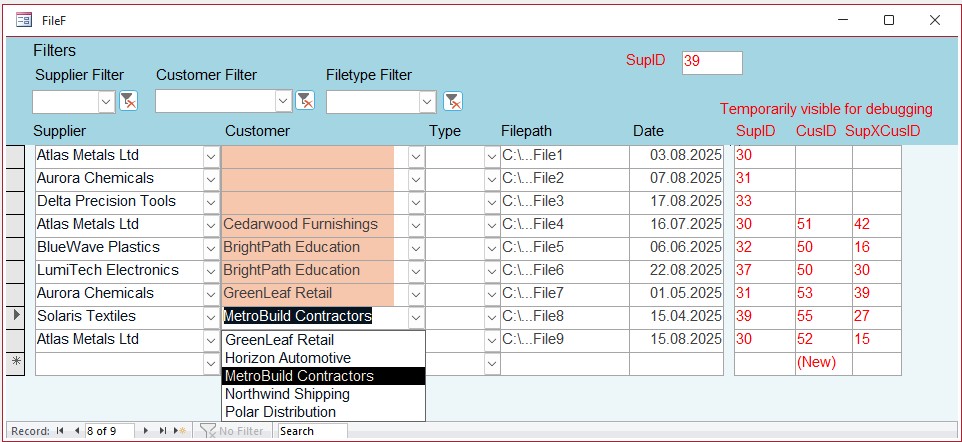
As a workaround, I tried overlaying a textbox (for display) on top of the combo (for selection). I learned that trick from Stackoverflow. It WORKS PERFECTLY, but it also feels like a clunky hack.
(see pic 6)

My question:

From your experience, what's the best way to handle this?

- Would you keep all files in one table with a mandatory SupplierID and optional SupXCusID (like I did)?
- If so, what kind of form or forms would you build to manage the files?
- Or would you approach the design differently altogether?

I'd really value your insight on this. Thanks!
Miikka Sohlman OP  @Reply  
     
9 months ago

Miikka Sohlman OP  @Reply  
     
9 months ago

Miikka Sohlman OP  @Reply  
     
9 months ago

Miikka Sohlman OP  @Reply  
     
9 months ago

Miikka Sohlman OP  @Reply  
     
9 months ago

Miikka Sohlman OP  @Reply  
     
9 months ago

Matt Hall  @Reply  
          
9 months ago
Without knowing the application, typically a SupplierXCustomerT will join the SupplierT with the CustomerT.
Miikka Sohlman OP  @Reply  
     
9 months ago
Matt
Hi Matt, are you wondering why my CustomerT goes through the junction table while the SupplierT goes straight to Files? It's because I have files that are related to a supplier only (retail prices) and have no relation whatsoever to a customer.

The customer files on the other hand always have a related supplier (I'm dealing with supplier's discount values for the customers).

Yes, that means I'm entering a superfluous SupplierID for the customer files (technically not needed as the junction table already has it) but it's not a big deal because the data entry workflow would be: select a supplier first with the combo box, then select a customer. So the SupplierID kinda gets chosen and entered naturally as part of the flow anyways.
Matt Hall  @Reply  
          
9 months ago
If I understand correctly, you would want to relate the supplierID from supplierT to supplierID from supplierXcustomerT.
Miikka Sohlman OP  @Reply  
     
9 months ago
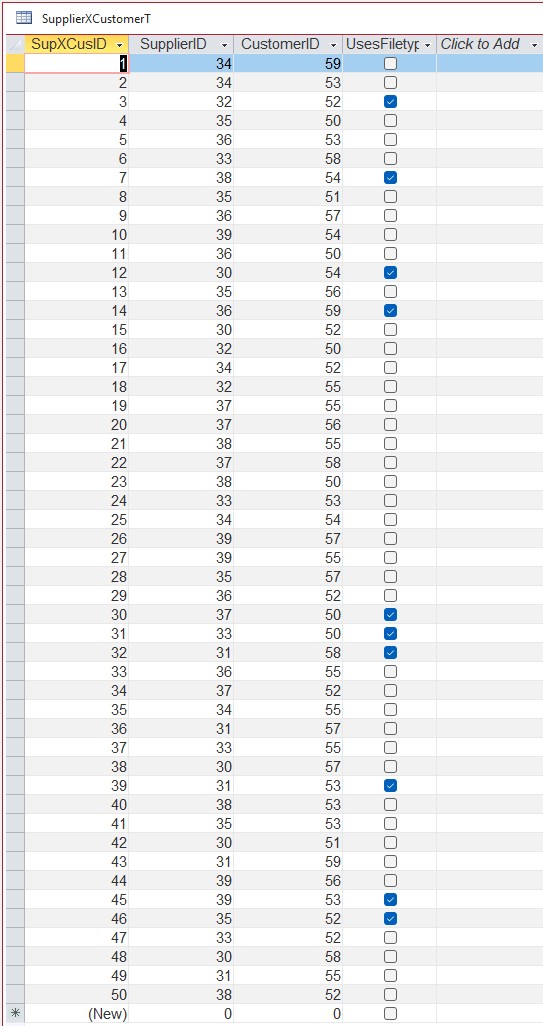
No no, I have the supplier-customer pairings established already in the junction table, it's just not showing in that simplified query in pic 1. This is not the crux of my problem. :)

See the next picture for the pairings. Ignore the UsesFiletypeA Field.

I *think* my structure is sound, but I ran into strange quagmires while designing a form for the files. It occurred to me that I might be trying to do too much with it. For example if I only called the Files form from a Supplier form, and it listed files for only that supplier and I didn't even allow the user to unfilter it and show all the suppliers, the combo box issue wouldn't be there.

I dunno, I'm curious how Rich would handle the situation for files, where some files are Supplier only, and some are Supplier-Customer files. Both structure wise and form design wise.
Miikka Sohlman OP  @Reply  
     
9 months ago

Matt Hall  @Reply  
          
8 months ago
What, exactly are the files?  

Based on what I have read, I assume these are true:

One file can only have one supplier
One supplier can have many files

One customer can have many suppliers
One supplier can have many customers

Customers don't have files, but customers do have suppliers that have files

Let me know if any of my assumptions are wrong.
Miikka Sohlman OP  @Reply  
     
8 months ago
These are all correct assumptions.

I have lists of retail prices from the suppliers.
I have lists of customer specific discount percentages for product categories from suppliers.

Not all suppliers are paired with all customers.

These are excel and text files. In the fields I store the file paths and dates, the type (is it a retail list or a discount list), the file formats also (excel or txt) and for the excel files I store column letters for relevant fields such as ProductCode = "A", ProductName = "B", ProductPrice = "D" etc.

I use that info for later importing-macros so that they know which columns to import etc.

So there are product tables and other tables in my dB but I didn't include them in this mockup.
Matt Hall  @Reply  
          
8 months ago
Table structure should be like this:

FileT to SupplierT would be a one-to-many relationship with SupplierID in FileT.  -- Like you have.
Supplier to customer would be a many-too-many relationship via junction table (SupplierXCustomerT)  --  This would be different.
   -- SupplierXCustomerT would also contain your discount percentage for any particular customer-supplier pair

You might make a copy of your database to test with and try this.  

You might also check out Many-to-Many.
Miikka Sohlman OP  @Reply  
     
8 months ago
It's not just one discount value a customer gets, each product (or actually product category) gets different discounts. So it's not just one field I can add to the junction table.

Also, I used to have fields in the junction table that handled two files (a discount percentage file for product categories and a file for individually discounted products). And the SupplierT had fields for the retail-files. But that was ugly and I wanted to normalize so I moved all the file fields into a dedicated files table.

I checked the extended cut of that Many-to-Many link and while Mr. Ross didn't have exactly the troubles I have, I did notice he made two separate forms with subforms for two "paths": Customer->Courses and Courses->Customers. I might do the same in the end:
Supplier form -> list retail files and all the customer files linked to that supplier.
Customer form -> list all the supplier discounts files etc. for that one customer.

Because the problem I currently have in my files form is that I allow unfiltered suppliers and customers. I have trouble with combo boxes only when there are multiple suppliers and multiple customers showing. If I didn't allow unfiltering the supplier field, meaning there will only ever be one supplier showing at a time, the customer combo box does behaves correctly so I might design it that way. Or I just go with the hacky text-boxes overlayed on top of combo-boxes in the Customer field. It works.

I haven't decided how I want my forms to ultimately behave yet and I'm working on a different part of the database now, so I'll keep watching videos and wait for some lightbulb moment to kick in.
Matt Hall  @Reply  
          
8 months ago
When you say one customer-discount value per product category, do you mean customers get a different discount value for each supplier?

Matt Hall  @Reply  
          
8 months ago
Does any file ever relate to more than one customer?
Miikka Sohlman OP  @Reply  
     
8 months ago
Matt
Well yeah, like Supplier 1 gives a -45% discount for products xyz to Customer A, but customer B gets only -35% for the same products from the same supplier.

And no, a file is only ever related to one customer (i.e. customers don't share discount lists)
Matt Hall  @Reply  
          
8 months ago
Well, that means that each file is directly related to one supplier and optionally, one customer.  That would mean that you need a SupplierID and CustomerID in the FileT joined to SupplierT and CustomerT, respectively.  You said that you considered this early on.  Have you tried it?
Miikka Sohlman OP  @Reply  
     
8 months ago
I did try. But I didn't like the idea because then I could theoretically choose "illegal" supplier-customer pairings. The combo boxes would show all the suppliers and all the customers. I could accidentally choose Supplier 1 and Customer Z and give them a file, when in fact those two are not doing business together. Supplier 1 might be doing business only with customers A, B and D, but not with Z.

The legal pairings are defined in the SupplierXCustomer table.

So the next thing I tried was to limit the Customer combo dropdown list to only Customers that deal with the previously selected Supplier. In the combo box query I brought the SupplierXCustomer table in, took the SupplierID from there and added this criteria for it: [Forms]![FileF]![SupplierID]. That limits the list of customers to only those who deal with a selected Supplier.

Except, it's exactly what I did in the first place, see the third picture from the top. And it naturally resulted in the same problem I'm having in pic 5 where only the customers that deal with the selected supplier are showing.

Sigh...

Although, I admit that in practice I wouldn't need to limit the combo box to legal customers only because in my current business new suppliers and customers enter so rarely I wouldn't choose a wrong customer even if the combo gave me every option. And I'm the only one using this form. It just bothers me that in theory it could happen if I don't make this perfect. :P
Richard Rost  @Reply  
          
8 months ago
Thanks Matt for jumping in to help here. You pretty much nailed the explanation.

Miikka, one thing I will add is that in theory you are absolutely right to want to prevent "illegal" pairings, but in practice sometimes the perfect solution ends up making the database harder to use than it needs to be. If you are the only person entering data and you know your supplier-customer pairings well, then the risk of picking a bad combo is probably minimal. In that case, having SupplierID and CustomerID both in FileT might be the simpler way to go, even if it is not 100 percent theoretically pure.

Another approach I use in my own systems is to allow something through at the point of entry, but then run a daily or weekly routine to check for bad data. For example, I sometimes get customers who sign up for a Silver Membership when they are already a Silver. The site should block it, but under certain conditions it can slip through. Instead of making the whole sign-up process more complicated, I run a nightly routine that flags duplicates like that. It is a lot easier than building a perfect check into every form. You could do the same thing here: let the data go in, then have a process that checks for illegal pairings and flags them for review.

This is one of those cases where I tell my students that there is a tradeoff between normalization on paper and usability in the real world. You want your data structure solid, but you also do not want to over-engineer the form so it becomes a constant fight.
Matt Hall  @Reply  
          
8 months ago
The data bound to the combo box is the customerID.  It seems to me like the combobox is using the rowsource to populate the names.  With a partial rowsource, you only get part of the names.  

You can do the textbox thing.  Another option would be to use a before update event, in the combo box, to run code to validate that that the customer does business with that supplier.  If it fails the validation you can cancel the update and blank the combo box and send a msgbox.
Miikka Sohlman OP  @Reply  
     
8 months ago
Well, thanks guys. I'm sure I'll find a way that satisfies me later after I've tinkered around with other forms etc. There's something else about the files I'm working on as well right now and once I've figured that out, I'll have a better vision of how I want my forms to behave...

I guess what prompted me to start this thread was that after I normalized my files into their own table I encountered way more difficulties with the combo boxes than I expected, and wondered what makes it so hard when Rich never has any issues like mine in his videos. I think so far what I've learned from his videos is that he basically doesn't allow this scenario to happen. If there was a student-course form, he'd have one student at a time at the top and a list of courses at the bottom (as a subform) that apply to that one student. Not a form with all the students and courses available unfiltered where there's a condition in the courses-box that it needs to show only legal courses to that student... That's just too much I realize. The form needs to be more focused.
Matt Hall  @Reply  
          
8 months ago
You might  check out Subform in a Continuous Form.

This thread is now CLOSED. If you wish to comment, start a NEW discussion in Access Forum.
 

Next Unseen

 
New Feature: Comment Live View


The following is a paid advertisement
Computer Learning Zone is not responsible for any content shown or offers made by these ads.
 

Learn
 
Access - index
Excel - index
Word - index
Windows - index
PowerPoint - index
Photoshop - index
Visual Basic - index
ASP - index
Seminars
More...
Customers
 
Login
My Account
My Courses
Lost Password
Memberships
Student Databases
Change Email
Info
 
Latest News
New Releases
User Forums
Topic Glossary
Tips & Tricks
Search The Site
Code Vault
Collapse Menus
Help
 
Customer Support
Web Site Tour
FAQs
TechHelp
Consulting Services
About
 
Background
Testimonials
Jobs
Affiliate Program
Richard Rost
Free Lessons
Mailing List
PCResale.NET
Order
 
Video Tutorials
Handbooks
Memberships
Learning Connection
Idiot's Guide to Excel
Volume Discounts
Payment Info
Shipping
Terms of Sale
Contact
 
Contact Info
Support Policy
Mailing Address
Phone Number
Fax Number
Course Survey
Email Richard
[email protected]
Blog RSS Feed    YouTube Channel

LinkedIn
Copyright 2026 by Computer Learning Zone, Amicron, and Richard Rost. All Rights Reserved. Current Time: 5/6/2026 7:04:31 AM. PLT: 0s