Free Lessons
Courses
Seminars
TechHelp
Fast Tips
Templates
Topic Index
Forum
ABCD
 
Home   Courses   TechHelp   Forums   Help   Contact   Merch   Join   Order   Logon  
 
Back to Access Forum    Comments List
Upload Images   @Reply   Bookmark    Link   Email   Next Unseen 
Which Part of Access Gives You the Most Trouble?
Richard Rost 
          
8 months ago
Everyone has that part of Access that makes them groan a little. For some people it is setting up proper table relationships and keeping everything normalized. Others say designing forms that look clean and user friendly is a constant battle. And of course, plenty of folks hit a wall when it comes to VBA because even though it unlocks the most power in Access, it can be tough to get started with.

I would love to hear from you. What is the area that gives you the most headaches? Queries, forms, reports, VBA, macros, or something else entirely? Drop a comment below and let us see what kind of patterns show up.

LLAP
RR
Jeffrey Kraft  @Reply  
      
8 months ago
I'm still having issues (kind off) with RecordSets.  Getting better I think.  SQL can be a nightmare if I'm working with specific fields.
Ken Wykoff  @Reply  
       
8 months ago
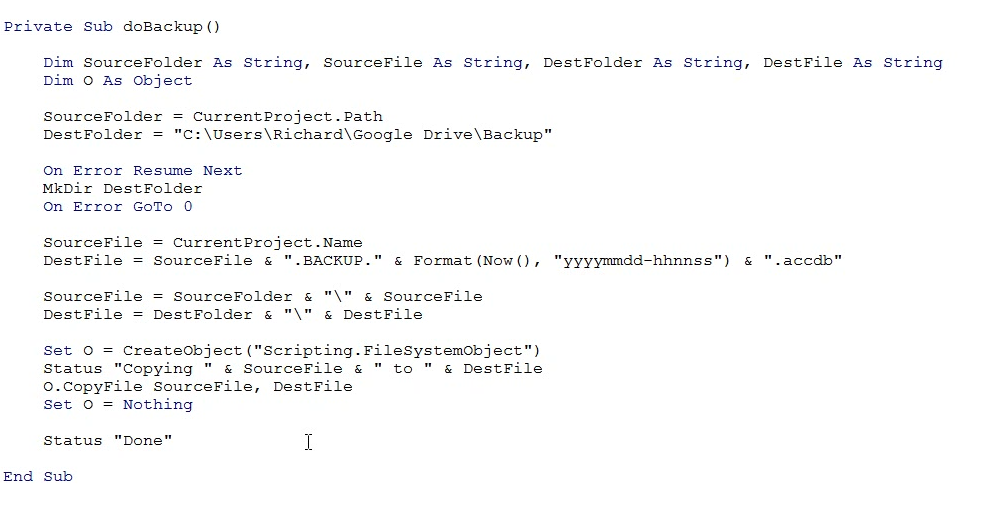
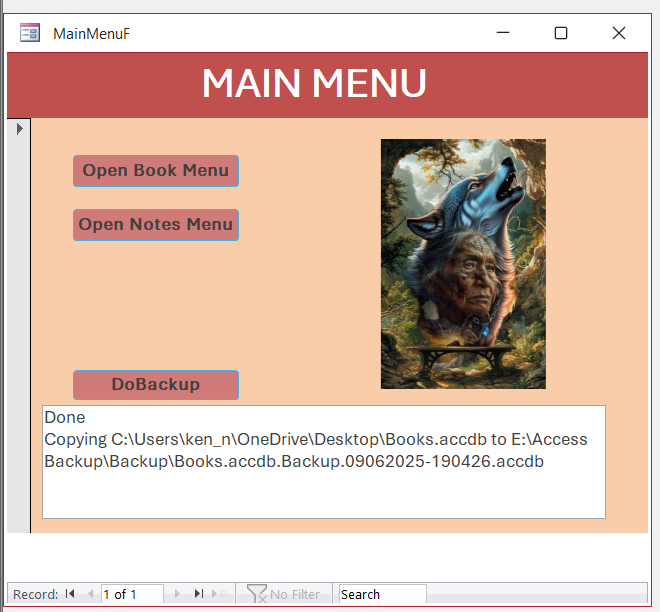
Hi Richard, I downloaded the free blank template, but when I tried to open it, I received some error messages. Since I'm just learning VBA, I had no idea what anyone was suggesting. So I watched the video (extended version) to build the button and wrote everything you did except the Google Drive information. I thought I had it right, but when I ran the debug, it got stuck on the word 'Status', and I couldn't get past that. Probably need more VBA instructions on keywords like, SourceFolder and SourceFile. Pretty sure the SourceFolder means where it comes from and the SourceFile is the name of the access database I are working on. I will attach a screenshot of where the debug stops and hopefully you can tell me what's wrong. I looked at what was on your video and it appears to be right but obviously it is not. Thanks for asking, Ken
Ken Wykoff  @Reply  
       
8 months ago

Ken Wykoff  @Reply  
       
8 months ago
It's the part right below Set O =
Richard Rost OP  @Reply  
          
8 months ago
Sounds like you're missing my status function. If you downloaded this from my website, that function should be included in the database.
Ken Wykoff  @Reply  
       
8 months ago
Thanks, Richard, and I will run through it again.
Raymond Spornhauer  @Reply  
          
8 months ago
I like seeing all the tips and techniques you use... or various ways to use the various features.

Some Examples I've been using:
- Using the Form Timer to limit how long a Form is open (preventing long record locks)
- Changing a Form BackColor to give the user feedback they are editing data
- Utilizing an 'Archive' Field for records and allowing users to search archive records
- Utilizing a 'System' Field to prevent users from deleting certain records
- Utilizing a 'Save' Button for users unfamiliar with Access
- Tracking which users having Certain Forms Open
- Tracking Which users make changes to certain fields in Tables
- Incorporating a Change Log for tracking critical changes
- Adding "Change Bars" on reports notifying users of changes in the last 12 hours
- Implementing a Progress Bar for user feedback during large query updates
- Implementing Security features
- Helper Data for Combo Boxes (reducing the number of tables in my database)
- Updating Record Source for Sub-Forms using other Sub-Forms
- Using Labels to allow Sorting
- Using Labels to change Sub-forms

Looking forward to learning more techniques like these.

-Raymond
Lee Shastid  @Reply  
    
8 months ago
Its the relationships and joins for me. I dont know what it is But I struggle with those areas BADLY. I have the working with forms going pretty good and kind of enjoy that part of it. Its hard to get to that point when you struggle with something that comes before it.
Ken Wykoff  @Reply  
       
8 months ago
Richard Richard, you were right, and once I put that in, after watching the Status Box Video, it works perfectly. Thank you! Ken
Ken Wykoff  @Reply  
       
8 months ago

Gary James  @Reply  
      
8 months ago
The most frustrating part of Access for me is SQL.   I understand the simple stuff -- SELECT, WHERE, FROM, etc. -- but when we start adding in nested SQL statements, JOINS, INNER and OUTER and UNIONS by mind goes blank.   I'm at the stage where if I can't create a query using the Access SQL editor, then I'm pretty much stumped.

Ahhh ... that felt good.
Brent Davis  @Reply  
     
8 months ago
Same as Gary on SQL. I love SQL but it can get intimidating. I also love VBA  but I don’t always know where to place things, On Open, On Load, etc.  I know the vision I want for my database  but  most times I make things harder than they need to be and I scrutinize the smallest thing and get frustrated.  But thanks to your teaching and this community and an assist from ChatGPT every now and then, I get to where I want to go. My database is just for me so I can play with it and if I screw it up, I just go to the last backup.  It’s a great training table. I love this community of learning and it has given me a tool that has made me a much more prepared account manager giving me the opportunity to grow my territory and providing work for our associates. So, I wait every day for the next tech help or question in the forum to see what I can learn and add to my database.

Keep up the great work sir and I will keep listening and learning!
Juan Rivera  @Reply  
            
8 months ago
SQL, Arrays, Double records source code.
Sandra Truax  @Reply  
         
8 months ago
My big issues is when and how to determine what values to send to a function inside the ().  For instance, I have been incorporating the filters for the ComboBoxes on multiple places in multiple forms, having to manually change the name of the ComboBox on each one. I finally asked ChatGPT if there was an easier way to do it, and they showed me how to set the ComboBox in the on Change event to send it the ComboBox name, Public Sub RefreshLocationCombo(cbo As ComboBox), so I didn't have to change that every time. This is the kind of stuff I do not understand - when and how it can be used. My brain just doesn't work that way, I guess. I hear you say all the time that you're going to send it some kind of information, but can't get to the point that I understand what information needs to be send it and why.
Matt Hall  @Reply  
          
8 months ago
For me, it's macros.  I just don't like them.  I feel like it is painting yourself in a corner when using them because you are limited to the options given.  

Also, the Microsoft help pages.  Often, there are too few examples and the information is incomplete.  I start at the help pages but I wind up surfing the web until I find where someone else has used the command in an example and get the information I am looking for from that.
Stanley Mc Keown  @Reply  
     
8 months ago
All the different types of Dims where and how to use them especially the ones that seem to be defined in the sub routine title. Like in the Status box sub routine on the Status Box video.

  " Private sub Status ( S As String ) "
Stanley Mc Keown  @Reply  
     
8 months ago
Defining objects etc
William DeGrandis  @Reply  
      
8 months ago
I have difficult with a few things like recordset and recordsetclones and SQL just the joins.
Martin Fairbairn  @Reply  
    
8 months ago
For me, RecordSets and Loops are always challenging and I have to go to I for help.  And arrays are simply no-no
Martin Fairbairn  @Reply  
    
8 months ago
go to AI for help ....
Jeffrey Kraft  @Reply  
      
8 months ago
AI isn't always helpfull if Richard hasn't taught it (AI) all he knows... :D

AI has gotten better as of late.
Hendra Gunawan  @Reply  
     
8 months ago
For me it is how to build a bullet proof Form without cluttering your VBA codes.

What if the user types something or does something you don’t expect. It could cause your form to either crash or do funny things. In one of the lesson, I don’t remember which one, the form that the lesson builds is good enough for most circumstances but I could make it do funny thing with certain combination of inputs (typing and clicking). I remember making it bullet proof by writing codes that take care this rare circumstances.

It works but it makes my VBA codes very difficult to read and understand. The codes become very bloated.

This thread is now CLOSED. If you wish to comment, start a NEW discussion in Access Forum.
 

Next Unseen

 
New Feature: Comment Live View


The following is a paid advertisement
Computer Learning Zone is not responsible for any content shown or offers made by these ads.
 

Learn
 
Access - index
Excel - index
Word - index
Windows - index
PowerPoint - index
Photoshop - index
Visual Basic - index
ASP - index
Seminars
More...
Customers
 
Login
My Account
My Courses
Lost Password
Memberships
Student Databases
Change Email
Info
 
Latest News
New Releases
User Forums
Topic Glossary
Tips & Tricks
Search The Site
Code Vault
Collapse Menus
Help
 
Customer Support
Web Site Tour
FAQs
TechHelp
Consulting Services
About
 
Background
Testimonials
Jobs
Affiliate Program
Richard Rost
Free Lessons
Mailing List
PCResale.NET
Order
 
Video Tutorials
Handbooks
Memberships
Learning Connection
Idiot's Guide to Excel
Volume Discounts
Payment Info
Shipping
Terms of Sale
Contact
 
Contact Info
Support Policy
Mailing Address
Phone Number
Fax Number
Course Survey
Email Richard
[email protected]
Blog RSS Feed    YouTube Channel

LinkedIn
Copyright 2026 by Computer Learning Zone, Amicron, and Richard Rost. All Rights Reserved. Current Time: 5/2/2026 6:51:06 AM. PLT: 1s